Free trial
Signing up grants 2,000 words and access to all styles, and the homepage editor can process a sample without payment. Free results use a shared model that the site says is easier for detectors to catch.
Learn moreRewrites AI drafts so detectors score them as human text

AI Humanize is an AI detection remover tool that rewrites AI drafts so detectors score them as human text. AI Humanize rewrites ChatGPT and Claude output into text that it claims passes detectors such as Turnitin, GPTZero and Copyleaks.
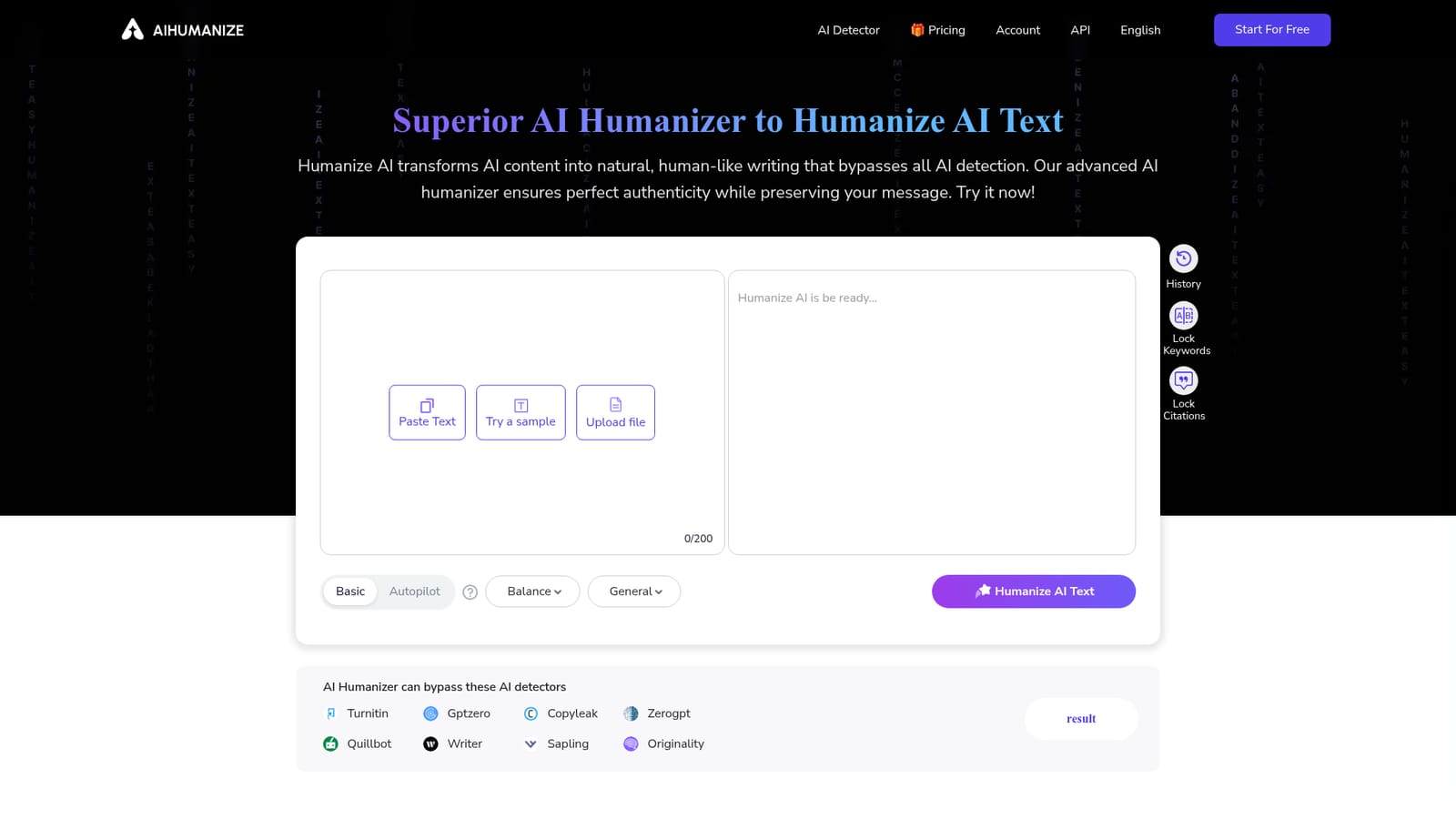
AI Humanize is a web based rewriting tool built for one job: taking text produced by models such as ChatGPT or Claude and reshaping it so that AI detectors flag it as human writing. You paste a passage, choose a style, and the service returns a rewritten version within roughly ten seconds according to the site. It is aimed at bloggers, marketers, students and agencies who already generate drafts with AI but need output that reads naturally and survives scrutiny from tools like Turnitin, GPTZero, Copyleaks, ZeroGPT, Quillbot, Writer, Sapling and Originality. In practice the workflow is a single editor box. Text can be pasted, loaded from a sample, or imported from .txt, .md, .pdf and .docx files up to 10MB. A style menu covers General, Academic, Blog, Formal, Informal, Expand and Simplify, and separate toggles lock SEO keywords and quoted citations in place so the rewrite does not disturb them. A quality selector offers Balance, Enhanced and Private modes. The Autopilot Pro setting, reserved for paying users, keeps rewriting a passage until it reaches a 0 percent AI score, whereas the Basic path makes a single pass and the homepage itself states that free models are easier for detectors to catch. The product sits in the same niche as other humanizer services, and its differentiation rests on two claims: a private rewriting model that is periodically updated against GPTZero and Turnitin, and a detector report built into the dashboard. Signed in users get 2,000 words plus history tracking. Paid tiers are sold monthly or yearly, ranging from 20,000 to unlimited humanizer words per month, with daily AI detection allowances of 30, 100 or unlimited depending on the plan. Buyers should treat the bypass percentages on the site as marketing targets rather than guarantees. Results depend on the source text, the detector used and the style chosen, and the interface even asks users to report failed bypasses or poor text quality. The tool is strongest for English language web content and academic-adjacent work, and weakest as a substitute for genuine editing on anything where accuracy and voice matter more than a clean detector score.
Signing up grants 2,000 words and access to all styles, and the homepage editor can process a sample without payment. Free results use a shared model that the site says is easier for detectors to catch.
Learn moreThree tiers, billed monthly or yearly. Monthly: Basic $15 for 20,000 words and 1,000 words per request; Pro $25 for 60,000 words and unlimited words per request; Unlimited $40. Yearly cuts this to $6, $10 and $20 per month. All paid plans add Autopilot Pro, history, all styles, a private model, keyword and citation locking, and 30, 100 or unlimited daily AI detections.
Learn moreA feedback form in the interface collects reports on failed detector bypasses and poor text quality, and a blog covers detection and humanization topics. No help centre, email address or live chat is listed on the homepage.
Core functions include one click AI to human rewriting in about ten seconds, seven style presets, three quality modes, keyword and citation locking, file upload for text, markdown, PDF and Word documents, rewrite history, an AI score readout, and Autopilot Pro which repeats rewrites until the detector shows zero. Paid plans add a private model refreshed against GPTZero and Turnitin.
 AI Angels400+ customizable AI girlfriends for NSFW chat, voice calls, and roleplay
 Candy AIExperience the future of companionship with AI friends who chat, role-play, and connect with you on a human level.
 ourdream.aiA vast AI roleplay platform with millions of characters for chat, images, video and voiceAI Angels400+ customizable AI girlfriends for NSFW chat, voice calls, and roleplayCandy AIExperience the future of companionship with AI friends who chat, role-play, and connect with you on a human level.ourdream.aiA vast AI roleplay platform with millions of characters for chat, images, video and voice