Balance

Write down an anxious thought, get an AI breakdown of it

Beginner
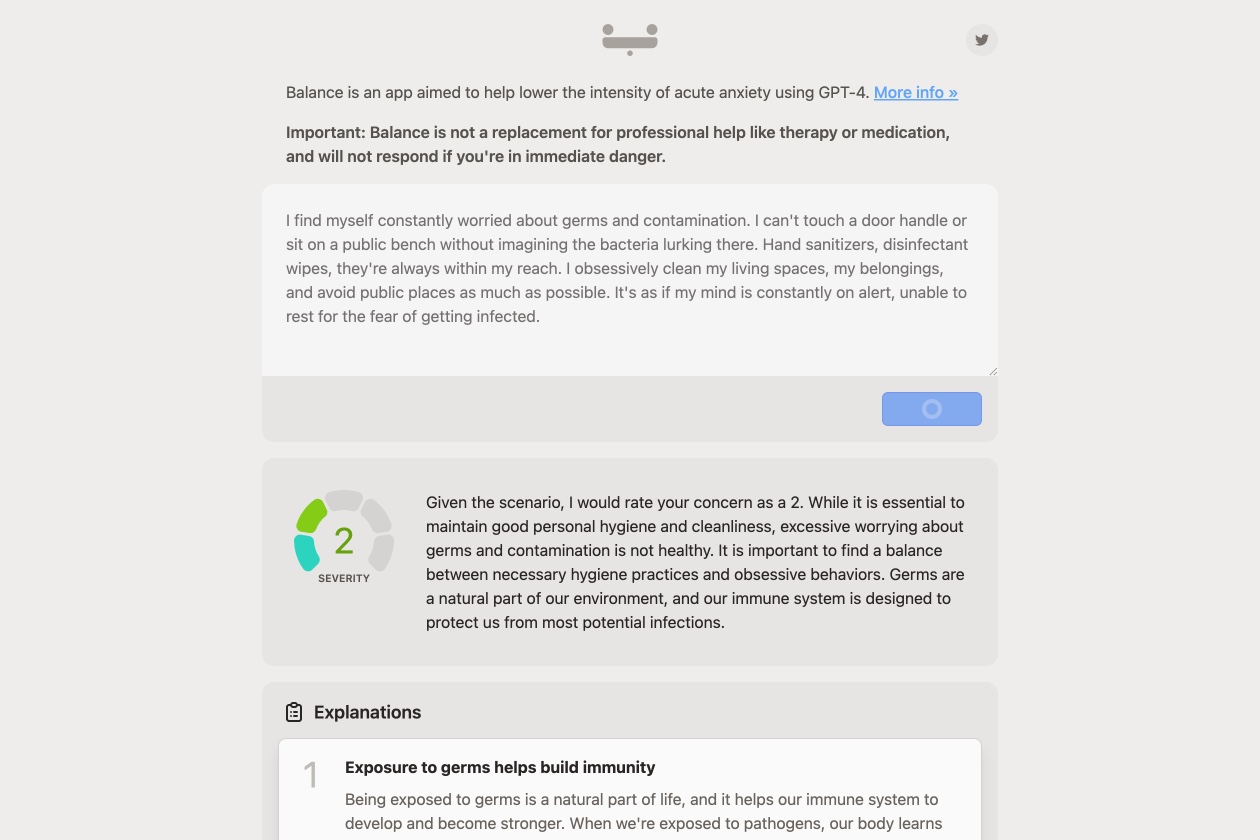
Screenshot of Balance, Write down an anxious thought, get an AI breakdown of it

What is Balance?

Balance is an AI tool that writes down an anxious thought, get an AI breakdown of it. A single-purpose web app that takes a written description of an anxious thought (up to 2048 characters), optionally adds counter-arguments, and returns a GPT-5.6 Sol analysis.

Balance is a small web app built around a single, narrow job: taking an anxious thought out of your head and putting it into words, then getting a structured AI response back. The interface is a text box that accepts up to 2048 characters, a toggle for whether to include rebuttals, and a submit button. There is no account wall described on the homepage, no onboarding quiz, and no mood tracking dashboard. The whole product is the input and the analysis that follows. In practice the workflow is deliberately short. You describe what is making you anxious (the page offers example prompts such as public speaking, germs, or change if you are stuck), decide whether you want counter-arguments to your anxious thoughts included in the response, and send it. The tool runs the text through GPT-5.6 Sol and returns an analysis. Keyboard shortcuts exist for the mechanics: Ctrl+Enter or Cmd+Enter submits, Escape clears the field. That is the entire loop, and it is designed to be repeated whenever a specific worry spikes rather than used as a daily journal. Who it suits: people who already recognise anxious thought patterns and want a fast, private-feeling way to interrogate one at a time, especially those who find writing things down clarifying. It works best as a between-sessions supplement for someone in therapy, or as a first step for people who are not ready to talk to anyone yet. It is not a diagnostic tool, not a therapist, and the site states plainly that it does not replace professional help such as therapy or medication, and will not respond if you are in immediate danger. Among alternatives it sits closer to a structured thought-record exercise than to a chatbot companion. General assistants will discuss anxiety if prompted, but they rarely constrain the exchange to one worry and an optional rebuttal pass. That focus is the appeal and also the limit: there is no memory of previous entries shown, no trend view, and no crisis routing beyond the disclaimer.

How do you use Balance?

  1. 1Open the app and read the disclaimer first
    Before typing anything, note the notice on the homepage: Balance is not a replacement for therapy or medication and will not respond if you are in immediate danger. Decide whether this fits the moment you are in.
  2. 2Describe the specific worry
    Type what is making you anxious into the text box, up to 2048 characters. If you are stuck, click one of the example prompts such as public speaking, germs or change to see the kind of description that works.
  3. 3Choose whether to include rebuttals
    Set the rebuttals toggle according to what you need. Turning it on asks the analysis to include counter-arguments to the anxious thoughts; leaving it off keeps the response to analysis without direct pushback.
  4. 4Submit with the keyboard shortcut
    Press Ctrl+Enter on Windows or Cmd+Enter on Mac, or click the Ask button. The analysis runs on GPT-5.6 Sol and appears in the results area below.
  5. 5Read the analysis, then clear and retry
    Work through the returned analysis against what you wrote. Press Escape to clear the field, then rewrite the same worry more precisely or move to a different one and submit again.

Pros and cons

Pros

  • Extremely low friction: one text field, one toggle, one submit actionAI
  • Optional rebuttals setting lets you choose between validation and direct counter-argumentAI
  • Example prompts (public speaking, germs, change) help when you cannot start writingAI
  • Clear, prominent disclaimer that the tool does not replace therapy or medicationAI
  • Keyboard shortcuts make repeat use fast for people who use it oftenAI

Cons

  • No indication of memory or history, so each worry is handled in isolation with no progress viewAI
  • The 2048 character cap will frustrate anyone who wants to explain a complex situationAI
  • No stated crisis routing: the homepage says it will not respond if you are in immediate danger, with no signposting to helplinesAI
  • Nothing on the page describes privacy handling or what happens to the text you submitAI
  • Quality depends entirely on how well you can articulate the thought, which is hard during acute anxietyAI

How much does Balance cost?

Features

A free-text anxiety description field of up to 2048 characters, a rebuttals toggle that adds counter-arguments to the response, example prompts for common worries, keyboard shortcuts (Ctrl/Cmd+Enter to submit, Escape to clear), and GPT-5.6 Sol analysis returned in a results panel below the form.

Frequently asked questions about Balance

  • How do you use Balance?
    The walkthrough on this page covers 5 steps: 1. Open the app and read the disclaimer first 2. Describe the specific worry 3. Choose whether to include rebuttals 4. Submit with the keyboard shortcut 5. Read the analysis, then clear and retry.
  • What platforms does Balance support?
    Balance is available on Web App.
  • What are the limitations of Balance?
    No indication of memory or history, so each worry is handled in isolation with no progress view. The 2048 character cap will frustrate anyone who wants to explain a complex situation. No stated crisis routing: the homepage says it will not respond if you are in immediate danger, with no signposting to helplines.

Status

StatusActive
Views0
Outbound clicks0
Added10/21/2026

Platforms

Web App

Pricing

Free