Free trial
300 trial credits, granted once, usable with every model. No card is required.
Learn moreEvent-triggered AI bots across your tools, with you approving
Own Chat with Work? Verify ownership to get a dofollow link
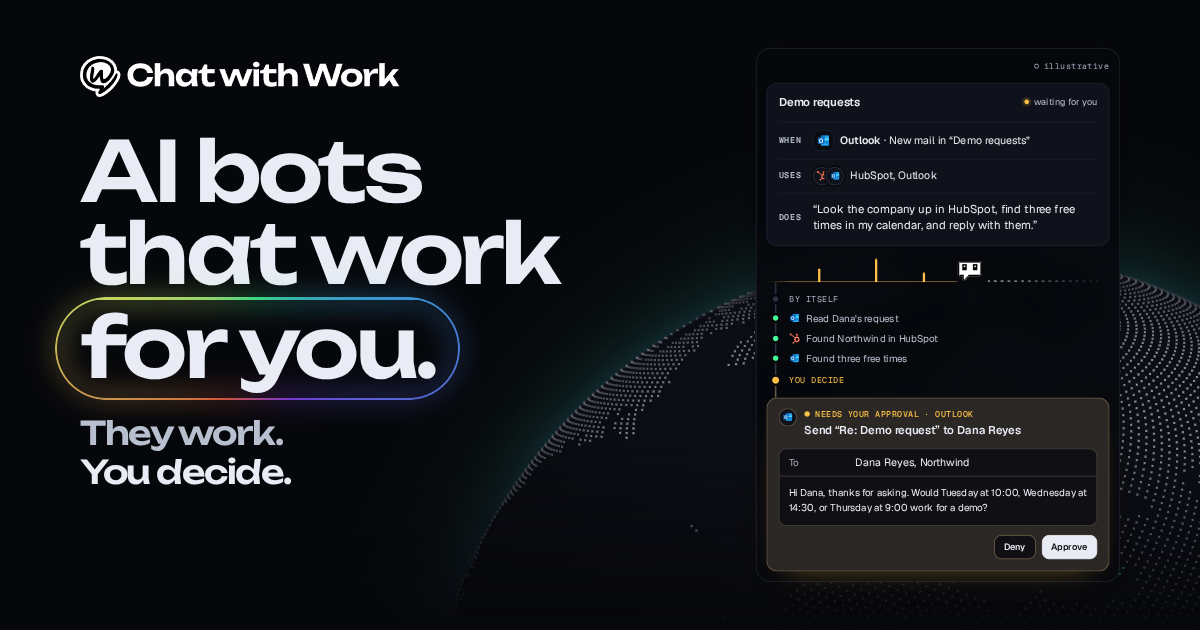
Chat with Work is an AI chat bot tool. Chat with Work lets teams build AI bots triggered by events or schedules that act across CRM, mail, calendar, helpdesk and finance tools, then send decisions to a dashboard for approval.
Chat with Work is a workflow automation platform built around AI bots that start on an event or a schedule, work across the business tools a team already uses, and hand back only the items that need a human. Each bot is defined by three parts: a trigger (such as new mail in a given Outlook folder), the apps it may use, and a plain-language instruction describing what it should do. Results surface in a single Decisions dashboard, where the user approves or denies what the bot proposes. The homepage demonstrates this with a sample flow. A new request lands in Outlook, the bot looks the company up in HubSpot, checks the calendar for three free slots, and drafts a reply. The bot works through those steps on its own, then pauses so the person can approve or deny the draft before anything is sent. That approval step is the core idea: automation does the legwork, a person keeps the final say. The product is aimed at small and mid-sized teams that want agent-style automation without writing integration code. A library of 116 ready-made bot recipes is grouped by function: sales and CRM, support, operations, finance, marketing and content, people and recruiting, engineering, communities and open source, and home and office. Examples include a lead researcher, stale deal nudger, meeting prep brief, inbox triage, invoice chaser, contract renewal watcher and bug-reports-to-issues. Recipes are written to work with a category of tool (any CRM, any mailbox, any helpdesk) rather than one vendor. Coverage is broad: the site cites 1,918 integrations and 1,953 triggers. Hosting is a selling point for European buyers, since the service runs in Europe on every plan, with EU models on Azure in Germany West Central, and a self-hosted option exists. Compared with general automation tools such as Zapier or Make, the emphasis is on language-driven agents and human approval. Compared with a plain chat assistant, the bots act on events rather than waiting for a prompt.
300 trial credits, granted once, usable with every model. No card is required.
Learn moreFree to start with 300 trial credits, granted once and usable on every model, with no card. Paid plan prices are not stated on the homepage, though EU hosting is said to be included on every plan.
Learn moreLists 1,918 integrations, including Outlook, Gmail, Google Calendar, HubSpot, Salesforce, Odoo, Slack, Teams, Discord, Notion, Jira, Linear, GitHub, Asana, Stripe, Chatwoot and Google Drive.
Learn moreEvent- and schedule-triggered AI bots, a Decisions dashboard for approve or deny, 116 bot recipes, 1,918 integrations and 1,953 triggers, EU-hosted models on every plan, and a self-hosted option.
Learn more AI Angels400+ customizable AI girlfriends for NSFW chat, voice calls, and roleplay
 Candy AIExperience the future of companionship with AI friends who chat, role-play, and connect with you on a human level.
 ourdream.aiA vast AI roleplay platform with millions of characters for chat, images, video and voiceAI Angels400+ customizable AI girlfriends for NSFW chat, voice calls, and roleplayCandy AIExperience the future of companionship with AI friends who chat, role-play, and connect with you on a human level.ourdream.aiA vast AI roleplay platform with millions of characters for chat, images, video and voice


