Free trial
Signing up is free and comes with starter credits that let you run the generation workflow before paying. The curated free coloring pages can be downloaded as PNG or PDF with no account at all.
Learn moreTurn text prompts or personal photos into printable coloring pages.
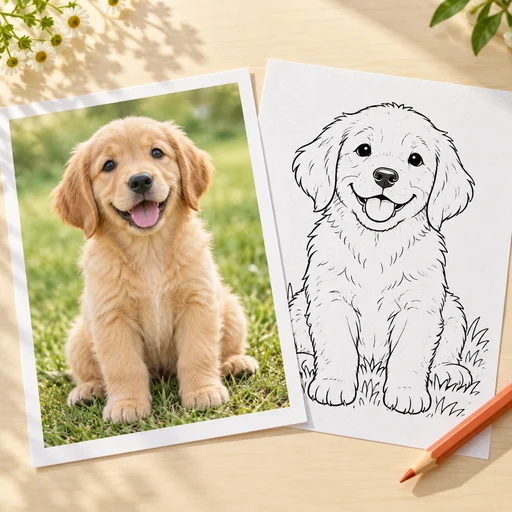
CPages is a bulk image generator tool that turns text prompts or personal photos into printable coloring pages.
CPages is a web based AI coloring page generator built around a single, narrow job: producing clean line art that prints well. Two dedicated workflows handle the input. Text mode takes a written description (an animal, a scene, a lesson theme) and returns up to four variations, with controls for the age of the colorist and the page shape. Photo mode takes a picture you already own and reduces it to line art, letting you decide how much fine detail survives and whether the background is simplified or kept. Both modes export watermark free PNG and PDF files sized for home or classroom printers. The tool scales past single sheets. Batch mode on any paid plan converts a list of ideas or a set of photos into as many as 50 pages in one run, delivered as a ZIP or a combined PDF. The separate coloring book builder goes further, assembling a theme or character story into a full PDF with a color cover plus 3 to 40 interior pages. Style presets cover the usual ground: simple open shapes for ages 3 to 6, cartoon lines for ages 5 to 10, detailed patterns and mandalas for teens and adults, plus pet portraits, doodles, vehicles and florals. Parents, teachers and hobbyist colorists are the obvious audience. Parents use it for party themes, travel packs and screen free quiet time; teachers build activity sheets and visual aids tied to a lesson; adult colorists use photo conversion for pets and custom mandalas. The free curated gallery is a useful fallback when nobody wants to sign in. The main caveat is that the site does not publish prices, only that credits are consumed per generation and shown before you submit. Competing generators are sometimes bundled into broader image suites, so CPages wins on print formatting and book assembly rather than on raw model flexibility. Sources stay private and standard outputs are unlisted by default. Active paid subscribers can mark a generation as Private.
Signing up is free and comes with starter credits that let you run the generation workflow before paying. The curated free coloring pages can be downloaded as PNG or PDF with no account at all.
Learn moreGeneration runs on a credit system with a stated cost shown before each submission, and credits reserved for a failed or timed out job are released. Batch mode is available on any paid plan. The site does not publish actual plan prices or credit rates.
Learn moreText to coloring page with age and page shape controls and up to four variations per prompt; photo to coloring page with line detail and background settings; batch generation of up to 50 pages per run delivered as a ZIP or combined PDF; a coloring book builder producing a color cover plus 3 to 40 pages in one PDF; style presets covering simple, cartoon, detailed, mandala, pet portrait, doodle, vehicle and floral lines.
Learn more AI Angels400+ customizable AI girlfriends for NSFW chat, voice calls, and roleplay
 Candy AIExperience the future of companionship with AI friends who chat, role-play, and connect with you on a human level.
 ourdream.aiA vast AI roleplay platform with millions of characters for chat, images, video and voiceAI Angels400+ customizable AI girlfriends for NSFW chat, voice calls, and roleplayCandy AIExperience the future of companionship with AI friends who chat, role-play, and connect with you on a human level.ourdream.aiA vast AI roleplay platform with millions of characters for chat, images, video and voice