Crowd Feel

Paste a LinkedIn draft, define a reader persona, and see how the crowd might react.

Beginner
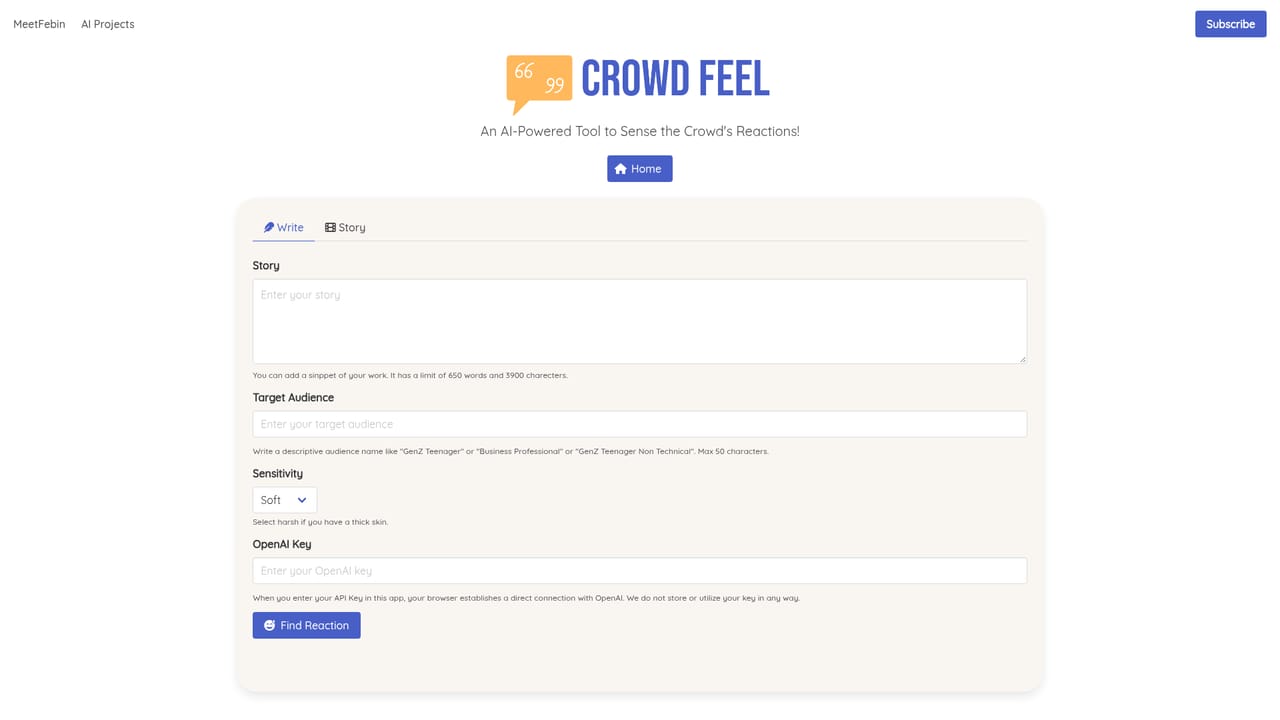
Screenshot of Crowd Feel, Paste a LinkedIn draft, define a reader persona, and see how the crowd might react

What is Crowd Feel?

Crowd Feel is a content tool. An experimental AI tool that reads a LinkedIn draft against a chosen reader persona (GenZ, Millennial, Business Professional and others) and reports how that audience is likely to react, useful as a pre publish gut check for people who post professionally.

Crowd Feel is a small browser based experiment from independent developer Meet Febin that asks a simple question: can an AI model sense how a specific audience will react to a LinkedIn post before it goes live? The workflow is deliberately narrow. A writer pastes a draft into the tool, describes the reader they are writing for by picking one of several audience types (GenZ, Teenager, Millennial, Business Professional, Senior), and the model produces a read on how that persona is likely to respond. It is framed on the site as a test of AI reaction sensing rather than a polished publishing suite, and the author is openly inviting feedback on how accurate the predictions turn out to be. The practical use case is pre publishing sanity checking. Someone drafting a LinkedIn post can run it through Crowd Feel with the persona closest to their intended readers and get a second opinion before hitting publish. That fits social media managers, independent consultants, founders who post in public, and anyone who writes for a professional audience and wants a cheap gut check on tone and resonance. Because the input is a draft and the output is a modeled reaction, the tool is closer to a critique partner than an analytics dashboard: it does not touch live performance data, reach metrics, or engagement history from an actual account. In context, Crowd Feel sits alongside other lightweight single purpose AI experiments rather than full social media management platforms. It does not schedule posts, track competitors, or pull analytics. The value is in the persona angle: instead of a generic AI review, the model is nudged to answer as a defined reader segment, which is a more useful framing for audience targeted writing. The page also notes that more storytelling oriented tools are in development from the same developer, which suggests this is one piece of a larger set of writing aids rather than a standalone product roadmap. Worth knowing before trying it: the site presents Crowd Feel as an experiment, so expect a simple input and output loop rather than saved projects or team features. Treat the reaction reading as a qualitative prompt for revision, not a forecast of real engagement numbers.

How do you use Crowd Feel?

  1. 1Open the Crowd Feel write page
    Go to the write page linked from the Crowd Feel landing page. That is the whole interface for the experiment.
    Crowd Feel — Open the Crowd Feel write page
  2. 2Paste your LinkedIn draft
    Drop the post or draft you want reviewed into the input. Shorter, complete drafts give the model something concrete to react to.
  3. 3Define your reader persona
    Pick the audience type that best matches who you are writing for, such as GenZ, Millennial, Business Professional or Senior.
  4. 4Run the reaction and read it critically
    Submit the draft and review the modeled reaction as editorial feedback. Use it to spot tone mismatches, then revise the draft yourself.
  5. 5Rerun with a different persona
    Submit the same draft against another reader type to see how the reaction shifts between audiences. This is the most useful part of the experiment.

Pros and cons

Pros

  • Persona driven review forces the writer to name the audience before getting feedbackAI
  • Fast to use: a draft in and a reaction reading out with no setupAI
  • Covers five distinct reader types from Teenager to SeniorAI
  • Useful pre publish check for social managers, founders and consultantsAI
  • Being an open experiment, the framing is honest about what it does and does not claimAI

Cons

  • No connection to real LinkedIn analytics, so predictions cannot be validated against actual engagementAI
  • Output is qualitative and cannot forecast reach, clicks or impressionsAI
  • Single purpose workflow with no saved drafts, history or team collaborationAI
  • Persona choices are fixed buckets, so niche or mixed audiences are hard to representAI

How much does Crowd Feel cost?

Features

Paste a LinkedIn post draft, choose a target reader persona (GenZ, Teenager, Millennial, Business Professional, Senior), and get an AI reading of how that audience is likely to react. The site frames it as an experiment in AI reaction sensing, with further storytelling tools said to be in development.

Learn more

Frequently asked questions about Crowd Feel

  • How do you use Crowd Feel?
    The walkthrough on this page covers 5 steps: 1. Open the Crowd Feel write page 2. Paste your LinkedIn draft 3. Define your reader persona 4. Run the reaction and read it critically 5. Rerun with a different persona.
  • What platforms does Crowd Feel support?
    Crowd Feel is available on Web App.
  • What are the limitations of Crowd Feel?
    No connection to real LinkedIn analytics, so predictions cannot be validated against actual engagement. Output is qualitative and cannot forecast reach, clicks or impressions. Single purpose workflow with no saved drafts, history or team collaboration.

Status

StatusActive
Views0
Outbound clicks0
Added10/21/2026

Platforms

Web App

Pricing

Free





