FlaiChat

A multilingual group chat that translates every message as it arrives

Beginner

What is FlaiChat?

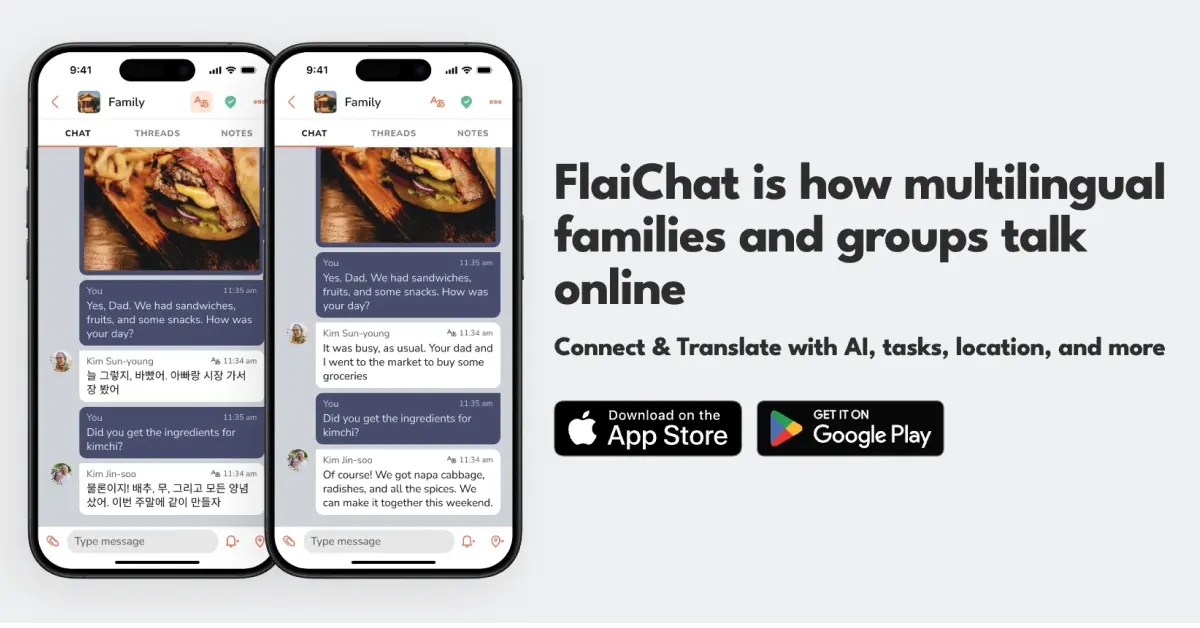
FlaiChat is a multilingual chat app that translates group messages automatically into each member's language, with optional voice cloning so audio messages are read aloud in the sender's own voice. It supports 40+ languages, joins groups by link or QR code, and targets families, couples and travel businesses.

FlaiChat is a messaging app built around one idea: a group chat should not break apart because its members speak different languages. Every message that arrives is translated automatically into the reader's own language, with no extra app, no copy and paste step, and no setup beyond picking the language you want to read in. The app covers more than 40 languages, including Arabic, Bengali, Hindi, Korean, Portuguese, Tagalog, Vietnamese, Mandarin and Cantonese, and the translation engine is tuned for hybrid speech such as Hinglish, Spanglish and Konglish, which is where general purpose translators usually stumble. The feature that separates it from a standard messenger with a translate button is voice cloning. A user records a sample of their own voice, and that sample becomes a read aloud option. When someone in the group plays an audio message translated into their language, they hear the sender's cloned voice speaking it. Voice clones are private to the person who created them. Beyond translation, FlaiChat includes group chats joined by link or QR code, shared photos, integrated tasks, an AI bot and daily moment sharing, so it can serve as the household or team messenger rather than a single purpose translation utility. The practical audience is families split across languages, couples in long distance relationships, and travel and hospitality businesses such as tour guides and agencies serving international visitors. Because invitations work through a link or QR code, no phone numbers need to be exchanged, which matters to parents who want relatives in contact with their children without exposing contact details. Setup is quick: install the app, create an account, then create or join a group and let translation run. Among alternatives, FlaiChat sits closer to WhatsApp with built in translation than to a standalone translator. Google Translate handles documents and phrases, and bilingual messengers often require manual toggling, while FlaiChat makes translation the default state of every conversation. The tradeoffs are real: the product is mobile only for now, with desktop and web versions described as in progress, and some advanced features sit behind a premium mode.

How do you use FlaiChat?

  1. 1Install the app and create an account
    Download FlaiChat from the Apple App Store or Google Play and register. Linking a Google or Apple account is what lets you recover chat history on a new device later.
  2. 2Create or join a group
    Start a new group or accept an invitation sent as a link or QR code. No phone numbers are exchanged, which keeps personal contact details out of the group.
  3. 3Set your translation language
    Pick the language you want incoming messages translated into. Group settings also let you choose a different target language, which is useful if you are learning one.
  4. 4Record a voice clone
    Provide a sample of your own voice to build a clone, then select it as a read aloud option so others hear your voice speaking their language when they play your audio messages.
  5. 5Chat and test voice translation
    Send text and audio messages in the group. Incoming messages translate automatically; play a translated audio message to confirm the cloned voice is working as expected.
  6. 6Review the travel setup for business use
    Tour guides, agencies and hospitality teams can read the travel page for how instant multilingual chat applies to serving international guests.

Pros and cons

Pros

  • Translation is on by default, so nobody has to paste text into a separate translatorAI
  • Voice cloning lets recipients hear audio messages in the sender's real voiceAI
  • Handles hybrid languages such as Hinglish, Spanglish and Konglish rather than only standard formsAI
  • Group invites work by link or QR code, so phone numbers stay privateAI
  • Free to download and use, with most users expected to stay on the free tierAI

Cons

  • No desktop or web app yet; iOS and Android are the only supported platformsAI
  • The premium tier and its exact feature limits are not spelled out on the siteAI
  • Voice cloning depends on the quality of the recorded sample, and no accuracy figures are publishedAI
  • It is a closed messenger: people outside FlaiChat cannot be reached, unlike cross platform chat toolsAI
  • Translation quality for less common languages and dialects is not documented beyond the supported listAI

How much does FlaiChat cost?

Pricing

Downloading and using FlaiChat is free. A premium mode exists for some advanced features and for very heavy users, though the site does not list prices or itemise which features sit behind it. Most users are expected to remain on the free tier permanently.

Learn more

Support

Support runs through email at support@flai.chat for feedback, issue reports and missing language requests. The site also links Instagram, LinkedIn and Facebook profiles for product updates.

Features

Core features include automatic message translation across 40+ languages, voice cloning for read aloud audio in the sender's voice, group chats joined by link or QR code, photo sharing, and support for hybrid languages. Extras include integrated tasks, an AI bot and daily moment sharing. Data is encrypted in transit and at rest.

Frequently asked questions about FlaiChat

  • How much does FlaiChat cost?
    Downloading and using FlaiChat is free. A premium mode exists for some advanced features and for very heavy users, though the site does not list prices or itemise which features sit behind it. Most users are expected to remain on the free tier permanently.
  • How do you use FlaiChat?
    The walkthrough on this page covers 6 steps: 1. Install the app and create an account 2. Create or join a group 3. Set your translation language 4. Record a voice clone 5. Chat and test voice translation 6. Review the travel setup for business use.
  • What platforms does FlaiChat support?
    FlaiChat is available on iOS and Android.
  • What are the limitations of FlaiChat?
    No desktop or web app yet; iOS and Android are the only supported platforms. The premium tier and its exact feature limits are not spelled out on the site. Voice cloning depends on the quality of the recorded sample, and no accuracy figures are published.

Status

StatusActive
Views0
Outbound clicks0
Added10/21/2026

Platforms

iOSAndroid

Pricing

FreeFreemium