Klaviyo SMS Assistant

AI copy for SMS campaigns, built inside Klaviyo

Beginner
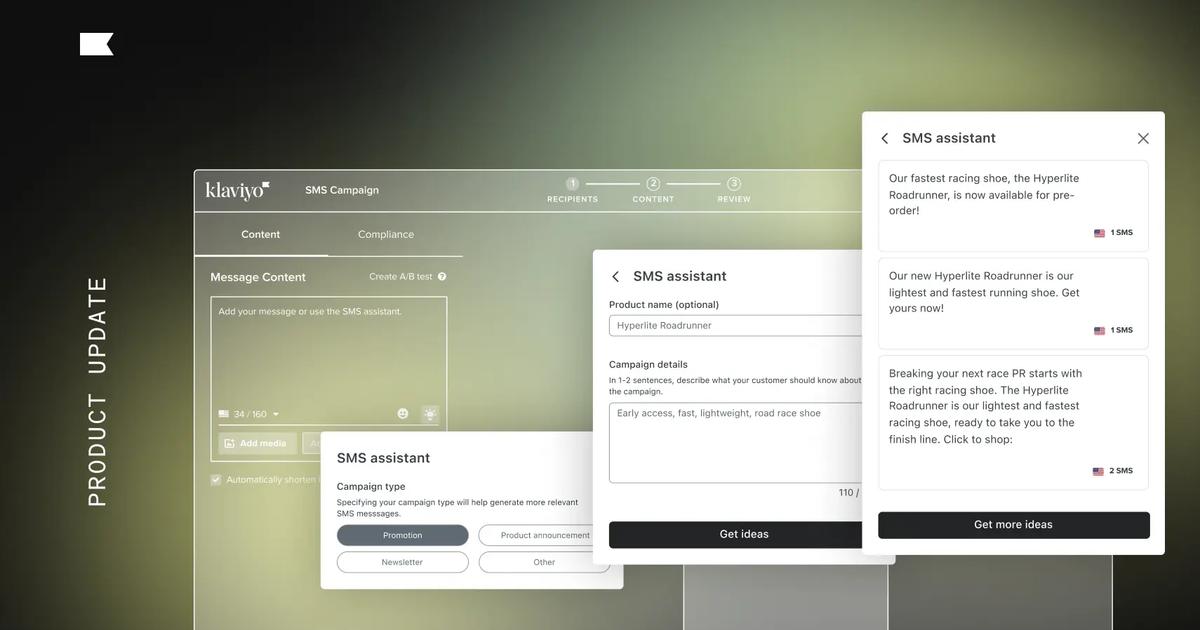
Screenshot of Klaviyo SMS Assistant, AI copy for SMS campaigns, built inside Klaviyo

What is Klaviyo SMS Assistant?

Klaviyo SMS Assistant is a copywriting tool. An AI copywriting assistant inside Klaviyo's SMS campaign editor that turns a short brief and a campaign type into three compliant text message drafts, two single-segment and one two-segment, in seconds.

Klaviyo SMS Assistant is an AI copywriting feature that lives inside the Klaviyo SMS campaign editor. Instead of staring at a blank message field, a marketer selects a campaign type, adds a short brief, and receives three ready-to-edit SMS drafts within seconds. The assistant is tuned for the constraints of text messaging, where brevity and carrier compliance matter more than in almost any other marketing channel. The workflow is deliberately narrow. Four campaign types are offered: Promotion, Product Announcement, Newsletter, and Other. Choosing one shapes the vocabulary of the output, so a Promotion brief leans toward urgency and sales language. The brief itself takes an optional product name plus a free-text description of the campaign. The assistant then returns two shorter messages sized to a single SMS segment and one longer message that spans two segments. Clicking any suggestion appends it to the existing editor content rather than overwriting it, so partial drafts survive. Compliance is the feature's main differentiator. Klaviyo states the assistant is trained to avoid forbidden SMS content and to align with mobile carrier regulations, which is a meaningful safety net for brands entering text marketing for the first time. The vendor positions it primarily for those newcomers, though experienced SMS marketers can use it as a starting point for iteration rather than a finished product. It is not a standalone tool. There is no separate app or free tier: the assistant only exists for Klaviyo customers sending SMS campaigns to predefined segments. That makes it a convenience layer on top of an existing CRM rather than a reason to switch platforms. Brands already on Klaviyo get a fast first draft and a compliance check; everyone else is looking at the cost of the full platform.

How do you use Klaviyo SMS Assistant?

  1. 1Create a Klaviyo account
    Sign up for Klaviyo to access the campaign editor. The SMS Assistant is a feature within the platform, so an account is required before any copy can be generated.
  2. 2Open an SMS campaign
    Start a new SMS campaign in Klaviyo and target a pre-established segment. Then click the purple lightbulb icon in the upper right corner of the campaign editor to open the assistant.
  3. 3Pick a campaign type
    Choose Promotion, Product Announcement, Newsletter, or Other. The selection shapes the wording the assistant produces, for example urgency and sales language for a Promotion.
  4. 4Describe the campaign
    Enter the product name if relevant and a brief description of the message. More detail in the brief produces more relevant suggestions.
  5. 5Generate and apply ideas
    Click Get Ideas to receive three drafts, typically two one-segment messages and one two-segment message. Click a suggestion to append it to the editor, then refine the wording to match your brand voice.
  6. 6Request more options or get a demo
    Use Get More Ideas to refresh the set (this replaces the current suggestions, so save favorites first). Teams evaluating the wider platform can book a demo instead.

Pros and cons

Pros

  • Generates three draft options from a short brief, which is faster than writing SMS copy from scratchAI
  • Trained to avoid forbidden content and follow mobile carrier compliance rulesAI
  • Campaign type selection (Promotion, Product Announcement, Newsletter, Other) tailors the tone of the outputAI
  • Suggestions append to the editor instead of overwriting existing textAI
  • Useful on-ramp for teams new to text marketing who lack SMS copywriting experienceAI

Cons

  • Only available inside Klaviyo, so it requires an existing Klaviyo account and SMS setupAI
  • No standalone pricing; cost is tied to the broader Klaviyo platform subscriptionAI
  • Getting more ideas wipes the current set of suggestions, so drafts must be saved firstAI
  • Limited to four campaign types and a short text brief, with no brand voice model or tone controls describedAI
  • Output still needs human editing for brand voice, offers and link placementAI

How much does Klaviyo SMS Assistant cost?

Features

Generates SMS campaign copy from a short brief, with four campaign types (Promotion, Product Announcement, Newsletter, Other). Each request returns three suggestions, usually two single-segment messages and one two-segment message. Selected drafts append to the existing editor text, and a Get More Ideas button produces a fresh set. Copy is trained to avoid forbidden SMS content and follow mobile carrier rules.

Learn more

Frequently asked questions about Klaviyo SMS Assistant

  • How do you use Klaviyo SMS Assistant?
    The walkthrough on this page covers 6 steps: 1. Create a Klaviyo account 2. Open an SMS campaign 3. Pick a campaign type 4. Describe the campaign 5. Generate and apply ideas 6. Request more options or get a demo.
  • What platforms does Klaviyo SMS Assistant support?
    Klaviyo SMS Assistant is available on Web App.
  • What are the limitations of Klaviyo SMS Assistant?
    Only available inside Klaviyo, so it requires an existing Klaviyo account and SMS setup. No standalone pricing; cost is tied to the broader Klaviyo platform subscription. Getting more ideas wipes the current set of suggestions, so drafts must be saved first.

Status

StatusActive
Views0
Outbound clicks0
Added10/21/2026

Platforms

Web App

Pricing

PaidSubscription