Free trial
A free version of the plugin can be downloaded from WordPress.org. No time-limited Pro trial is mentioned.
Learn moreNo-code AI chatbot plugin for WordPress, trained on your own site content
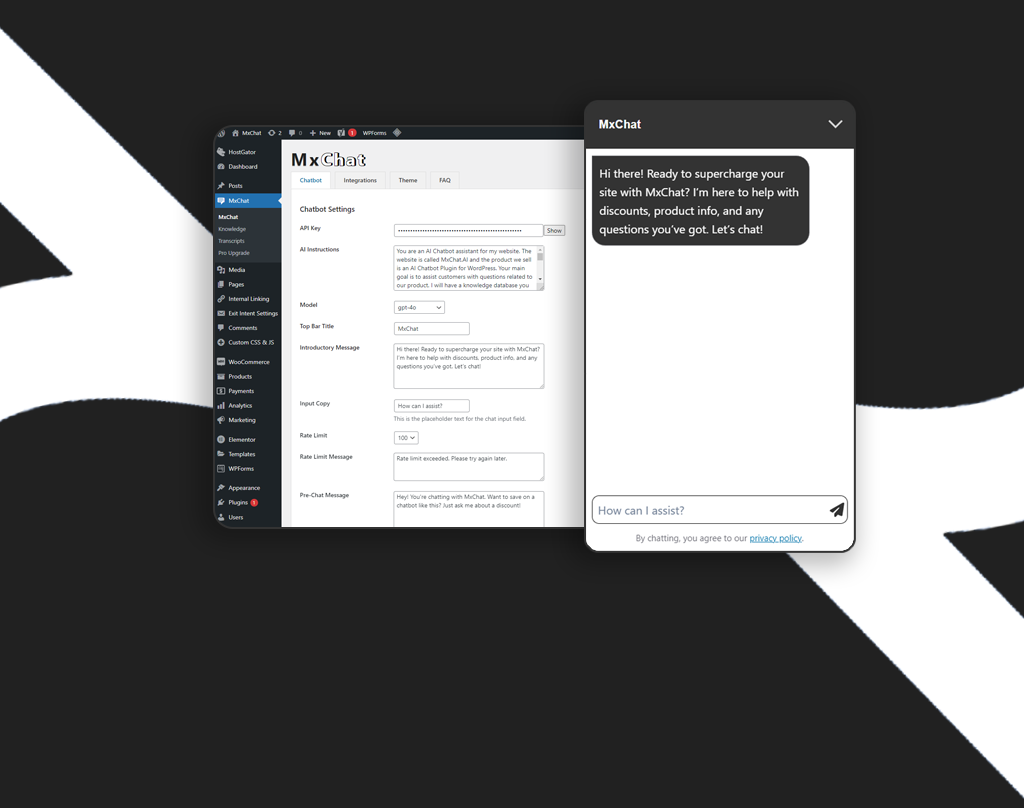
MxChat is a WordPress plugin for building no-code AI chatbots trained on your pages, products and PDFs. It supports multiple bots, several AI model providers, lead capture forms and a lifetime-license Pro tier alongside a free version.
MxChat is a WordPress plugin that adds AI chatbots to a site and trains them on the site's own material. Pages, posts, products and PDFs are ingested into a searchable knowledge base using retrieval-augmented generation, so answers come from the owner's actual content instead of the model's guesses. Questions are matched by meaning rather than keywords, and the knowledge base can be refreshed whenever the content changes. The plugin is aimed at small businesses, agencies and WordPress site owners who want customer support and lead capture running without writing code. A single install supports multiple bots, each with its own knowledge base, personality, AI model, rate limits and configuration, which suits sites that need separate assistants for support, sales, technical questions or HR. Bots can be duplicated in one step. Model choice spans providers such as OpenAI, Anthropic, Google, xAI and DeepSeek, so the underlying engine can be swapped to balance cost and quality. In practice, the free version is installed from the WordPress.org plugin directory and the paid Pro license unlocks premium add-ons, advanced models, PDF and image handling, WooCommerce integration, live agent handoff and a bundle of enhanced features. Lead capture forms can fire mid-conversation, triggered by detected intent, message count or user role. A theme generator lets the owner describe the desired look in plain English and receive a styled chat widget without editing CSS. The Pro tier also includes text-to-video generation through Google Veo and OpenAI Sora from the WordPress dashboard. Among WordPress chatbot plugins, MxChat differentiates itself with a one-time lifetime license rather than a monthly subscription, which makes the total cost predictable, though model usage through third-party providers is presumably billed separately by those providers. Reviewers on WordPress.org compare it favorably with other AI plugins for setup speed and support responsiveness. Agency and Agency+ bundles supply five or ten Pro keys for people managing several client sites. It is a WordPress-only product, so teams on other platforms will need a different tool.
A free version of the plugin can be downloaded from WordPress.org. No time-limited Pro trial is mentioned.
Learn moreFree version on WordPress.org. Pro is a $69.97 lifetime license, Agency (5 Pro keys) is $174.97 and Agency+ (10 Pro keys) is $279.97. All are one-time payments with lifetime updates and no monthly fees; a 15% discount is advertised.
Learn moreReviewers praise responsive support, and the Agency tiers advertise agency-level and priority support. The on-site chat agent also points to documentation, support tickets and contact options.
Works with WordPress and WooCommerce, and connects to model providers including OpenAI, Anthropic, Google, xAI and DeepSeek. Video generation uses Google Veo and OpenAI Sora. Live agent integration is included in Pro.
RAG-based knowledge base from pages, posts, products and PDFs, semantic search, unlimited bots with separate personalities and models, multiple AI providers, AI theme builder, intent-based lead capture forms, WooCommerce integration, live agent handoff and Veo/Sora video generation.
 AI Angels400+ customizable AI girlfriends for NSFW chat, voice calls, and roleplay
 Candy AIExperience the future of companionship with AI friends who chat, role-play, and connect with you on a human level.
 ourdream.aiA vast AI roleplay platform with millions of characters for chat, images, video and voiceAI Angels400+ customizable AI girlfriends for NSFW chat, voice calls, and roleplayCandy AIExperience the future of companionship with AI friends who chat, role-play, and connect with you on a human level.ourdream.aiA vast AI roleplay platform with millions of characters for chat, images, video and voice