Free trial
The Starter plan is free to use with no credit card required, but it caps you at limited credits and essential features rather than a time-limited full trial.
Learn moreRehearse speeches and interviews against AI-generated reference voice
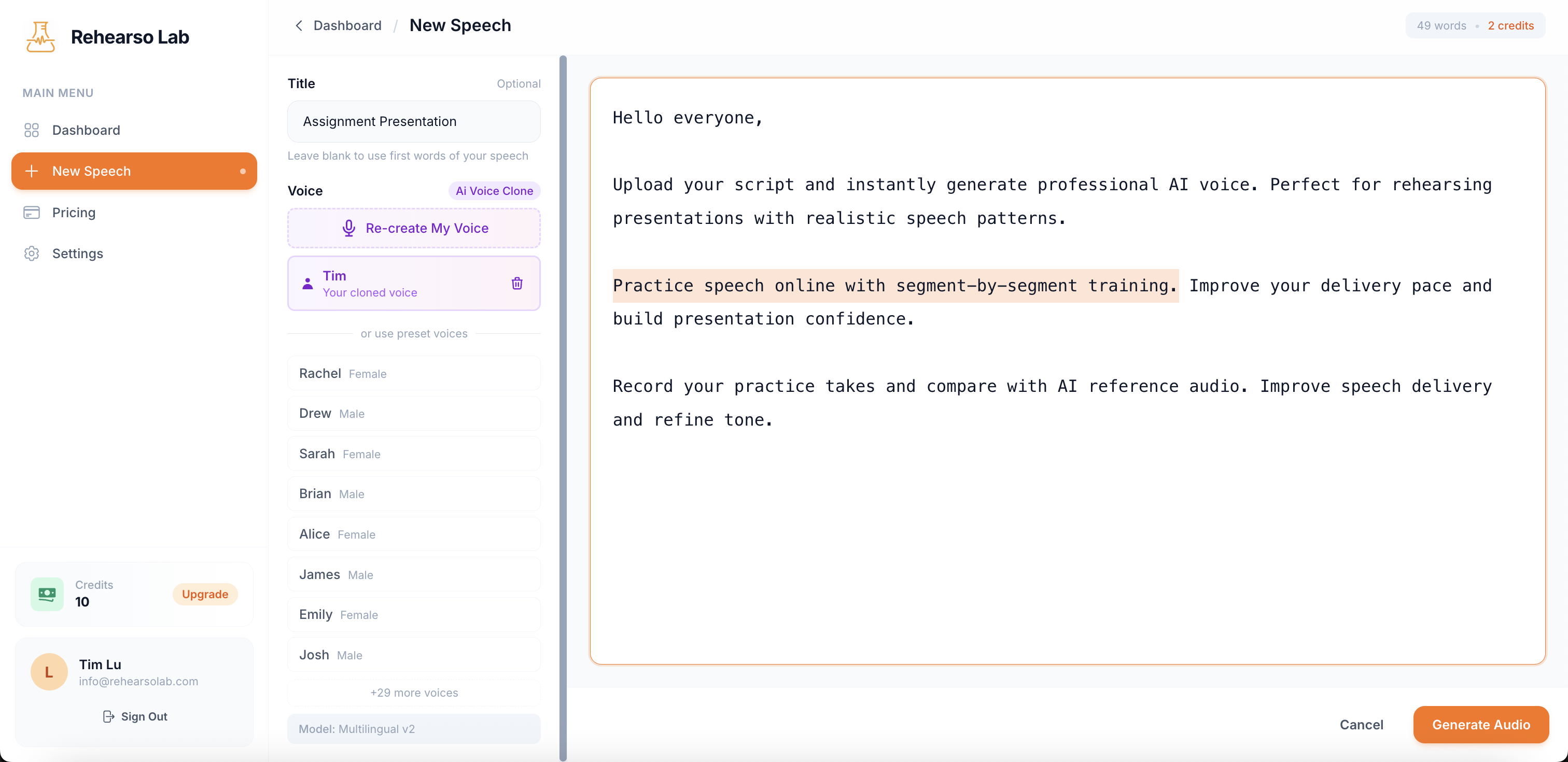
Rehearso Lab turns your script into AI reference speech, then lets you record takes and compare delivery segment by segment. It targets interview prep, presentations and public speaking across 32+ languages, with a free Starter tier, a monthly Pro plan and a one-time lifetime option.
Rehearso Lab is a speech practice environment built around a simple swap: instead of finding a human to listen to your script, you generate a synthetic reference voice and train against it. You paste or upload written material, the platform renders it as speech, and you record your own takes beside that audio to hear where your timing, pace and tone drift from the target. The stated aim is preparation for job interviews, conference presentations, keynote slots, pitch meetings, client calls and classroom talks, which covers most of the situations where delivery decides the outcome more than the words do. The workflow is segmented. Rather than running an entire script top to bottom, you break it into pieces and drill each one, which makes sense for anyone who has discovered that a full run-through hides the two or three passages that keep falling apart. Recording a take and comparing it with the AI reference audio is the core feedback loop, since the comparison surfaces rushed transitions and flat delivery without needing a coach in the room. Scripts are held in cloud storage and generated audio can be exported for offline rehearsal. Language coverage is broader than most rehearsal tools bother with: 32 or more languages, each with native pronunciation and intonation, automatic language detection from pasted text, and handling of scripts that mix languages. Voice selection can be varied across sessions, which matters if you want to practice adapting the same material to different registers rather than memorising one cadence. Pricing puts a free Starter tier with limited credits next to Pro at $11.99 per month for unlimited generations, a $99.99 one-time Lifetime Pro option, and pay-as-you-go credit packs that do not expire. The product is in v1.0 early access, and live AI conversation practice plus an interactive learning space are listed as coming soon rather than shipping. Compared with generic text to speech tools, Rehearso Lab wraps generation in a practice loop; compared with human coaching, it removes scheduling and cost but cannot judge content, only your delivery against a synthetic baseline.
The Starter plan is free to use with no credit card required, but it caps you at limited credits and essential features rather than a time-limited full trial.
Learn moreStarter is free with limited credits and basic practice features. Pro costs $11.99 per month with unlimited TTS credits, priority support and custom voice options. Lifetime Pro is $99.99 once and adds future features plus early access to betas. Credit packs are one-time purchases that do not expire.
Learn morePriority support is listed as a Pro benefit; no separate help centre or documentation page is referenced on the homepage.
Text to speech from uploaded scripts, segment-by-segment speech timing practice, recorded takes compared against AI reference audio, 32+ languages with native accents and automatic detection, mixed-language script handling, multi-voice selection, secure cloud script storage and exportable audio files.
 AI Angels400+ customizable AI girlfriends for NSFW chat, voice calls, and roleplay
 Candy AIExperience the future of companionship with AI friends who chat, role-play, and connect with you on a human level.
 ourdream.aiA vast AI roleplay platform with millions of characters for chat, images, video and voiceAI Angels400+ customizable AI girlfriends for NSFW chat, voice calls, and roleplayCandy AIExperience the future of companionship with AI friends who chat, role-play, and connect with you on a human level.ourdream.aiA vast AI roleplay platform with millions of characters for chat, images, video and voice