Tavern Scribe

Campaign tracker for TTRPGs with AI session recaps

Beginner
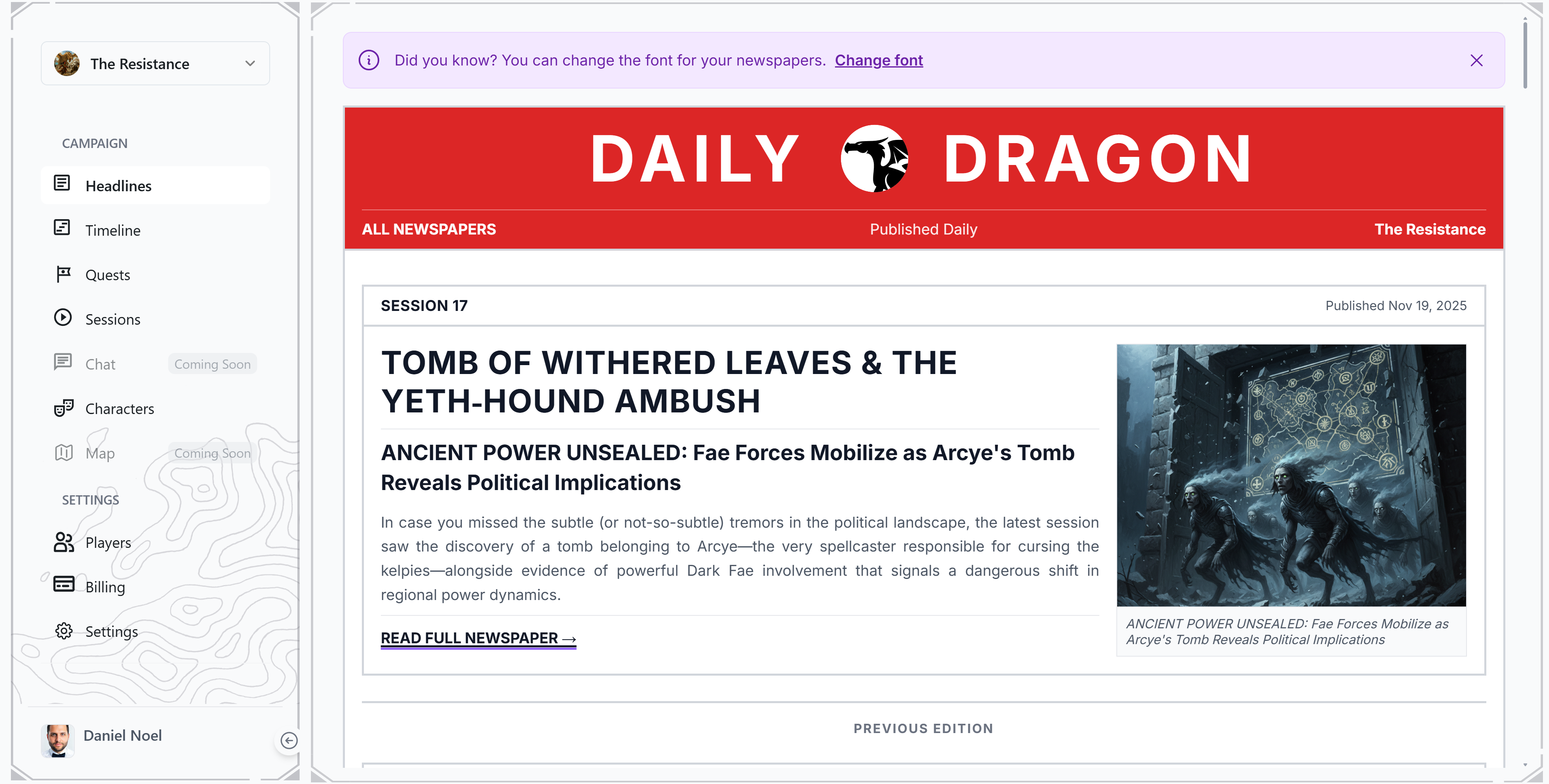
Screenshot of Tavern Scribe, Campaign tracker for TTRPGs with AI session recaps

What is Tavern Scribe?

Tavern Scribe is an interactive story tool. A TTRPG campaign workspace that unifies battle maps, character sheets, world wiki, NPCs, loot and scheduling, with optional AI recaps, newspapers and voice driven session control generated from recorded game nights. Free table tools, paid AI lift.

Tavern Scribe is a campaign management workspace for tabletop roleplaying games, covering systems such as Dungeons and Dragons, Daggerheart, Pathfinder and Call of Cthulhu. Rather than forcing a group to abandon the virtual tabletop or generators they already use, it positions itself as the single source of truth for campaign memory: the world wiki, session plans, NPCs, loot, quests and private player knowledge all sit in one searchable place instead of being scattered across note apps, spreadsheets, pinned chat threads and forgotten lore documents. It works on three levels, and a group can pick any of them. The free tier is table tools only: a virtual tabletop with battle maps, tokens, fog of war and 3D dice, plus character sheets, inventory, currency tracking, quests, notes, a world wiki and session scheduling with Discord announcements. The middle tier keeps an existing setup and adds session memory: the group records or uploads audio from game night, and the Scribe produces written recaps, a generated newspaper, memorable quotes, a campaign timeline and public share links the whole party can open. The fullest option runs the entire campaign in the product, where the world state is updated after each session and the AI can also act on voice or typed instructions, rendering a battle map from a description, summoning an encounter, granting an item to a character sheet or placing a merchant shop on a location map. The audience is game masters first, especially those with limited prep time, plus players who miss sessions and need to catch up. Scheduling is treated as a first class problem: date polls are announced to Discord, tallied live, answerable by email or in app without an account, with automatic reminders. A tinkerer track exposes signed webhooks, scoped device keys and a public ESP32 starter for streamers and physical tables that want props to react to in game events. Alternatives tend to be either full virtual tabletops with thin note keeping or note tools with no table at all. Tavern Scribe's differentiator is the written record: recaps and a searchable history generated from the actual recording, with the AI billed as optional rather than mandatory.

How do you use Tavern Scribe?

  1. 1Create your free account
    Sign up on the site to open the workspace. Every campaign starts free, so table tools can be tried before any AI spend.
  2. 2Choose how much of the tool your table will use
    Decide between running the whole campaign inside Tavern Scribe, keeping an existing VTT and adding session memory, or staying manual with the free table tools.
  3. 3Set up the campaign and first session
    Add the world wiki, NPCs, quests and loot, then use the prep desk to pull open story threads and unresolved player decisions into a session plan.
  4. 4Record game night and let the Scribe write it up
    Record or upload the session audio. Recaps, a campaign newspaper, memorable quotes and a timeline are produced from the recording afterwards.
  5. 5Share the recap with the party
    Open a generated recap or newspaper through its public link so absent players can catch up and returning players can remember where they stopped.
  6. 6Review plans and pricing before scaling up
    Compare the free workspace against subscriptions and silver packs so the AI features are only paid for when they save real prep time.

Pros and cons

Pros

  • Consolidates campaign notes, wiki, NPCs, loot and scheduling into one searchable workspace instead of many tabsAI
  • AI recaps, quotes and newspapers are generated from the session recording, so nobody at the table has to take notesAI
  • Usable at three levels of commitment: full workspace, session memory layered onto an existing VTT, or free table tools onlyAI
  • Scheduling polls reach Discord, tally live and can be answered by email or in app without creating an accountAI
  • Signed webhooks, scoped device keys and a public ESP32 starter give streamers and physical tables room to buildAI

Cons

  • Pricing detail is not visible on the homepage, so the cost of AI recaps, subscriptions and silver packs needs checking on the pricing page before committingAI
  • Recap quality depends on recorded audio, which means table noise, cross talk and remote audio setup directly affect the outputAI
  • The feature set is broad (VTT, wiki, scheduling, AI, webhooks), and groups wanting one simple tool may find the surface area heavyAI
  • AI assistance is metered separately from the free workspace, so heavy recap use is likely to push a group onto paid tiersAI
  • The tinkerer features assume some technical comfort with webhooks and device keys, which many game masters will not haveAI

How much does Tavern Scribe cost?

Pricing

The workspace is free for the whole table, including the VTT, character sheets, wiki and scheduling. AI features such as recaps are paid through subscriptions and silver packs. Exact prices are not listed on the homepage and appear on the pricing page.

Learn more

Integrations

Discord receives scheduling polls, reminders and announcements. Signed campaign webhooks and a receive-only live socket with scoped device keys support external props, stream overlays and the public ESP32 starter.

Learn more

Features

Virtual tabletop with battle maps, tokens, fog of war, initiative and 3D dice; character sheets, inventory and currency; world wiki, NPCs, quests, loot and player knowledge; session planning and readiness checks; AI recaps, newspapers and quotes from recordings; Discord scheduling polls with reminders; voice or typed commands to render maps, summon encounters and grant items; signed webhooks and a public ESP32 starter.

Learn more

Frequently asked questions about Tavern Scribe

  • How much does Tavern Scribe cost?
    The workspace is free for the whole table, including the VTT, character sheets, wiki and scheduling. AI features such as recaps are paid through subscriptions and silver packs. Exact prices are not listed on the homepage and appear on the pricing page.
  • How do you use Tavern Scribe?
    The walkthrough on this page covers 6 steps: 1. Create your free account 2. Choose how much of the tool your table will use 3. Set up the campaign and first session 4. Record game night and let the Scribe write it up 5. Share the recap with the party 6. Review plans and pricing before scaling up.
  • What platforms does Tavern Scribe support?
    Tavern Scribe is available on Web App.
  • What does Tavern Scribe integrate with?
    Discord receives scheduling polls, reminders and announcements. Signed campaign webhooks and a receive-only live socket with scoped device keys support external props, stream overlays and the public ESP32 starter.
  • What are the limitations of Tavern Scribe?
    Pricing detail is not visible on the homepage, so the cost of AI recaps, subscriptions and silver packs needs checking on the pricing page before committing. Recap quality depends on recorded audio, which means table noise, cross talk and remote audio setup directly affect the output. The feature set is broad (VTT, wiki, scheduling, AI, webhooks), and groups wanting one simple tool may find the surface area heavy.

Status

StatusActive
Views0
Outbound clicks0
Added10/21/2026

Platforms

Web App

Pricing

FreeFreemiumSubscription