Free trial
The homepage says premium features can be tried for free, but does not state a trial length or which features are included.
Learn moreTurn any text into natural speech, listen online or export MP3.
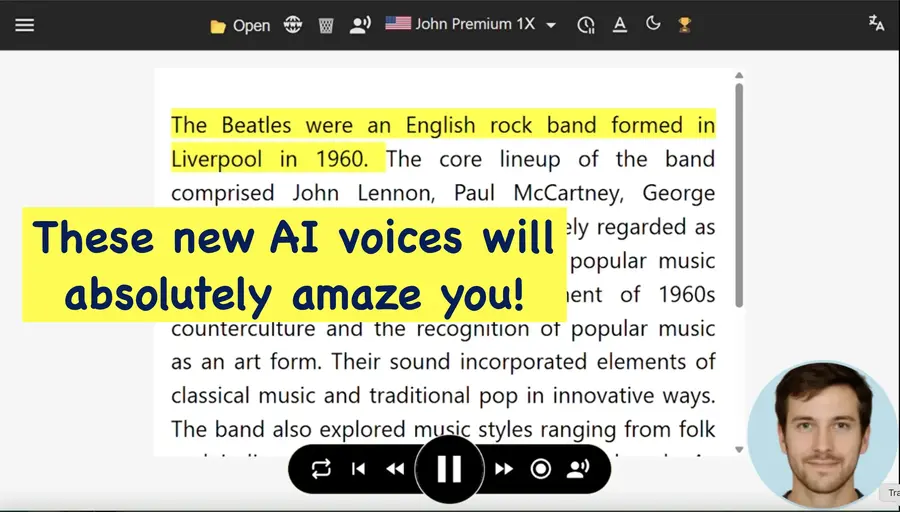
TTSReader is an AI narration tool that turns any text into natural speech, listen online or export MP3. TTSReader converts text, PDFs, ebooks and web pages into natural speech in the browser. Free system voices work without limits, while premium AI voices and MP3 export require a paid plan.
TTSReader is a browser-based text-to-speech tool that reads aloud plain text, files, PDFs, ebooks and web pages. It runs in any modern browser on desktop, laptop, Chromebook or mobile without installation or login. Users paste text, upload a document or drop in a URL, choose a voice and press play. The service remembers the text, caret position and preferences, so a session can be paused and resumed later even after closing the browser. The voice library combines free system voices exposed through the Web Speech API with premium AI voices from Google, Microsoft, OpenAI and xAI, plus proprietary options. Free voices carry no usage limits, while premium voices are available on a paid plan. A single file can mix multiple voices, languages and speeds, which suits dialogues, multi-language narration and proofreading. A pronunciation dictionary and find and replace help fine-tune output before export. Beyond listening, TTSReader exports synthesized speech to MP3. That export is limited to Windows and requires a premium subscription. Exported audio can be used commercially for some voices under the site's commercial terms, which makes the tool relevant for video narration, telephony, audiobooks and classroom material. The player highlights the sentence being read and scrolls to keep it in view, supporting read-along for speed and comprehension. TTSReader sits between simple browser speech tools and studio voice generators. It is less specialized than dedicated voice-cloning platforms but broader in input handling, accepting PDF, DOCX, EPUB and web links. WikiTTS extends the same engine to pre-synthesized Wikipedia articles. The service is operated by WellSource Ltd. and has run since 2015, with a Chrome extension, an iOS app and an Android reader as companion options. It targets students, teachers, proofreaders, authors, accessibility users and anyone who wants to listen to written content.
The homepage says premium features can be tried for free, but does not state a trial length or which features are included.
Learn moreFree voices from the Web Speech API are available without usage limits. Premium AI voices from Google, Microsoft, OpenAI and xAI require a paid upgrade, and MP3 export is a premium feature. The homepage does not list specific prices.
Learn moreThe contact page lists ways to reach the team, send feedback and join the user community. No dedicated help centre is mentioned on the homepage.
Learn moreNo third party integrations are described on the homepage. The tool runs in the browser and offers a Chrome extension and a separate WikiTTS reader for Wikipedia articles.
Reads text, files, PDFs, ebooks and web pages aloud. Offers free system voices plus premium AI voices, multilingual and multi-voice narration, pronunciation dictionary, find and replace, sentence highlighting with auto-scroll, position memory, MP3 export on Windows, and a Chrome extension for listening to pages in place.
 AI Angels400+ customizable AI girlfriends for NSFW chat, voice calls, and roleplay
 Candy AIExperience the future of companionship with AI friends who chat, role-play, and connect with you on a human level.
 ourdream.aiA vast AI roleplay platform with millions of characters for chat, images, video and voiceAI Angels400+ customizable AI girlfriends for NSFW chat, voice calls, and roleplayCandy AIExperience the future of companionship with AI friends who chat, role-play, and connect with you on a human level.ourdream.aiA vast AI roleplay platform with millions of characters for chat, images, video and voice





