Free trial
A one-time 5-link trial runs the full 30+ signal audit on your own URLs and returns the same Excel, PDF and disavow.txt output. No subscription and no automatic renewal.
Learn moreAudit uploaded backlink exports with live URL checks and clear disavow labels
Own Verify Backlinks? Verify ownership to get a dofollow link
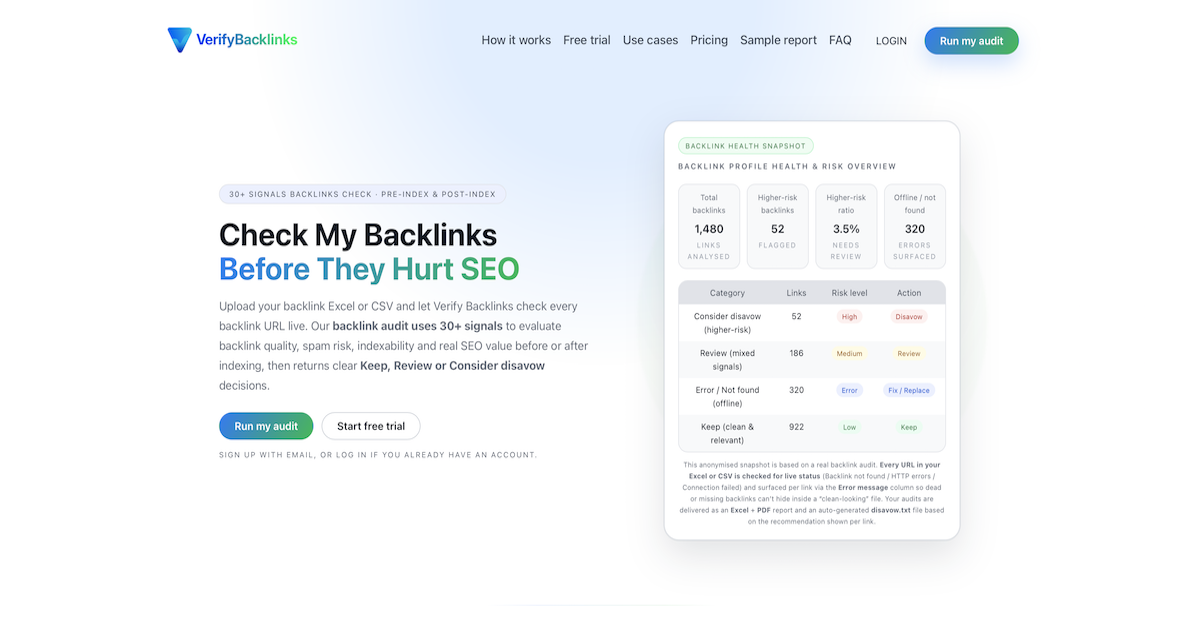
Verify Backlinks is an AI tool. A file-based backlink auditor: upload an Excel or CSV export, and every URL is checked live against 30+ signals for status, follow type, indexability, placement and spam risk. Audits return Keep, Review or Consider disavow labels with an Excel workbook, PDF summary and disavow.txt.
Verify Backlinks is a pay-per-audit backlink checker that works from a file you already own. You upload the backlink Excel or CSV you received from a vendor, an outreach partner or your own SEO tool, and the service verifies every listed URL live rather than auditing your domain. Each link is evaluated against more than 30 signals covering presence, HTTP status, follow attributes (dofollow, nofollow, sponsored, UGC), indexability (robots blocks, noindex directives, canonical conflicts), placement context, tier, topical relevance and language, then labelled Keep, Review or Consider disavow. The workflow is built around two moments. A pre-index audit runs before links are crawled, so problems can be caught while a campaign can still be fixed. A post-index audit re-checks links after indexing to confirm they still exist, remain accessible and still pass value. Because everything runs on the uploaded file, there is no Search Console connection and no access to your property; you decide what to submit to Google. Output is deliberately practical. Every audit returns an Excel workbook with Results, Summary, Explanation, Tier Summary and Authority tabs, a client-ready PDF with follow type, risk label and indexability rollups, and a disavow.txt generated only from links marked Consider disavow. Dead or unconfirmed links surface per row through an Error message column, so missing placements cannot hide inside a tidy spreadsheet. Verify Backlinks is aimed at SEO agencies validating vendor deliveries, affiliate and niche site owners protecting money pages, and in-house SEO teams that want one repeatable audit standard across providers and legacy campaigns. Against full-suite SEO platforms that bundle link data with rank tracking and site crawling, it is a narrow, single-purpose utility: you bring the link list, it returns decisions and documents. Pricing is charged per audit rather than by subscription, and a one-time 5-link trial lets you validate the report format on your own URLs first.
A one-time 5-link trial runs the full 30+ signal audit on your own URLs and returns the same Excel, PDF and disavow.txt output. No subscription and no automatic renewal.
Learn morePay per audit, no subscription and no automatic renewals. Starter is €29 for up to 500 backlinks, Pro is €59 for up to 2,000, and Agency is €99 for up to 5,000, each from a single Excel or CSV file. Every tier includes the same 30+ signal audit, Keep/Review/Consider disavow labels, Excel plus PDF report and disavow.txt.
Learn moreLive URL verification with error message logging (backlink not found, HTTP errors, connection failures, timeouts), risk labels with short explanations, indexability checks for robots, noindex and canonical conflicts, tier and placement context, follow type and language signals, and link-level labels of Keep, Review or Consider disavow. Output includes an Excel workbook with Results, Summary, Explanation, Tier Summary and Authority tabs, a PDF summary and an auto-generated disavow.txt.
Learn more AI Angels400+ customizable AI girlfriends for NSFW chat, voice calls, and roleplay
 Candy AIExperience the future of companionship with AI friends who chat, role-play, and connect with you on a human level.
 ourdream.aiA vast AI roleplay platform with millions of characters for chat, images, video and voiceAI Angels400+ customizable AI girlfriends for NSFW chat, voice calls, and roleplayCandy AIExperience the future of companionship with AI friends who chat, role-play, and connect with you on a human level.ourdream.aiA vast AI roleplay platform with millions of characters for chat, images, video and voice


