Vsub

Faceless videos drawn in a style cloned from any reference clip

Beginner API
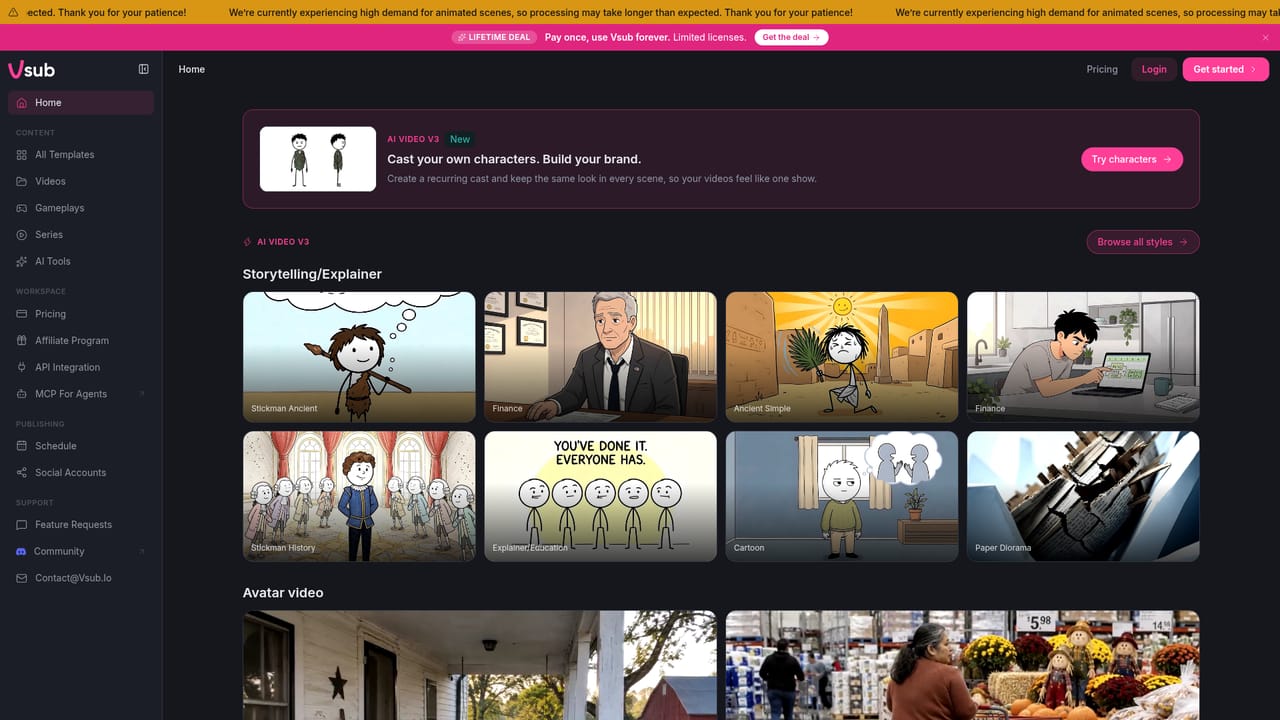
Screenshot of Vsub, Faceless videos drawn in a style cloned from any reference clip

What is Vsub?

Vsub is an AI narration tool. A faceless video generator that turns a script or voiceover into a narrated, illustrated video. Its template system clones the drawing style of any reference clip you upload, and the whole job can also be triggered from Claude, ChatGPT or Cursor over MCP.

Vsub is a browser based production tool for faceless video channels. The premise is simple: you supply a script or a voiceover, and the platform breaks it into scenes, generates narration, draws each frame and cuts the result into a finished video. The distinguishing feature is the template system. Instead of offering a fixed library of visual styles, Vsub lets you upload a reference video you already like and clones its drawing style into a reusable template that stays in your workspace. The workflow is built around a paste and generate loop. A script can run up to 50,000 characters, though the finished output must fit inside the maximum length allowed by your plan. Narration is generated automatically, or you can upload your own recording, in which case the script is transcribed from the audio and no synthetic voice is layered over it. Scenes are drawn with the chosen template, and the assembled video opens in an editor where individual scenes can be redrawn. Failures are recoverable: a retry resumes from the step where generation stopped, and the voiceover, scenes and images already produced are preserved and not billed again. Ready made templates cover the styles that dominate faceless YouTube: stickman explainers, history and ancient themed drawings, finance clips, cartoon, paper diorama, quiz and commentary formats. These can be used as they are, so a first video needs no template work at all. Custom cloning is there for creators who want a look nobody else is publishing. Reference clips work best when they contain spoken narration and still or moving footage, run at least 30 seconds, and sit around three minutes for the strongest match. Beyond the web editor, Vsub exposes an API endpoint for creating videos from a script and template, and an MCP connection that lets assistants such as Claude, ChatGPT or Cursor request a video directly. That puts it in the company of other script to video generators, but the template cloning and the assistant driven path are what separate it. It suits solo faceless channel operators and small teams publishing frequently, less so anyone who needs hand authored motion design or frame level creative control.

How do you use Vsub?

  1. 1Open the workspace and pick a template
    Sign in to the workspace and browse the published templates. Stickman, history, finance, cartoon and quiz styles can be used immediately without any preparation.
    Vsub — Open the workspace and pick a template
  2. 2Clone a template from your own reference video
    Upload a clip whose style you want to reuse. Aim for a narrated explainer of around three minutes, with a 30 second minimum, and the template becomes yours to reuse.
  3. 3Paste the script or upload a voiceover
    Add the narration text, up to 50,000 characters, or upload your own recording so the script is transcribed from the audio and no voice is generated.
  4. 4Generate and review the scenes
    Run the generation and let Vsub split the script, narrate it and draw each frame. The finished video opens in the editor, where any scene can be redrawn.
  5. 5Connect an AI assistant over MCP
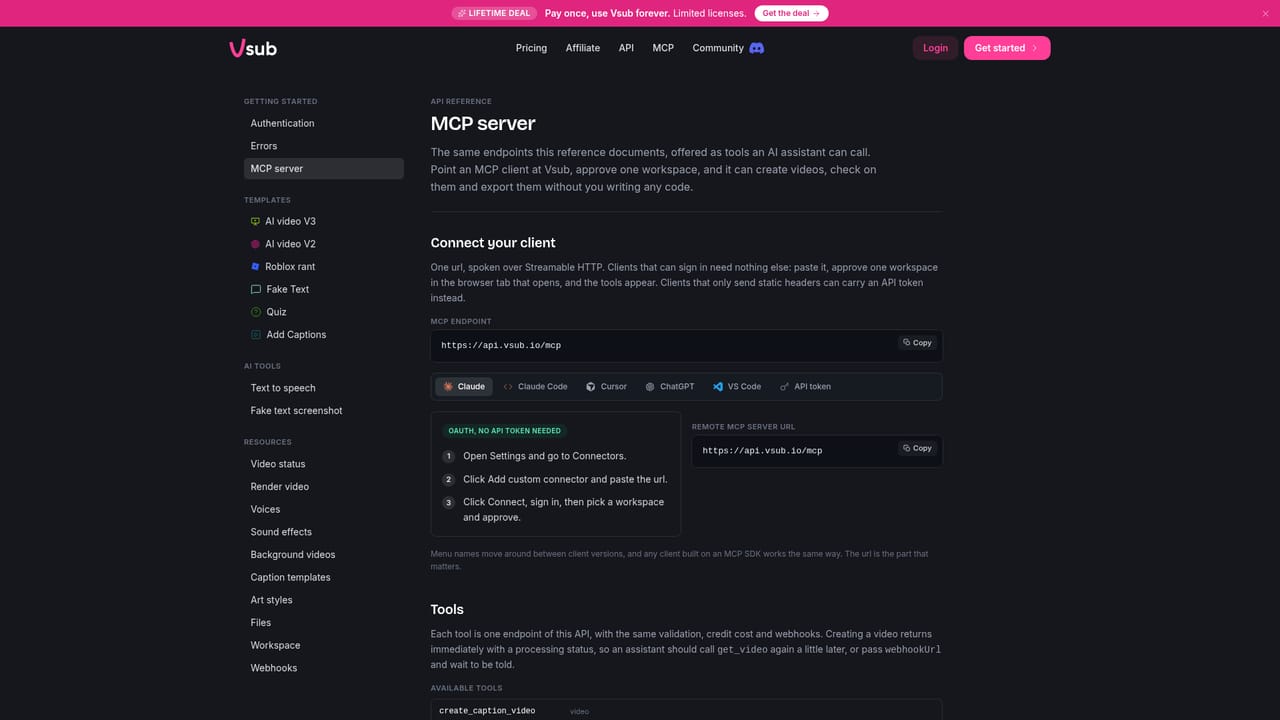
    For hands off production, connect Vsub to Claude, ChatGPT or Cursor and ask for a video. The assistant picks a template and sends the request to Vsub.
    Vsub — Connect an AI assistant over MCP

Pros and cons

Pros

  • Template cloning from a reference video gives a channel a visual identity that is not shared with everyone elseAI
  • Published templates for stickman, history, finance, cartoon and quiz formats mean a first video needs no setupAI
  • Custom voiceover uploads are used as-is, with the script transcribed rather than replaced by a synthetic voiceAI
  • Failed generations resume from the interrupted step without recharging for work that already completedAI
  • MCP and API access let an AI assistant create the whole video without opening the editorAI

Cons

  • Final video length is capped by your plan, so long form projects can hit a ceiling regardless of the 50,000 character script limitAI
  • Template quality depends on the reference clip: it needs narration, at least 30 seconds, and roughly three minutes for the best resultAI
  • The output leans toward popular faceless formats, and fine grained creative control is limited to redrawing individual scenesAI
  • Pricing, plan tiers and licensing terms are not described on the homepage, so cost has to be checked separately before committingAI
  • No native mobile or desktop application is mentioned; work happens in the browser or through an assistant connectionAI

How much does Vsub cost?

Pricing

The homepage advertises a lifetime deal: pay once and use Vsub forever, with a limited number of licences. Plan tiers, video length limits and per plan details are not listed on the homepage, so the pricing page is the place to confirm cost and limits.

Learn more

Integrations

An MCP connection lets Claude, ChatGPT or Cursor request videos directly, and a REST endpoint at /v1/ai-videos-v3 accepts a script and template for code driven creation.

Learn more

Features

Script or voiceover to finished video in one pass: scene splitting, narration, per scene illustration and an editor for redrawing. Templates can be cloned from a reference video of 30 seconds or more. Scripts run to 50,000 characters, custom voiceovers are transcribed rather than replaced, and failed jobs resume without double billing.

Frequently asked questions about Vsub

  • How much does Vsub cost?
    The homepage advertises a lifetime deal: pay once and use Vsub forever, with a limited number of licences. Plan tiers, video length limits and per plan details are not listed on the homepage, so the pricing page is the place to confirm cost and limits.
  • Does Vsub have an API?
    Yes, Vsub offers an API.
  • How do you use Vsub?
    The walkthrough on this page covers 5 steps: 1. Open the workspace and pick a template 2. Clone a template from your own reference video 3. Paste the script or upload a voiceover 4. Generate and review the scenes 5. Connect an AI assistant over MCP.
  • What platforms does Vsub support?
    Vsub is available on Web App.
  • What does Vsub integrate with?
    An MCP connection lets Claude, ChatGPT or Cursor request videos directly, and a REST endpoint at /v1/ai-videos-v3 accepts a script and template for code driven creation.
  • What are the limitations of Vsub?
    Final video length is capped by your plan, so long form projects can hit a ceiling regardless of the 50,000 character script limit. Template quality depends on the reference clip: it needs narration, at least 30 seconds, and roughly three minutes for the best result. The output leans toward popular faceless formats, and fine grained creative control is limited to redrawing individual scenes.

Status

StatusActive
Views0
Outbound clicks0
Added10/21/2026

Platforms

Web App

Pricing

FreemiumPaid


