Writers brew

An AI writing assistant for macOS that works in every app

Beginner
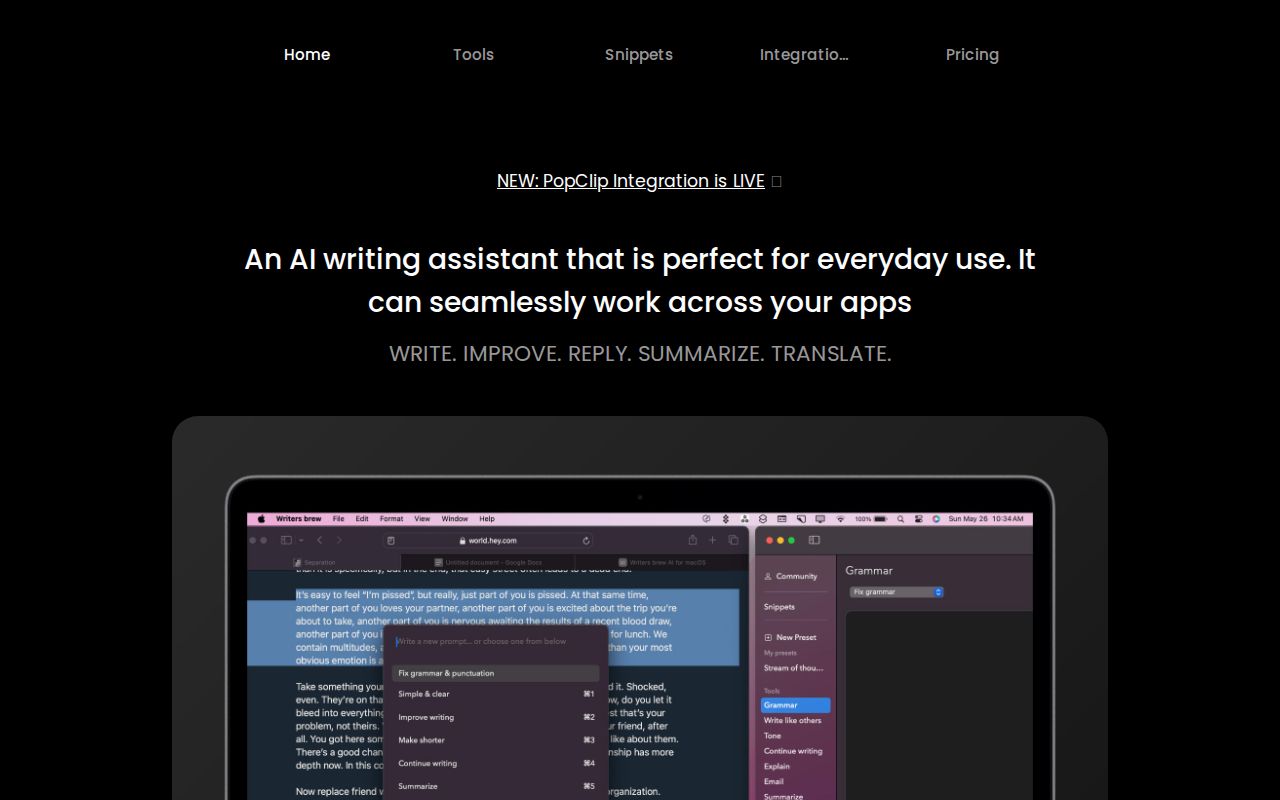
Screenshot of Writers brew, An AI writing assistant for macOS that works in every app

What is Writers brew?

Writers brew is an AI tool. A macOS writing assistant that opens from a keyboard shortcut in any app, offering 30+ AI writing tools, text utilities, snippets with smart placeholders, OCR to text and translations in 15+ languages. Users bring their own OpenAI key, and presets can be customised or imported.

Writers brew is a macOS writing assistant that sits above the operating system rather than inside one editor. Highlight text in any app that accepts typing (Notion, Obsidian, Craft, Notes, Google Docs, browser fields) and a keyboard shortcut opens a spotlight style menu of AI actions: rewrite, improve fluency, fix grammar, continue writing, reply, summarize, explain and translate. The pitch is that the assistant follows the user across apps instead of asking them to move their draft into a dedicated AI editor. The toolbox is broader than pure generation. The app ships 30 or more writing tools and around 15 utilities for unglamorous text work: extracting emails and URLs, sorting lines, stripping whitespace, newlines and duplicate lines, and converting case between uppercase, lowercase, title case, kebab case and snake case. A find and replace panel and a prefix and suffix inserter cover other small chores. Snippets act like a text expander: type a short keyword anywhere on macOS and a saved block of text is expanded, with smart placeholders for date, time, day and clipboard content, plus custom placeholders that turn a snippet into a small fill in form. Brew writer is the free form side, where instructions and input text are typed directly in the active editor and the model inserts the result where directed. Users can save their own prompts as presets (BYOP), and the site lists 50 or more community presets alongside predefined ones. OCR to text pulls copy out of images anywhere on the desktop, and translations cover more than 15 languages. It is aimed at people who write all day in other software: students, knowledge workers, support and sales teams, and anyone who resents copying text into ChatGPT and back. Alternatives like Grammarly lean toward checking prose, while dedicated AI editors require adopting a new writing surface. Writers brew competes on reach across apps. Note that the app requires your own OpenAI API key.

How do you use Writers brew?

  1. 1Install and open the app
    Download Writers brew for macOS, launch it once, then grant accessibility permissions so the assistant can read selected text and insert results into other apps.
  2. 2Add your OpenAI API key
    The app runs on your own OpenAI key. Create a key in your OpenAI account and paste it into the app settings before trying any AI prompt.
  3. 3Run your first prompt from a shortcut
    Highlight a paragraph in any app, press the Writers brew shortcut and pick a tool such as Improve fluency, Fix grammar or Summarize from the spotlight style menu.
  4. 4Set up snippets and forms
    Save reusable text with short keywords and smart placeholders for date, time and clipboard. Add custom placeholders in curly brackets to turn a snippet into a fill in form.
  5. 5Connect Raycast or PopClip
    Install the Raycast extension or the PopClip extension to trigger presets, translations and summaries from those menus instead of the app's own shortcut.
  6. 6Build your own presets
    Write and save your own prompt instructions as presets so recurring tasks can be run with one keyboard shortcut later.

Pros and cons

Pros

  • Runs system wide on macOS, so prompts work in browsers, native apps and Electron editors without switching toolsAI
  • Combines AI rewriting with practical utilities like line sorting, case conversion and duplicate removalAI
  • Snippets with date, clipboard and custom form placeholders replace a separate text expanderAI
  • Custom presets let users save their own prompts and reuse them from shortcuts, Raycast or PopClipAI
  • OCR to text extracts copy from images anywhere on the desktop, which most writing plugins skipAI

Cons

  • Requires your own OpenAI API key and bills usage separately through OpenAIAI
  • MacOS only, with no Windows, web or mobile version for cross platform teamsAI
  • No support page, documentation hub or clear contact route is published on the homepageAI
  • The homepage mixes many sections and demos, so pricing tiers and what each plan includes are hard to verifyAI
  • The tool automates text tasks rather than checking drafts as you type, so it will not replace a grammar checkerAI

How much does Writers brew cost?

Pricing

The homepage advertises a Pro plan and a time limited 40 percent discount at purchase. The plan list covers presets, 15 or more writing tools, build your own presets, 18 or more languages, 50 or more community presets, 15 or more utilities and snippets. AI usage runs on the user's own OpenAI key. Exact prices are not stated in the homepage text.

Learn more

Integrations

Raycast and PopClip extensions are documented on the homepage, each exposing presets such as grammar fixes, tone changes, translations and summaries from those launchers. The site does not list other integrations.

Features

30 or more AI writing tools (rewrite, improve, reply, summarize, explain, translate), 15 or more text utilities for extracting, sorting, cleaning and changing case, snippets with smart and custom placeholders, an OCR to text feature, translations in more than 15 languages, custom presets, and Brew writer for free form instructions with insert controls.

Frequently asked questions about Writers brew

  • How much does Writers brew cost?
    The homepage advertises a Pro plan and a time limited 40 percent discount at purchase. The plan list covers presets, 15 or more writing tools, build your own presets, 18 or more languages, 50 or more community presets, 15 or more utilities and snippets. AI usage runs on the user's own OpenAI key. Exact prices are not stated in the homepage text.
  • How do you use Writers brew?
    The walkthrough on this page covers 6 steps: 1. Install and open the app 2. Add your OpenAI API key 3. Run your first prompt from a shortcut 4. Set up snippets and forms 5. Connect Raycast or PopClip 6. Build your own presets.
  • What platforms does Writers brew support?
    Writers brew is available on MacOS.
  • What does Writers brew integrate with?
    Raycast and PopClip extensions are documented on the homepage, each exposing presets such as grammar fixes, tone changes, translations and summaries from those launchers. The site does not list other integrations.
  • What are the limitations of Writers brew?
    Requires your own OpenAI API key and bills usage separately through OpenAI. MacOS only, with no Windows, web or mobile version for cross platform teams. No support page, documentation hub or clear contact route is published on the homepage.

Status

StatusActive
Views0
Outbound clicks0
Added10/21/2026

Platforms

MacOS

Pricing

Paid