Free trial
The homepage invites users to create a first test bot for free and offers a free sign-up, but no trial length or plan limits are stated.
Learn moreVisual Telegram bot builder, no coding, unlimited messaging.
Own BotMother for Telegram? Verify ownership to get a dofollow link
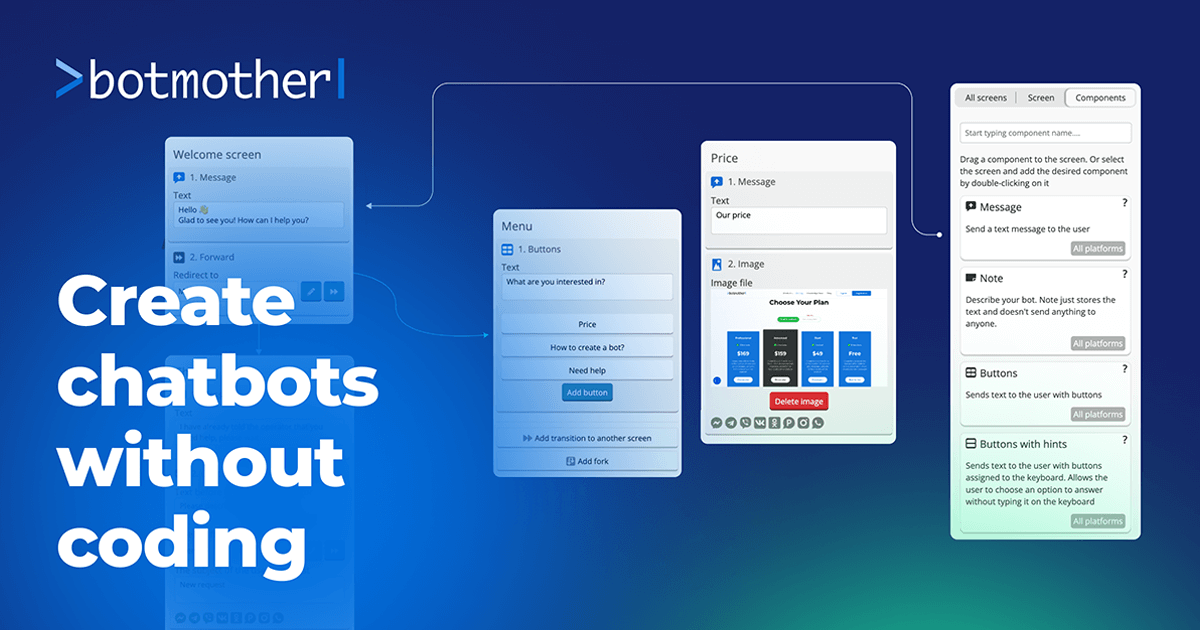
BotMother for Telegram is a no-code visual builder for Telegram bots, with tag-based segmentation, unlimited mailings, event scenarios, API access, and multi-platform deployment to Facebook, Viber, WhatsApp, Instagram, VKontakte, and Odnoklassniki.
BotMother for Telegram is a visual bot builder aimed at creating automated Telegram assistants without writing code. It targets small businesses, marketers, support teams, and community managers who want to hand off routine conversations, send broadcasts, or run simple sales flows inside the messenger. The homepage pitches Telegram's large audience, cross-platform reach, message speed, and the absence of a 24-hour messaging window as reasons to build there rather than on other chat networks. In practice, a bot comes together from blocks in a drag-and-drop editor. You get a token from @BotFather, paste it into the bot settings, assemble the first scenario, save, and send /start to the bot. From there the toolset expands: audience segments via tags, mailings to subscribers, event-driven scenarios, variables, and connections to external applications through service connectors or API requests. When the standard components fall short, the Native Request component exposes any method of the Telegram Bot API, so niche actions like silent sends or forwarding between chats are still reachable. The same bot logic can be published across Telegram, Facebook, Viber, WhatsApp, Instagram, VKontakte, and Odnoklassniki. According to the homepage, bots built from the main components do not need to be changed or modified for additional platforms, which makes BotMother a reasonable choice when Telegram is the starting point and other channels are planned later. Among no-code bot platforms, BotMother's emphasis is breadth of channels and direct API access rather than deep AI conversation design. Teams that need scripted flows, broadcasts, and multi-channel reach will find it a practical fit. Those who want natural language understanding at the core should expect to supplement it, since the homepage frames the product around visual scenario building, not AI dialogue.
The homepage invites users to create a first test bot for free and offers a free sign-up, but no trial length or plan limits are stated.
Learn moreA public documentation manual is linked from the homepage; it is the only support resource described there.
Learn morePublishes the same bot to Telegram, Facebook, Viber, WhatsApp, Instagram, VKontakte, and Odnoklassniki, and connects to other applications through service connectors or API requests.
Visual block builder, tagging for audience segmentation, subscriber mailings without a 24-hour window, event-based scenarios, variables, service connectors and API requests, plus a Native Request component that exposes any Telegram Bot API method. Bots can be published across Telegram, Facebook, Viber, WhatsApp, Instagram, VKontakte, and Odnoklassniki from shared main components.
 AI Angels400+ customizable AI girlfriends for NSFW chat, voice calls, and roleplay
 Candy AIExperience the future of companionship with AI friends who chat, role-play, and connect with you on a human level.
 ourdream.aiA vast AI roleplay platform with millions of characters for chat, images, video and voiceAI Angels400+ customizable AI girlfriends for NSFW chat, voice calls, and roleplayCandy AIExperience the future of companionship with AI friends who chat, role-play, and connect with you on a human level.ourdream.aiA vast AI roleplay platform with millions of characters for chat, images, video and voice