What these tools do
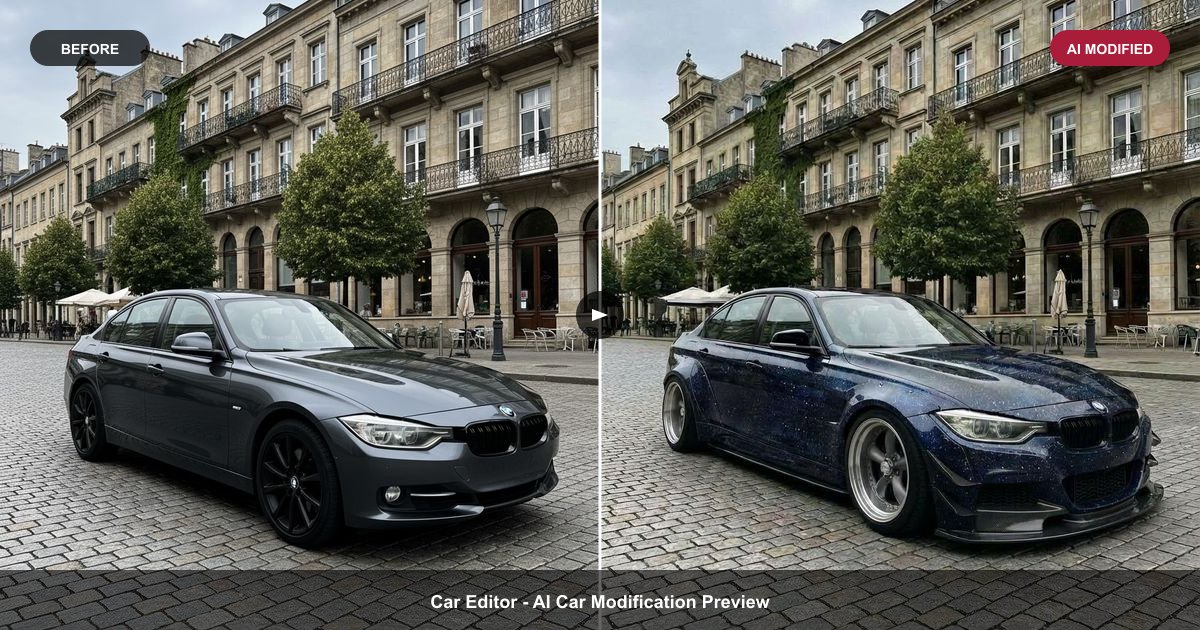
Game modding usually means writing code or editing asset files by hand. The tools on this page shorten that loop by turning an input you already have (a sentence, a photo, a short text prompt) into something the game can load. MineArcane converts plain-English item ideas into Fabric mod JARs, so a described item becomes a mod file rather than a spec for someone else to build. Photo to Skin produces a 64x64 Minecraft skin from a photo or text prompt, with a 3D preview before you commit. Car Editor previews paint, wheels, wraps and body kits on a photo of your own car, which suits racing and car-mod communities where a visual mock-up comes before any file work.
The audience is players and hobbyist creators, not studios. The tools replace the slow middle of a modding workflow: sketching an item, drawing a skin pixel by pixel, or mocking up a livery to show someone else. They do not replace the game's own mod loader, and they are not a full 3D modelling suite.
How to choose one
Start from the output format you actually need. If the target is a Fabric mod, only a tool that exports a JAR is useful; a skin generator will not help. If the target is a Minecraft character, a 64x64 skin with a 3D preview saves more time than a generator without one, because you can check the face and clothing alignment before uploading.
Then check the input you can supply. Photo to Skin takes either a photo or a text prompt, which matters if you have no reference image. Car Editor depends on a photo of your own car, so the result reflects that specific vehicle. MineArcane depends on a written description, so clarity of the prompt drives quality.
Finally, look at cost and platform. All three run in a browser; Car Editor also has iOS and Android apps, which matters if you mock up on a phone. Pricing mixes free tiers with subscription and paid options, so match the tier to how often you will actually export.
Notable tools
MineArcane turns plain-English item ideas into real Fabric mod JARs. It is the pick when the end product has to be a working mod file rather than a design.
Photo to Skin turns a photo or text prompt into a 64x64 Minecraft skin with a 3D preview. Useful for players who want a recognisable skin without pixel editing.
Car Editor previews paint, wheels, wraps and body kits on a photo of your own car. It is aimed at visual mock-ups before any real modification or livery work, and runs on the web plus iOS and Android.
Common questions
What is modding AI?
Modding AI covers tools that use generated output to speed up game customisation: text to mod files, photo to skin textures, or visual previews of modifications. The point is to skip manual asset work, not to automate the whole mod. These tools handle one step, and you still install and test the result yourself.
Is game modding with these tools safe for my game?
These tools produce assets and files; they do not change your installation for you. MineArcane exports a Fabric mod JAR, so the usual care around mod loaders and versions applies. Skins and car previews are cosmetic and carry no install risk beyond uploading the wrong file.
Do I need coding or art skills?
No. The inputs are a written description, a photo or a text prompt. Some judgement helps: a clear item description produces a better mod, and a clean, well-lit photo produces a better skin. Art skill is optional, not required.
Which one should I try first?
Match it to the output. For Fabric items, start with MineArcane. For a Minecraft character, use Photo to Skin. For car paint and body kit ideas, use Car Editor. Trying the wrong output type wastes time regardless of pricing tier.
When to look elsewhere
If the goal is a playable map rather than a mod file or skin, Roblox Map Maker fits better. If you want an assistant to answer gameplay questions while you play rather than generate assets, see Gaming AI Assistant.