Free trial
No free render is offered. The editor and catalog can be opened and browsed at no cost, and unused renders on a paid plan are covered by a 14-day money-back guarantee.
Learn morePreview paint, wheels, wraps and body kits on a photo of your own car.
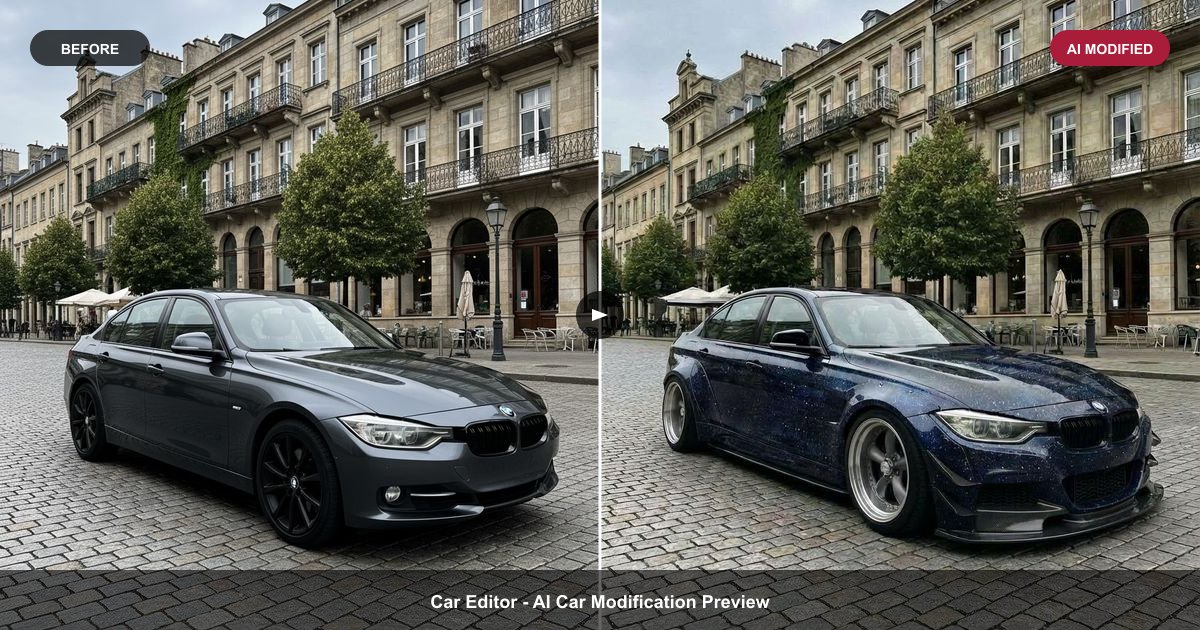
Car Editor is a game modding tool. AI car customizer that renders paint, rims, body kits, wraps, tint, spoilers, headlights and underglow onto a photo of your own car. 198 mods across 12 categories, web plus iOS and Android, with single renders or subscription plans.
Car Editor is an AI car customization tool that renders aftermarket modifications onto a photograph of your actual vehicle. Instead of browsing a catalog of generic 3D models, you upload one shot of your own car (a three-quarter angle works best) and the AI applies a chosen mod while keeping the original light, reflections, shadows and background intact. The result is a photoreal preview of a build that was never photographed, which makes it useful for deciding on an expensive change before money leaves your account. The catalog covers 12 categories and 198 options. Paint offers 35 finishes across 21 decks, including matte, gloss, chrome, candy and colour-shift. Wheel swaps draw on 65 styles with staggered fitment and offset treated as part of the render. Beyond that are 12 widebody kits and part combinations, 24 wrap colours and patterns, 11 tint levels, 8 spoiler types, 8 headlight styles, 10 underglow colours, plus carbon fibre accents, front bumpers, exhaust tips and suspension changes. Mods can be stacked on the same shot, so paint, wheels, a kit and tint appear together in one image. It is aimed at owners planning a build, tuners and detailers showing clients options, and sellers who want a listing photo to stand out. The editor runs in a browser at car-editor.com, with native apps for iOS and Android; combined ratings sit around 4.7 stars across more than 100K downloads. Compared with 3DTuning and Formacar, the difference is that nothing is modelled: your car, your angle, your driveway. Compared with Photoshop, there is no masking or layer work, only a render request. The practical limit is that output quality depends on the input photo. Flat lighting, a cluttered frame or a severe angle will carry into the render. Pricing is credit based, with a fixed 30 credits per edit regardless of how many mods are stacked, so a full build costs the same as a colour change.
No free render is offered. The editor and catalog can be opened and browsed at no cost, and unused renders on a paid plan are covered by a 14-day money-back guarantee.
Learn moreFree to open and browse; renders are paid. One render costs $2.99 outright. Plans: Weekly at $11.99 for 30 renders a week, Monthly at $25.99 for 90 renders with commercial rights, Yearly at $79.99 ($6.67/month) for 360 renders with commercial rights. Every edit costs a flat 30 credits, and plans cancel anytime with a 14-day money-back guarantee if renders are unused.
Learn morePaint jobs with 35 finishes across 21 decks, 65 wheel styles with staggered fitment, 12 widebody kits and part combinations, 24 wrap colours and patterns, 11 tint levels, 8 spoilers, 8 headlight styles and 10 underglow colours. Also carbon fibre accents, front bumpers, exhaust tips and suspension changes, all stackable on one photo with HD output saved to your account.
Learn more AI Angels400+ customizable AI girlfriends for NSFW chat, voice calls, and roleplay
 Candy AIExperience the future of companionship with AI friends who chat, role-play, and connect with you on a human level.
 ourdream.aiA vast AI roleplay platform with millions of characters for chat, images, video and voiceAI Angels400+ customizable AI girlfriends for NSFW chat, voice calls, and roleplayCandy AIExperience the future of companionship with AI friends who chat, role-play, and connect with you on a human level.ourdream.aiA vast AI roleplay platform with millions of characters for chat, images, video and voice


