Free trial
New users get 10k free tokens according to the listing, which allows testing before any spend. No trial length or paid tiers are stated.
Learn moreAI chat summaries, sentiment and agent feedback for LiveChat
Own Chat Summary for LiveChat? Verify ownership to get a dofollow link
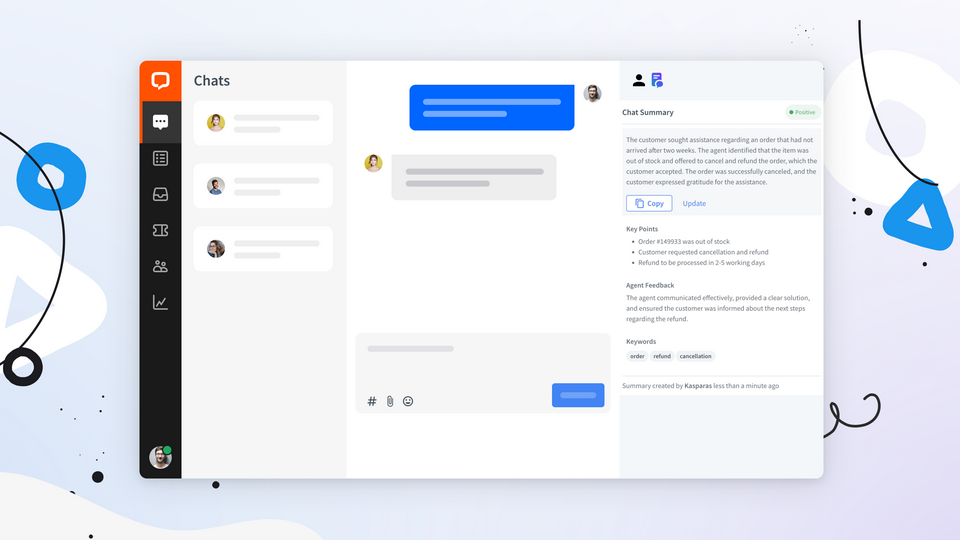
Chat Summary for LiveChat is an AI summarizer tool. Chat Summary is a LiveChat app from SKlabs that uses OpenAI to condense chat transcripts, extracting key points, sentiment and agent feedback, with a reports section storing every summary. Summaries run automatically on archive or by tag, or manually from chat Details.
Chat Summary is a LiveChat marketplace app built by SKlabs that turns finished customer conversations into short written digests using OpenAI language models. Support teams that handle high chat volume rarely have time to reread full transcripts before a shift handover or a quality review, and this app addresses that gap by condensing the transcript into a summary with the important points pulled to the surface. The app runs on a trigger you control. By default it produces a summary when a chat is archived, or when a conversation carries one of the tags selected in your settings. Agents can also request a summary on demand from the Details section of a chat. Alongside the prose summary, the output includes keyword extraction, a sentiment read on the emotional tone of the exchange, and feedback aimed at the agent, which makes it useful for coaching and for spotting recurring friction in customer conversations. A reports area keeps every generated summary in one place, with the chat ID, thread ID and the original transcript stored next to it, so supervisors can audit what the model produced without leaving the LiveChat interface. That combination of summarization, sentiment and reporting places the app closer to a lightweight quality assurance tool than to a plain note taker, and it sits naturally alongside LiveChat's exporter and dashboard apps in the analytics category. It is aimed at customer support managers, team leads and quality analysts running LiveChat, and it is least useful for very short chats where a summary adds little. The listing shows a 5.0 rating from a single review, so the evidence base is thin. Setup is handled through a tutorial from the developer and the app asks for broad scopes covering agents, chats, tags and webhooks, which is worth reviewing before installation.
New users get 10k free tokens according to the listing, which allows testing before any spend. No trial length or paid tiers are stated.
Learn moreThe listing mentions 10k free tokens to start with but does not publish a price, plan tiers or billing terms. Check the developer documentation for current costs.
Learn moreSupport is handled by the developer, SKlabs, through the app tutorial, a contact route from the listing, and a documentation site for setup and configuration.
Runs inside LiveChat only, installed from the LiveChat Marketplace and asking for scopes over agents, chats, tags, groups and webhooks.
Learn moreSummaries generated from chat transcripts by OpenAI models, triggered on archive, on selected tags, or manually from chat Details. Each summary carries extracted key points and keywords, sentiment analysis, and agent feedback. A reports section stores every summary with chat ID, thread ID and the full transcript.
 AI Angels400+ customizable AI girlfriends for NSFW chat, voice calls, and roleplay
 Candy AIExperience the future of companionship with AI friends who chat, role-play, and connect with you on a human level.
 ourdream.aiA vast AI roleplay platform with millions of characters for chat, images, video and voiceAI Angels400+ customizable AI girlfriends for NSFW chat, voice calls, and roleplayCandy AIExperience the future of companionship with AI friends who chat, role-play, and connect with you on a human level.ourdream.aiA vast AI roleplay platform with millions of characters for chat, images, video and voice





