
Gorilla Terminal

AI research terminal that condenses earnings calls and macro data into one screen

Intermediate
Screenshot of Gorilla Terminal, AI research terminal that condenses earnings calls and macro data into one screen

What is Gorilla Terminal?

Gorilla Terminal is an AI search tool. An AI assisted investment research terminal that combines ticker search, SEC filings, earnings call sentiment analysis, macroeconomic indicators and portfolio risk tools in one dashboard, aimed at self directed investors and analysts.

Gorilla Terminal is an investment research workspace that folds fundamental data, macro indicators and AI analysis of earnings calls into a single browser based terminal. The pitch is straightforward: instead of juggling filings, transcripts, news feeds and spreadsheets, an investor types a ticker or company name and lands on one page holding stock charts, SEC filings, quarterly reports, 10-Ks and 10-Qs, insider buying activity and aggregated sentiment from Twitter. AI is applied specifically to earnings call transcripts, where the system processes sentiment, digs into the questions management was asked, and pulls out individual revenue growth and margin statements so a reader does not have to scan the whole call. The product goes beyond reading material. A macro panel surfaces CPI, unemployment, total retail sales and consumer sentiment, and the tool ships with quantitative routines for regression analysis, value at risk and supply chain monitoring. Portfolio risk management is presented as a core use case, with statistical models intended to flag potential losses and balance a portfolio for risk and return. A sector overview and real time news alerts round out the market context, while the interface itself mimics a trading terminal with datatables and live futures display. Sample pages for Meta, Apple, Alibaba and Tesla earnings are publicly viewable before any commitment. This is built for self directed investors, analysts and research generalists who already understand what a 10-Q or a value at risk figure is and want the collection work compressed. It is not a brokerage, and nothing on the site suggests order execution. The audience is closer to someone doing due diligence across a handful of names than to an institutional desk needing a full market data feed. Against established terminal vendors, Gorilla competes on price and on the AI transcript layer rather than on breadth of instrument coverage, and against general purpose chat assistants it wins by keeping sourced filings and numbers in one place. Newcomers can use the earnings pages as a reading aid, but the quant features assume some statistical literacy.

How do you use Gorilla Terminal?

  1. 1Look at a sample earnings page first
    Open one of the public examples, such as the Meta or Tesla earnings page, to see how the AI summary, sentiment read and extracted financial statements are laid out before creating an account.
  2. 2Create your account
    Register through the signup page to unlock the full terminal. The free sample pages require no login, so this step is only needed for ticker search and portfolio tools.
    Gorilla Terminal — Create your account
  3. 3Search your first ticker
    Use the dashboard search to enter a company name or symbol. The result page collects stock charts, SEC filings, quarterly reports, insider buying and social sentiment in one view.
  4. 4Run an earnings call through the AI analysis
    Open the earnings view for a company you follow and read the sentiment breakdown, the questions raised on the call, and the individual revenue and margin statements the model has pulled out.
  5. 5Add macro and risk context
    Check the macroeconomic panel for CPI, unemployment, retail sales and consumer sentiment, then apply the regression or value at risk tools to your holdings to frame position risk.
  6. 6Pick a plan once you have tested the workflow
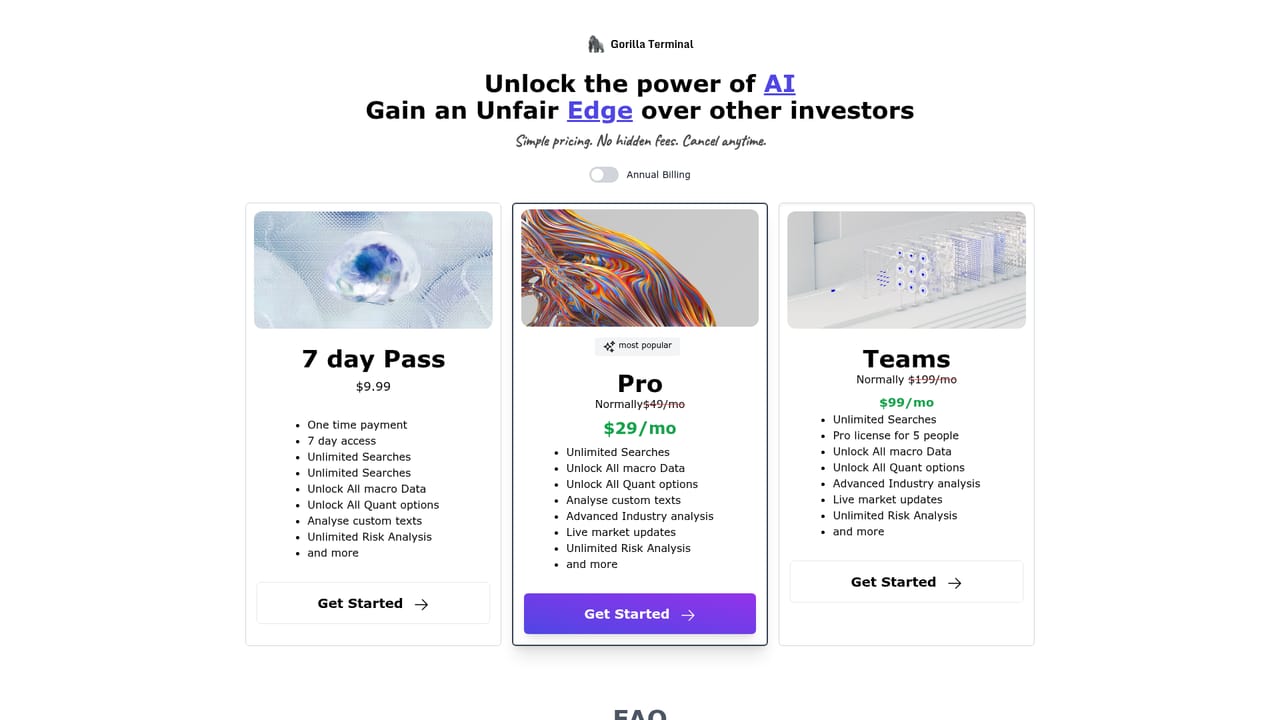
    Compare the paid tiers on the pricing page and choose the one that matches how many tickers and research hours you actually need each month.
    Gorilla Terminal — Pick a plan once you have tested the workflow

Pros and cons

Pros

  • Earnings call transcripts are analysed for sentiment, executive comments on revenue growth and margins, and the questions management facedAI
  • Ticker or company name search returns charts, filings, 10-Ks and 10-Qs together rather than scattered across tabsAI
  • Macro panel covers CPI, unemployment, retail sales and consumer sentiment without a separate data subscriptionAI
  • Public sample earnings pages for Meta, Apple, Alibaba and Tesla let you judge output quality before signing upAI
  • Quant features such as regression, value at risk and supply chain monitoring are bundled into the same workspaceAI

Cons

  • The homepage names no data vendors, so the freshness and licensing of quotes, filings and Twitter sentiment cannot be verified before signing upAI
  • No pricing figures appear on the landing page, which makes budget comparison against rival terminals difficult up frontAI
  • AI analysis is scoped to earnings calls; there is no claim of coverage for guidance models, screening or backtestingAI
  • Quant methods such as value at risk need statistical judgement, and the site offers no visible explanation of assumptions or methodologyAI
  • No mention of broker connectivity, exports or third party integrations, so the tool looks like a research silo rather than part of a wider stackAI

How much does Gorilla Terminal cost?

Features

Core features include AI earnings call analysis with sentiment scoring and extraction of revenue and margin statements, ticker search returning charts and SEC filings (10-K, 10-Q, quarterly reports), insider buying data, social sentiment, a macroeconomic dashboard covering CPI, unemployment, retail sales and consumer sentiment, plus regression analysis, value at risk, supply chain monitoring, sector overview and live news alerts.

Frequently asked questions about Gorilla Terminal

  • How do you use Gorilla Terminal?
    The walkthrough on this page covers 6 steps: 1. Look at a sample earnings page first 2. Create your account 3. Search your first ticker 4. Run an earnings call through the AI analysis 5. Add macro and risk context 6. Pick a plan once you have tested the workflow.
  • What platforms does Gorilla Terminal support?
    Gorilla Terminal is available on Web App.
  • What are the limitations of Gorilla Terminal?
    The homepage names no data vendors, so the freshness and licensing of quotes, filings and Twitter sentiment cannot be verified before signing up. No pricing figures appear on the landing page, which makes budget comparison against rival terminals difficult up front. AI analysis is scoped to earnings calls; there is no claim of coverage for guidance models, screening or backtesting.

Status

StatusActive
Views0
Outbound clicks0
Added10/21/2026

Platforms

Web App

Pricing

FreemiumSubscription