LingoLooper

Spoken language practice through AI roleplay in real world settings

Intermediate
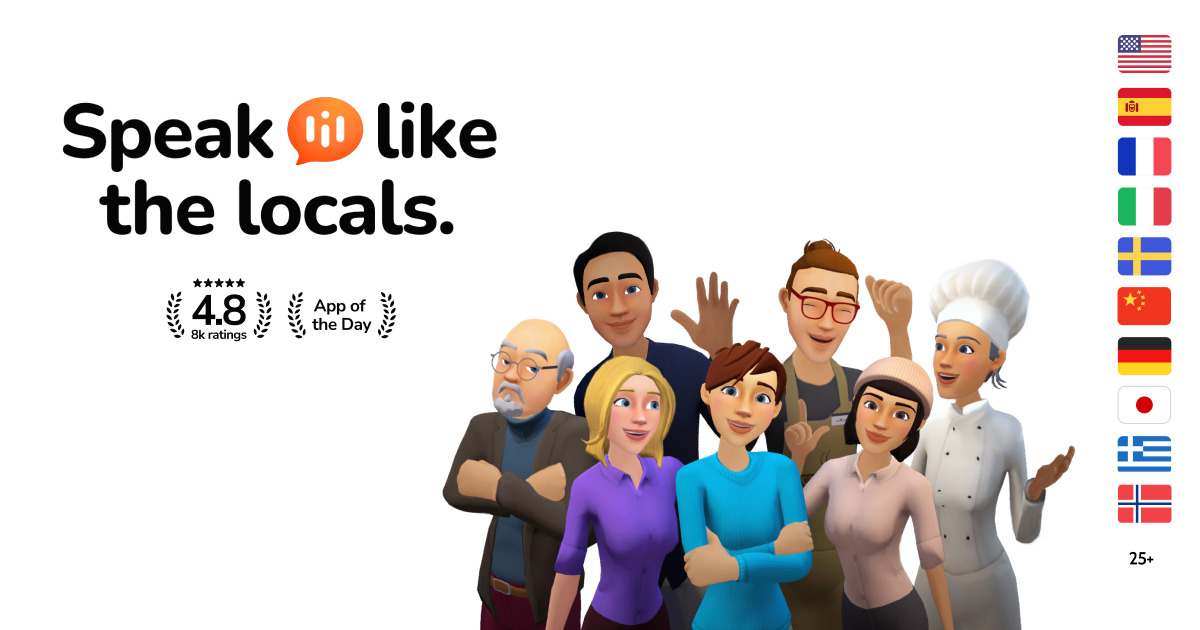
Screenshot of LingoLooper, Spoken language practice through AI roleplay in real world settings

What is LingoLooper?

LingoLooper is a language learning tool. A mobile language learning app that replaces lesson trees with spoken roleplay. Users pick a city and a real world location, then hold live voice conversations with AI locals who have distinct personalities.

LingoLooper is a mobile language learning app built around spoken conversation rather than drills. The premise is simple: most learners understand far more than they can produce out loud, so the product pushes users into talking from the first session. Instead of a lesson tree, the app opens onto a globe. Users spin it, choose a city, and land on a spot inside that city, such as a cafe, a clinic or a park. Each location is a scripted situation with its own social context, and stepping into it starts a live exchange with an AI character who replies out loud in real time. Those characters are the core of the experience. The app claims 350 or more unique avatars per city, and each local is written with a distinct personality. Regulars in a given location reappear, so repeated visits build a sense of familiarity rather than resetting to a blank chat. Conversation topics span everyday errands, work, study, travel, health, friends and family, with more than 200 scenarios across the catalogue. The library covers 29 or more languages, including English, Spanish, French, German, Italian, Portuguese, Japanese, Korean, Mandarin, Arabic, Polish, Turkish, Dutch and the Nordic languages. The app assumes users will get stuck, and designs around that. A suggestion tool offers a phrase when words fail, any word can be tapped for a definition, and lines can be replayed at a slower speed. As conversations run, LingoLooper measures fluency and vocabulary, unlocks harder levels as competence grows, and collects chosen words into personal lists for later review. The app is distributed through the App Store and Google Play, has drawn 1.6 million or more downloads and holds a 4.8 rating. It positions itself at roughly a tenth of the cost of a human tutor, which frames it as a high volume practice partner rather than a replacement for structured grammar instruction. It suits intermediate learners whose reading and listening outpace their speech, and travellers preparing for a specific trip. Complete beginners will find the early sessions demanding, since the format rewards willingness to improvise out loud.

How do you use LingoLooper?

  1. 1Install the app and pick your target language
    Download LingoLooper from the App Store or Google Play, open it, and select the language you want to practise from the supported list.
  2. 2Spin the globe and choose a city
    Use the globe view to select a city. Each city hosts a set of locations with their own situations, so pick one that matches something you would actually face.
  3. 3Enter a location and start talking
    Tap a spot on the map, such as a cafe or a clinic, to begin a live exchange. Speak out loud in the target language and the local answers in real time.
  4. 4Use the backup tools when you stall
    Request a suggested phrase, tap any word for its meaning, or replay a line at slower speed. These tools are meant to be used freely, especially in early sessions.
  5. 5Review progress and save vocabulary
    After the conversation, check the fluency and vocabulary readout, then add useful words to your personal list. Returning to the same regulars unlocks harder levels over time.

Pros and cons

Pros

  • Conversation-first design targets the gap between passive comprehension and actual speechAI
  • Large scenario library (200 or more topics) keeps practice tied to real situations rather than abstractionsAI
  • Per-location avatars with distinct personalities and recurring regulars add continuity across sessionsAI
  • Built-in scaffolding (suggested phrases, tappable words, slowed replay) lowers the fear of freezing mid-sentenceAI
  • Fluency and vocabulary tracking plus custom word lists give practice a measurable shapeAI

Cons

  • No web app: practice is confined to iOS and Android, which rules out desktop study sessionsAI
  • Voice-only interaction is awkward in public or noisy places, and speech recognition errors can derail a sessionAI
  • Grammar and structured curriculum take a back seat, so the app works poorly as a sole learning resourceAI
  • Characters are AI simulations, so cultural nuance and unscripted native idioms stay limitedAI
  • Pricing is not stated on the homepage, and in-app subscription terms need checking before committingAI

How much does LingoLooper cost?

Pricing

The homepage does not publish subscription tiers or prices. It claims the app is roughly 10 times cheaper than a human tutor and mentions promotional discount codes in third party social posts. Check the App Store or Google Play listing for current in-app pricing.

Learn more

Features

Location-based conversation scenarios across 200 or more real life topics, 29 or more languages, 350 or more avatars per city with individual personalities, live voice replies, suggested phrases, tappable word definitions, slowed replay, fluency and vocabulary tracking, level progression, and personal word lists.

Frequently asked questions about LingoLooper

  • How much does LingoLooper cost?
    The homepage does not publish subscription tiers or prices. It claims the app is roughly 10 times cheaper than a human tutor and mentions promotional discount codes in third party social posts. Check the App Store or Google Play listing for current in-app pricing.
  • How do you use LingoLooper?
    The walkthrough on this page covers 5 steps: 1. Install the app and pick your target language 2. Spin the globe and choose a city 3. Enter a location and start talking 4. Use the backup tools when you stall 5. Review progress and save vocabulary.
  • What platforms does LingoLooper support?
    LingoLooper is available on iOS and Android.
  • What are the limitations of LingoLooper?
    No web app: practice is confined to iOS and Android, which rules out desktop study sessions. Voice-only interaction is awkward in public or noisy places, and speech recognition errors can derail a session. Grammar and structured curriculum take a back seat, so the app works poorly as a sole learning resource.

Status

StatusActive
Views0
Outbound clicks0
Added10/21/2026

Platforms

iOSAndroid

Pricing

FreemiumSubscription