Pricing
Free download with no account required; Pro is listed at $19.99 as a one time purchase rather than a subscription. The homepage does not detail what the free tier restricts.
Learn moreOffline AI voiceovers, transcription and dubbing on your own machine.
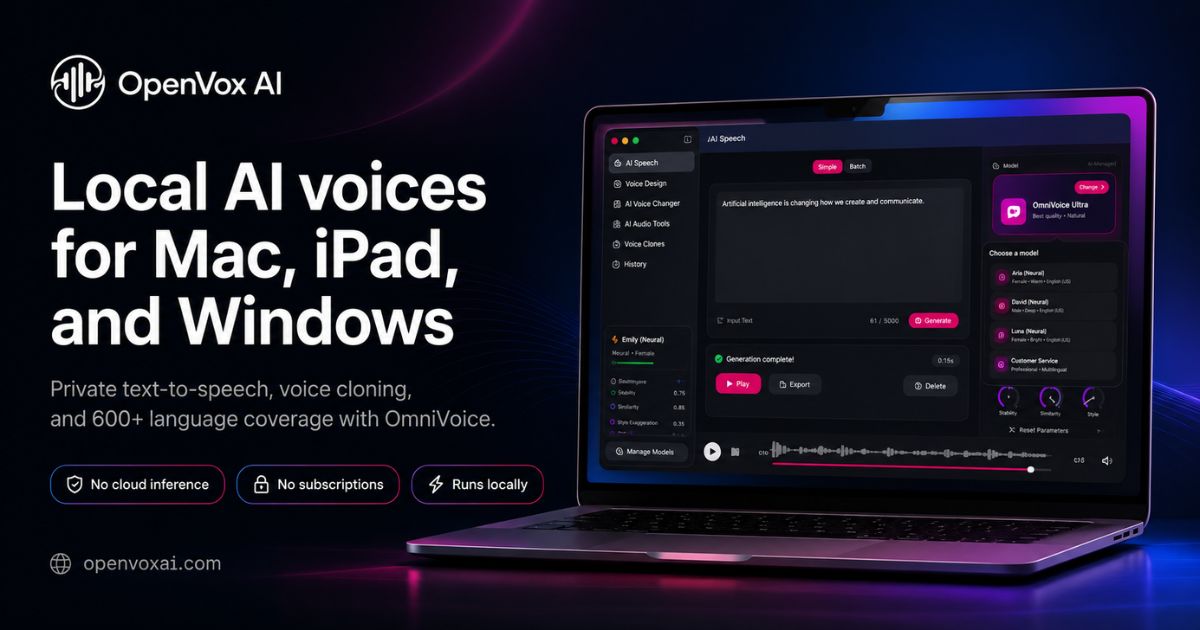
OpenVox is an offline text to speech and transcription app for Mac, iPad and Windows. It packs 300 plus voices, 600 plus languages and 15 plus local models for voiceovers, audiobooks, voice cloning with consent, subtitles and dubbing, sold as a free download with a one time Pro upgrade instead of a subscription.
OpenVox is a local voice studio for Mac, iPad and Windows. It bundles a large set of open speech models behind one interface, so you can write or paste a script, choose a voice, and render audio without sending the text to a cloud service. The homepage advertises more than 300 premium voices, 600 plus languages and 15 plus models, among them OmniVoice, Kokoro, Chatterbox variants, Qwen3-TTS, Pocket TTS, VibeVoice and FireRedTTS. Because the models run on the device, generation does not consume credits, and there are no per character limits to plan around. The tool covers more than narration. You can import EPUBs, PDFs and plain text to build chapters for an audiobook, keep one voice consistent across a whole book, use a read aloud mode for drafts and documents, and clone voices you own or have permission to use. On the input side, OpenVox transcribes recordings, meetings, interviews and video into editable text and timestamped SRT subtitles, then dubs dialogue with a local voice. Its transcription lineup includes Whisper Large v3 Turbo, Parakeet and Nemotron, with M2M100 listed for translation work. A dedicated reader app is also offered. It is built for creators, publishers and anyone handling sensitive material: podcasters producing narration, authors reviewing their own manuscripts as audio, language teachers generating listening material, and teams that cannot upload recordings to a third party. The workflow is download, pick a model, optionally let it load into memory, then generate. Larger models can take a while on modest hardware, particularly on iPad, and RAM management matters, which is why the app includes a shutdown control to unload models. Against cloud competitors, the trade is straightforward: a one time Pro purchase instead of a recurring subscription, full privacy, and no voice library tied to a vendor account. What you give up is elasticity; speed depends on your own chip, and there is no hosted infrastructure to fall back on. OpenVox states plainly that it does not supply celebrity voices and that cloning or commercial use of a person's voice requires consent and rights.
Free download with no account required; Pro is listed at $19.99 as a one time purchase rather than a subscription. The homepage does not detail what the free tier restricts.
Learn moreLocal text to speech with 300 plus premium voices across 600 plus languages and 15 plus models (OmniVoice, Kokoro, Chatterbox, Qwen3-TTS, VibeVoice and others), voice cloning for permitted voices, audiobook creation from EPUB, PDF and text with chapter organization, read aloud for documents, plus transcription to text and timestamped SRT and dubbing for audio and video.
Learn more AI Angels400+ customizable AI girlfriends for NSFW chat, voice calls, and roleplay
 Candy AIExperience the future of companionship with AI friends who chat, role-play, and connect with you on a human level.
 ourdream.aiA vast AI roleplay platform with millions of characters for chat, images, video and voiceAI Angels400+ customizable AI girlfriends for NSFW chat, voice calls, and roleplayCandy AIExperience the future of companionship with AI friends who chat, role-play, and connect with you on a human level.ourdream.aiA vast AI roleplay platform with millions of characters for chat, images, video and voice