Free trial
Signing up includes one free trial credit for a logo free, full resolution colorization, and the free plan allows unlimited previews with a watermark and 500 by 500 pixel resizing.
Learn moreTurn black and white photos into lifelike color in seconds
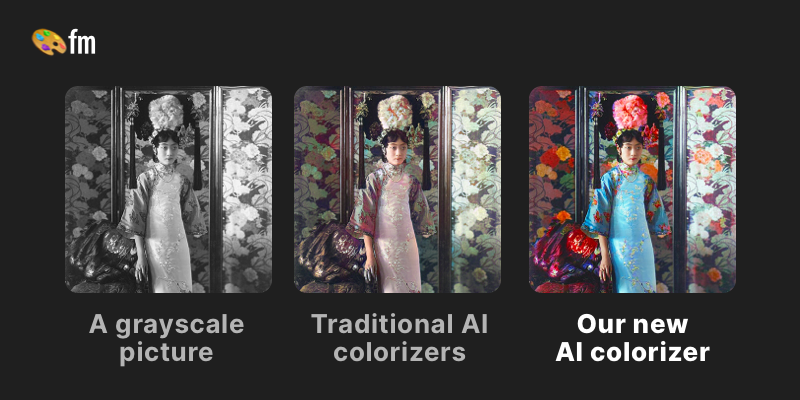
Palette is an image upload and edit tool that turns black and white photos into lifelike color in seconds. Palette is a browser based AI colorizer for black and white photos. Upload an image, choose from over 21 filters, refine the result with keywords, and download a full resolution colorization using a credit system.
Palette is a web based colorization service built around a single, narrow promise: take a black and white photograph and return it with plausible, natural looking color. The upload flow is deliberately short. You add an image (or a batch of them), browse a library of more than 21 color filters, apply one, and download the result. Where the tool goes beyond a one click filter is customization: each filter can be adjusted with keywords that steer how the model reads the scene, so skin tones, foliage, fabric and interior surfaces land closer to what the user expects. The tool is positioned for people handling historical and personal archives: genealogists working through family photographs, researchers and writers who need period images for publication, and digital artists who use grayscale blocking as a composition base. The site quotes a Wired founding editor, a Photoshop instructor and a documentary style user among its endorsers, and reports 6.6 million users with 54 million photos colorized. Editorial claims aside, the visible design choice is restraint: the company argues that its output keeps the original tonal structure and facial features intact rather than reshaping the image, which matters to artists who treat color as a layer on top of their own drawing. Pricing follows a credit model rather than unlimited access. One credit equals one logo free, full resolution colorization at up to 5000 by 5000 pixels. Free accounts get a trial credit plus unlimited previews, but previews are resized to 500 by 500 pixels and carry a logo watermark. Paid options include an annual subscription with a monthly credit refresh, rollover up to five times the monthly amount, faster processing, saved and pinned filters, and no ads, plus a one time credit pack that stays valid for two years. Compared with general purpose image editors that bolt on colorization, Palette trades flexibility for speed and consistency: it will not retouch, crop or composite for you, and it does not replace a full restoration workflow. For bulk heritage work and quick previews it is a focused, low friction option.
Signing up includes one free trial credit for a logo free, full resolution colorization, and the free plan allows unlimited previews with a watermark and 500 by 500 pixel resizing.
Learn moreFree plan with unlimited watermarked previews at up to 500 by 500 pixels and one trial credit. Subscription at $72 per year for 480 credits, with faster processing and pro filter tools. One time pack at $49 for 75 credits, valid for two years. One credit equals one logo free colorization up to 5000 by 5000 pixels.
Learn moreSupport is handled by email at support@palette.fm, and the site keeps a FAQ section covering accuracy, credits, sign in and restrictions.
Learn moreAI colorization of black and white photos with over 21 filters, keyword based color adjustment, batch uploads, and output up to 5000 by 5000 pixels. Paid tiers add watermark free previews, faster processing, pinnable and organized filters, and no ads.
Learn more AI Angels400+ customizable AI girlfriends for NSFW chat, voice calls, and roleplay
 Candy AIExperience the future of companionship with AI friends who chat, role-play, and connect with you on a human level.
 ourdream.aiA vast AI roleplay platform with millions of characters for chat, images, video and voiceAI Angels400+ customizable AI girlfriends for NSFW chat, voice calls, and roleplayCandy AIExperience the future of companionship with AI friends who chat, role-play, and connect with you on a human level.ourdream.aiA vast AI roleplay platform with millions of characters for chat, images, video and voice





