Photo Studio Gen

Turn one selfie into a full virtual photoshoot with AI outfit try-ons

Beginner
Screenshot of Photo Studio Gen, Turn one selfie into a full virtual photoshoot with AI outfit try-ons

What is Photo Studio Gen?

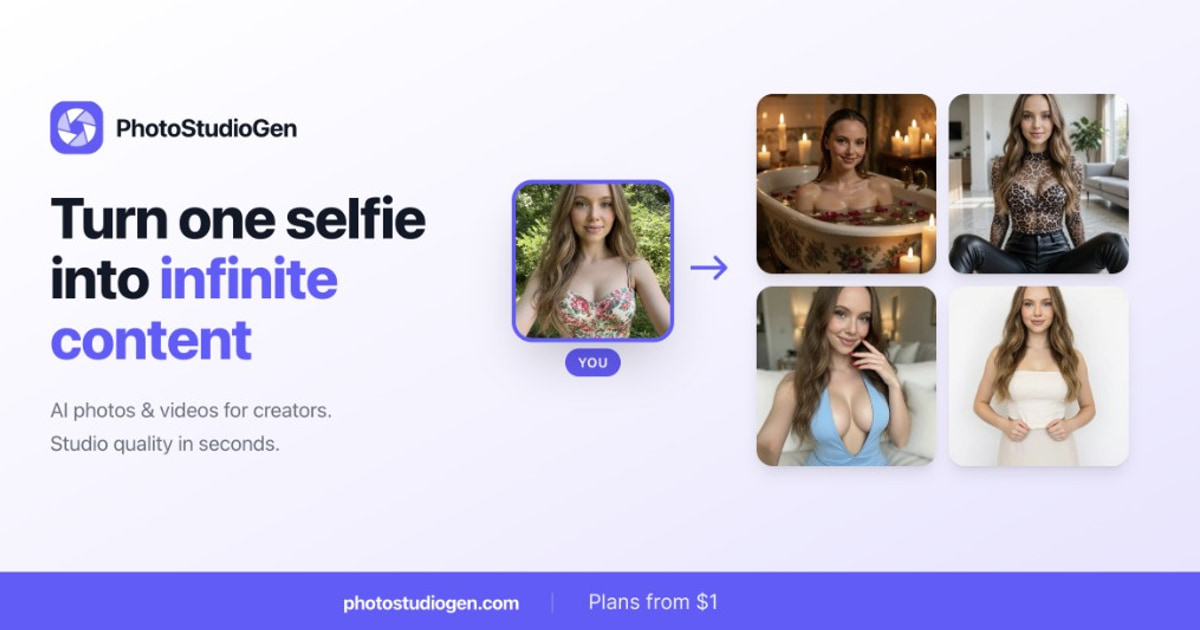
Photo Studio Gen is a generative image tool that turns one selfie into a full virtual photoshoot with AI outfit try-ons. A virtual photoshoot studio that turns one selfie into outfit try-ons, new poses, new locations and short videos, with a Shoots mode that chains several steps into one repeatable run.

Photo Studio Gen is a browser-based creative studio built around a single idea: one ordinary photo of yourself should be enough to generate a whole set of new ones. The headline tool is outfit try-on. You supply a shot of the clothing and a shot of yourself, and the service renders you wearing the garment without a fitting room or a photographer. Around that core sit pose transfer, scene changes, and a recast mode that drops you into an existing picture with the pose and outfit already in place. The workflow is deliberately short. Upload one clear, well-lit picture of your face (a normal phone selfie is described as sufficient), then describe the photo you want, pick an outfit, copy a pose from a reference, or choose a preset. Output arrives at 2K resolution as a JPG ready to download. The Shoots feature is the more interesting piece for anyone producing at volume: it chains outfit, pose and scene steps into a single repeatable sequence that runs in one go. Image to Video extends finished stills into short clips, and the plans bundle photo, video and audio creation together. Identity retention is the selling point the site leans on hardest, and its sample sets are all made from one reference each. That matters most for creators posting daily, fashion and apparel sellers who want to show garments on a body, and professionals who need a clean headshot without booking a session. Compared with a general image generator, the appeal is the narrow preset toolkit and the consistency across a series rather than raw artistic range. Plans start at $10 per month, usage resets each billing month, and the company states that uploads are never used for training and can be deleted at any time, with commercial use included.

How do you use Photo Studio Gen?

  1. 1Create an account and pick a plan
    Sign up through the site, then choose a plan. Plans begin at $10 per month and every tier includes photo, video and audio creation, so pick by the usage allowance you expect.
  2. 2Upload one clear reference photo
    Start a generation and add a single well-lit photo of your face. A standard phone selfie is enough according to the site; the tools all work from this one reference.
  3. 3Run an outfit try-on
    Open the Outfit Try-On tool, upload a shot of the clothing, and let the service render you wearing it. The result keeps your features and swaps the garment.
  4. 4Adjust pose, scene or both
    Use Pose Transfer for new angles from the same photo, Change Scene to keep your pose and outfit in a different location, or Recast to place yourself into an existing image.
  5. 5Chain a full shoot
    For a series, build a Shoots sequence that stacks outfit, pose and scene steps, then run it once to produce the whole set in a consistent style.
  6. 6Download or animate the results
    Export the finished images at 2K as JPG, or send chosen stills through Image to Video to turn them into short realistic clips for social posting.

Pros and cons

Pros

  • Outfit try-on, pose transfer, scene change and recast are bundled in one tool rather than sold separatelyAI
  • Shoots chains several generation steps so a whole set can be produced from one setupAI
  • Only one clear reference photo is needed, and the site states identity is carried across every generationAI
  • Entry pricing starts at $10 per month with a stated 7-day money-back window under 10% usageAI
  • Uploads are not used for training, can be deleted, and commercial use is included on the plansAI

Cons

  • Quality depends heavily on the reference photo: a soft or poorly lit selfie is the main failure point and the site offers no correction toolsAI
  • Included usage is metered per billing month in photo, video and audio units, so heavy experimentation burns allowance quicklyAI
  • No free tier or free trial is described; you pick a plan before you can generate anythingAI
  • Output is fixed at 2K JPG stills, which limits anyone needing print resolution or layered filesAI
  • The base plan covers roughly 26 Best photos a month, so high-volume publishing needs a higher tierAI

How much does Photo Studio Gen cost?

Pricing

Paid plans start at $10 per month, with a limited-time 30% off the first month on Pro and above. Every plan bundles photo, video and audio creation, and included usage resets each billing month. Cancellation is available at any time, and a 7-day money-back guarantee applies when usage stays under 10%.

Learn more

Features

Six tools share one reference photo: Outfit Try-On renders garments on your body, Pose Transfer generates new poses and angles, Change Scene relocates you while keeping pose and outfit, Recast inserts you into an existing photo, Image to Video animates finished stills, and Shoots chains outfit, pose and scene steps into a single run. Output is 2K JPG, and identity is preserved across every generation.

Frequently asked questions about Photo Studio Gen

  • How much does Photo Studio Gen cost?
    Paid plans start at $10 per month, with a limited-time 30% off the first month on Pro and above. Every plan bundles photo, video and audio creation, and included usage resets each billing month. Cancellation is available at any time, and a 7-day money-back guarantee applies when usage stays under 10%.
  • How do you use Photo Studio Gen?
    The walkthrough on this page covers 6 steps: 1. Create an account and pick a plan 2. Upload one clear reference photo 3. Run an outfit try-on 4. Adjust pose, scene or both 5. Chain a full shoot 6. Download or animate the results.
  • What platforms does Photo Studio Gen support?
    Photo Studio Gen is available on Web App.
  • What are the limitations of Photo Studio Gen?
    Quality depends heavily on the reference photo: a soft or poorly lit selfie is the main failure point and the site offers no correction tools. Included usage is metered per billing month in photo, video and audio units, so heavy experimentation burns allowance quickly. No free tier or free trial is described; you pick a plan before you can generate anything.

Status

StatusActive
Views0
Outbound clicks0
Added10/21/2026

Platforms

Web App

Pricing

PaidSubscription


