Pricing
The homepage describes Podium as open source and gives no plan names or prices.
Learn moreOpen-source workspace where a coordinator agent runs your coding agents
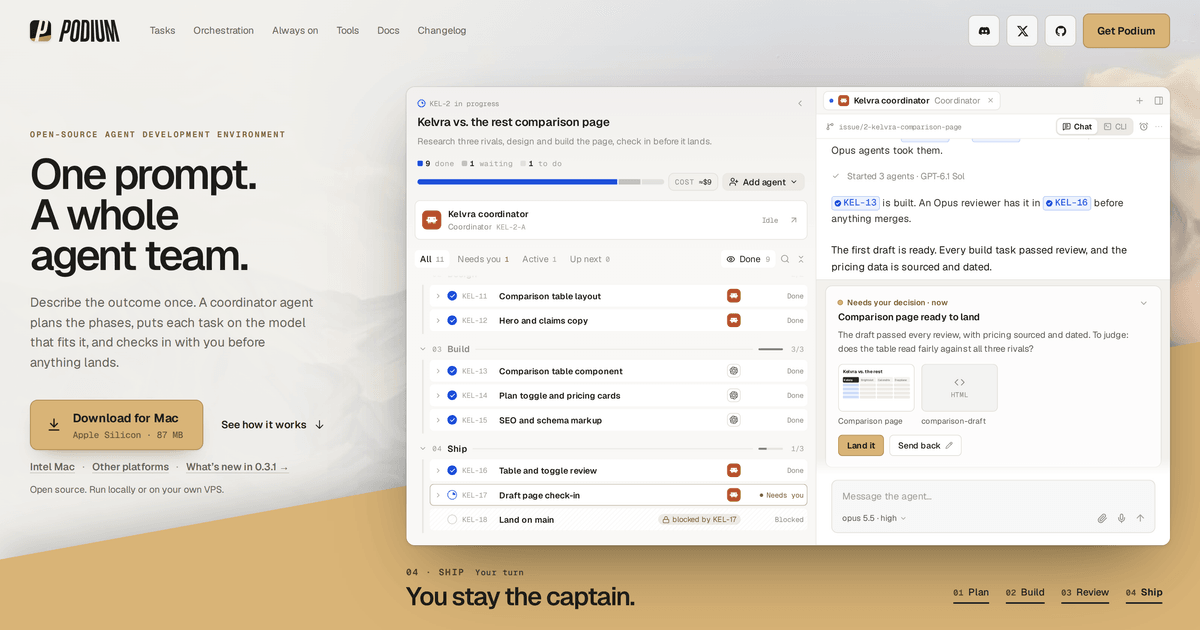
Podium ADE is an open-source agent development environment where a coordinator agent plans work, assigns tasks to different coding agents and models, and asks for your approval before anything lands. It runs on a Mac, on a VPS, and can be followed from a phone browser.
Podium ADE is an open-source agent development environment built for people who already use coding agents and want to run several of them on one job. Rather than chatting with a single assistant, the user describes an outcome and a coordinator agent turns it into phases and tasks, assigns each task to the model that suits it, and records what waits on what. It works alongside Claude Code, Codex, Cursor, OpenCode, Grok and Pi, so the agents a developer already trusts stay in the loop. The workflow centres on an issue system that both people and agents share. Ideas can be parked on a task board, or an agent can write and split tasks from a chat. Each task gets its own worktree and agent, so builders can run in parallel without colliding, and agents can file proposals for work they notice outside their scope. Plans, screenshots and recordings stay attached to the task beside its discussion. A flight deck view shows which agent holds which task, where the bottlenecks are and a running cost estimate. Before anything merges, an agent returns an offer with evidence, and the user approves it or asks for changes. Chat and CLI views let the user talk to the coordinator or to any individual agent. Podium can run on a Mac, or on a Linux VPS so agents keep working after a laptop closes. The desktop app connects to any Podium server, and a phone browser can follow and steer sessions. Windows and Linux desktop builds are labelled experimental, and a native iPhone app is in private beta. Among alternatives, it sits closer to a project manager for agent teams than to an editor or a single coding assistant. That makes it a fit for developers handling multi-step builds, and a heavier tool than needed for quick one-off edits. The homepage gives no pricing details beyond its open-source status.
The homepage describes Podium as open source and gives no plan names or prices.
Learn moreWorks with Claude Code, Codex, Cursor, OpenCode, Grok and Pi as coding agents, and can mix models such as Sonnet, Opus and GPT within one job.
Coordinator agent planning, shared task board, per-task worktrees, parallel agents, flight deck with dependencies and cost, agent proposals, task artifacts, approval offers, calm reading mode, chat and CLI views, VPS server mode.
 AI Angels400+ customizable AI girlfriends for NSFW chat, voice calls, and roleplay
 Candy AIExperience the future of companionship with AI friends who chat, role-play, and connect with you on a human level.
 ourdream.aiA vast AI roleplay platform with millions of characters for chat, images, video and voiceAI Angels400+ customizable AI girlfriends for NSFW chat, voice calls, and roleplayCandy AIExperience the future of companionship with AI friends who chat, role-play, and connect with you on a human level.ourdream.aiA vast AI roleplay platform with millions of characters for chat, images, video and voice


