Integrations
Built on Chromium, so it operates inside the websites and accounts the user is already logged in to. No separate integration list is given.
A Chromium browser whose built-in agent does your web tasks
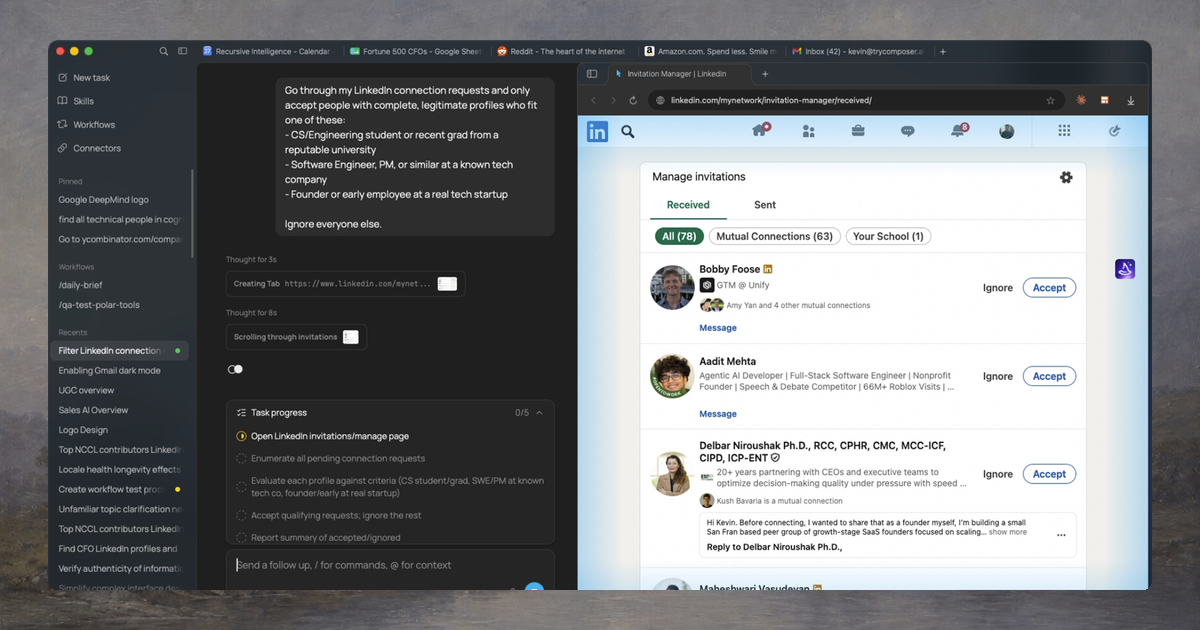
Polar is a Chromium-based desktop browser with a built-in agent that completes research, sales, recruiting and ops tasks from plain-language prompts, runs scheduled workflows, and works inside the user's existing logged-in accounts.
Polar is a desktop web browser with an AI agent built into it. Instead of answering questions in a side panel and leaving the clicking to the user, the agent carries out the work itself: it opens sites, reads pages, fills in forms and moves between tabs based on a plain-language instruction. Tasks can be short lookups or jobs that run for many hours across several websites. The product is aimed at knowledge workers who lose their days to repetitive browser chores. The homepage focuses on founders, investors, operators, sales and growth staff, recruiters and ops teams. Example jobs include building a market map of vendors, reading competitor pages and Reddit threads to extract customer complaints, ranking suppliers by minimum order quantity and lead time, account research for outbound sales, and keeping CRM or property records current. A templates page collects ready-made prompts grouped by function. In practice, the user types what they want done and watches the agent work inside the browser. Because Polar is built on Chromium, it operates within accounts and sessions the user is already signed in to, rather than needing separate connectors for each service. The user can take over at any point, and guardrails are meant to stop the agent from taking high-risk actions on its own. The company states that it is SOC 2 Type II certified. A prompt can be saved as a workflow and re-run on an hourly, daily, weekly or custom schedule, carrying the same context into each run. From any open tab, the current page can be used as context for a quick question or a handed-off task. Among alternatives, Polar competes with agentic browsers and browser-automation agents, and it publishes benchmark scores that place it ahead of several general models on a browser-use test. Those figures come from the vendor. The company recommends making Polar the main browser for best context, though it says value is available without fully switching. Builds exist for macOS and Windows.
Built on Chromium, so it operates inside the websites and accounts the user is already logged in to. No separate integration list is given.
Natural-language task automation, autonomous runs lasting many hours, saved and scheduled workflows with shared context, a side-by-side view of the agent's actions with manual takeover, current-page context in any tab, and a template library by function.
Learn more AI Angels400+ customizable AI girlfriends for NSFW chat, voice calls, and roleplay
 Candy AIExperience the future of companionship with AI friends who chat, role-play, and connect with you on a human level.
 ourdream.aiA vast AI roleplay platform with millions of characters for chat, images, video and voiceAI Angels400+ customizable AI girlfriends for NSFW chat, voice calls, and roleplayCandy AIExperience the future of companionship with AI friends who chat, role-play, and connect with you on a human level.ourdream.aiA vast AI roleplay platform with millions of characters for chat, images, video and voice