Free trial
The homepage offers a free way to try PolyChat without rate limits. No trial length is stated, so check the pricing page for what the free tier includes.
Learn moreOne interface for OpenAI, Anthropic, Google and Perplexity models

Polychat is a direct chat AI tool. A hosted multi-model chat workspace built on Open WebUI. It gathers OpenAI, Anthropic, Google, Perplexity, DeepSeek and Llama models in one interface, adds automatic model routing and side-by-side answer comparison, and starts at $5 per month with a free tier to try.
PolyChat is a multi-model chat interface that puts frontier language models from OpenAI, Anthropic, Perplexity, Google, DeepSeek, Llama and others behind a single login. Instead of holding separate subscriptions or juggling browser tabs, a user types a question once and picks which engine should answer it, or lets the service decide. The product is built on the open source Open WebUI framework, which means the chat experience follows a familiar layout: conversation history on one side, the active thread in the middle, and model selection controls close at hand. Two features define how it works in daily use. Smart Routing inspects the question and forwards it to whichever model the system judges best suited, so a quick factual lookup and a long reasoning task can land with different providers without any manual switching. AI Comparison runs the same prompt against several models and shows the answers side by side, which is the honest way to see where one engine is stronger than another on a real task rather than a benchmark chart. Conversations are private to the account, and the vendor states that enterprise-grade security protects them. PolyChat suits people who already pay for two or more AI subscriptions and want to consolidate, teams that need a neutral place to evaluate models before committing, and casual users who prefer one bookmark over a folder of links. Pricing starts at $5 per month, with a free tier to try it and no rate limits advertised on the homepage. Among alternatives, the closest comparison is the free Open WebUI project itself, which PolyChat wraps with hosting and provider access, plus standalone chatbot subscriptions that each cover a single vendor. Anyone who needs only one model has little reason to switch; the value appears when answers are compared across providers or when routing saves a user from guessing which engine to ask.
The homepage offers a free way to try PolyChat without rate limits. No trial length is stated, so check the pricing page for what the free tier includes.
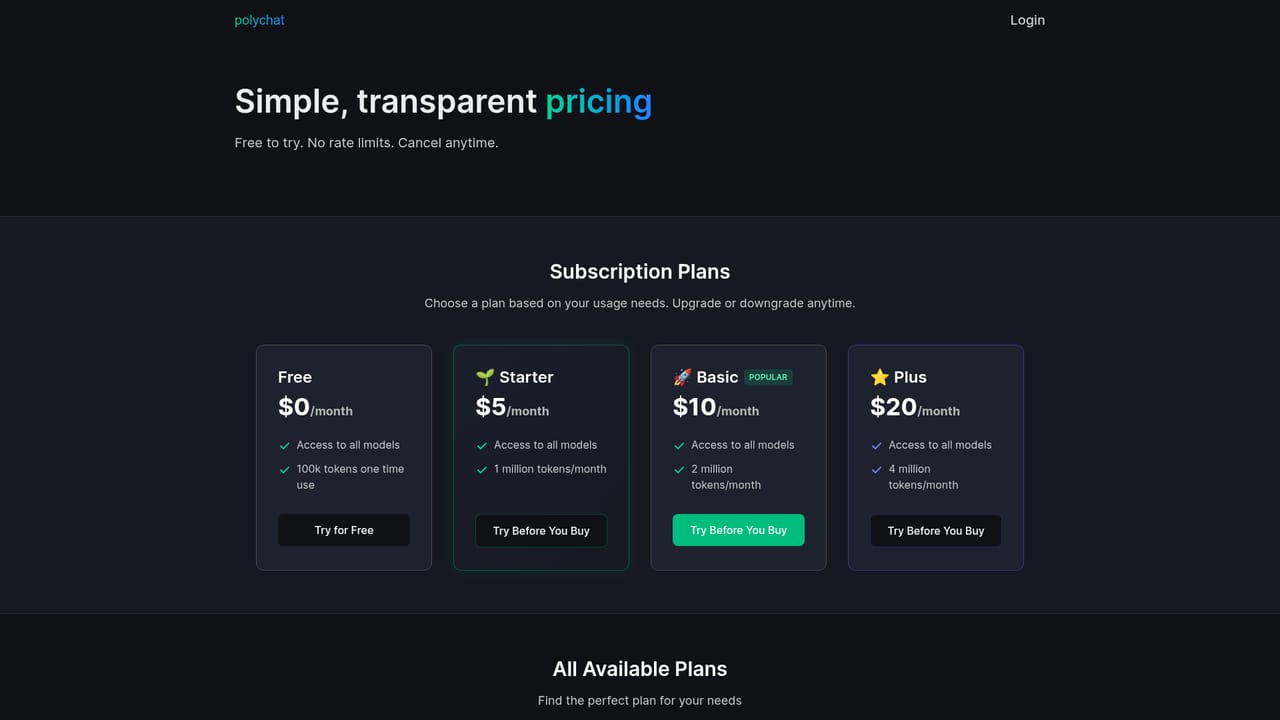
Learn morePlans start at $5 per month, and the homepage invites visitors to try the service for free with no rate limits. The pricing page holds the full plan breakdown; model access per tier is not described on the homepage.
Learn moreCore features are multi-model access to OpenAI, Anthropic, Perplexity, Google, DeepSeek and Llama, Smart Routing that selects a model per question, side-by-side AI Comparison of responses, and enterprise-grade security for conversations. The interface is built on the Open WebUI framework.
 AI Angels400+ customizable AI girlfriends for NSFW chat, voice calls, and roleplay
 Candy AIExperience the future of companionship with AI friends who chat, role-play, and connect with you on a human level.
 ourdream.aiA vast AI roleplay platform with millions of characters for chat, images, video and voiceAI Angels400+ customizable AI girlfriends for NSFW chat, voice calls, and roleplayCandy AIExperience the future of companionship with AI friends who chat, role-play, and connect with you on a human level.ourdream.aiA vast AI roleplay platform with millions of characters for chat, images, video and voice


