Free trial
The homepage invites users to start for free and states that the full template collection is free even for users on the free tier, but it does not name paid plans or trial limits.
Learn moreTurn text, documents, links and videos into finished slide decks

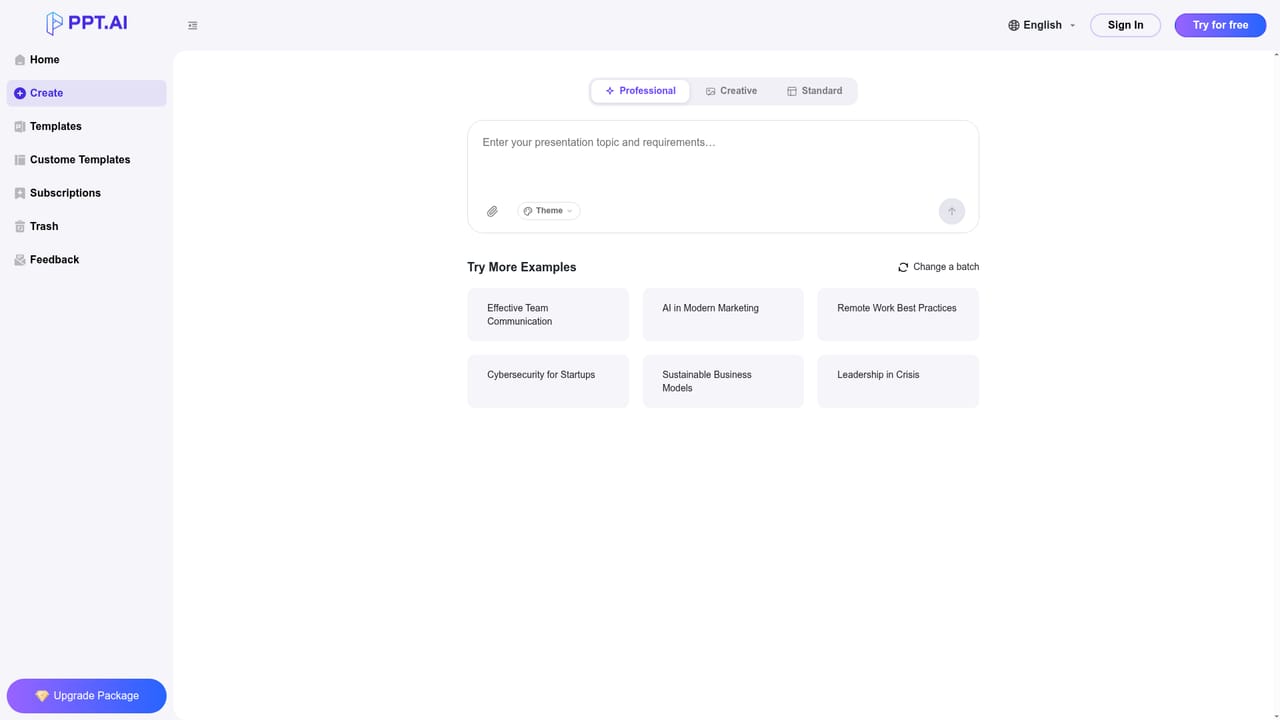
PPT.AI is a presentation maker tool that turns text, documents, links and videos into finished slide decks. PPT.AI builds slide decks from a prompt, uploaded document, web page, YouTube video or image. Scene, audience, tone and length controls steer the output, and decks can be edited and exported to PowerPoint.
PPT.AI is a browser based presentation builder that generates slide decks from a wide range of source material. Visitors can start from a plain topic, paste a web address or a YouTube link, or upload a file, and the service returns a structured presentation with a title, an outline and designed slides. The homepage repeats the claim that the whole process saves 95 percent of creation time and that a deck of more than 20 slides can be produced in under a minute, so the pitch is speed and volume rather than handcrafted polish. Inputs are broader than plain text. The upload box accepts DOC, DOCX, PPT, PPTX, XLS, XLSX, CSV, PDF, TXT, MD, HTML, EPUB, MOBI, XMIND and MM files up to 10MB, and images in PNG, JPG, JPEG or BMP up to 5MB. Before generation, four settings shape the output: scene (general, teaching materials, work summary, work plan, project report, solution, research report, meeting materials, product or company introduction, business plan, science popularization, public speaking), audience (public, students, teachers, superiors, subordinates, interviewer, colleagues), tone (professional, friendly, technical, persuasive, academic, inspirational, educational, humorous, concise) and length (short, medium or long). Generation runs on a multi-model engine, with DeepSeek, GPT-4o, Claude 3.5 and Gemini 2.0 named as the underlying models. Templates are offered free, including to users without a paid plan, and the library leans heavily toward classroom, lesson plan, exam review, annual report, work summary and city report designs. Finished decks can be edited inside the editor (text, colors, images) and exported to PowerPoint format, which the site says preserves all design elements. Multilingual output and translation are also listed. It suits teachers, students, consultants and office teams who need a serviceable deck fast and would otherwise spend hours on layout. It is not a design studio: anything requiring heavy branding control or a custom narrative will still need manual work, and the 95 percent time claim is a marketing figure rather than a measured benchmark. Think of it as a quick first draft engine that competes with other prompt to PowerPoint tools on input variety and free template access.
The homepage invites users to start for free and states that the full template collection is free even for users on the free tier, but it does not name paid plans or trial limits.
Learn moreConversion of text, documents, PDFs, spreadsheets, websites, YouTube videos and images into slide decks; scene, audience, tone and page-length controls; a multi-model engine using DeepSeek, GPT-4o, Claude 3.5 and Gemini 2.0; free templates with design suggestions; automatic layout and visual refinement; multilingual output and translation; in-editor editing and PowerPoint export.
 AI Angels400+ customizable AI girlfriends for NSFW chat, voice calls, and roleplay
 Candy AIExperience the future of companionship with AI friends who chat, role-play, and connect with you on a human level.
 ourdream.aiA vast AI roleplay platform with millions of characters for chat, images, video and voiceAI Angels400+ customizable AI girlfriends for NSFW chat, voice calls, and roleplayCandy AIExperience the future of companionship with AI friends who chat, role-play, and connect with you on a human level.ourdream.aiA vast AI roleplay platform with millions of characters for chat, images, video and voice