Salee

Turn your website into a LinkedIn campaign that runs in the cloud.

Beginner API
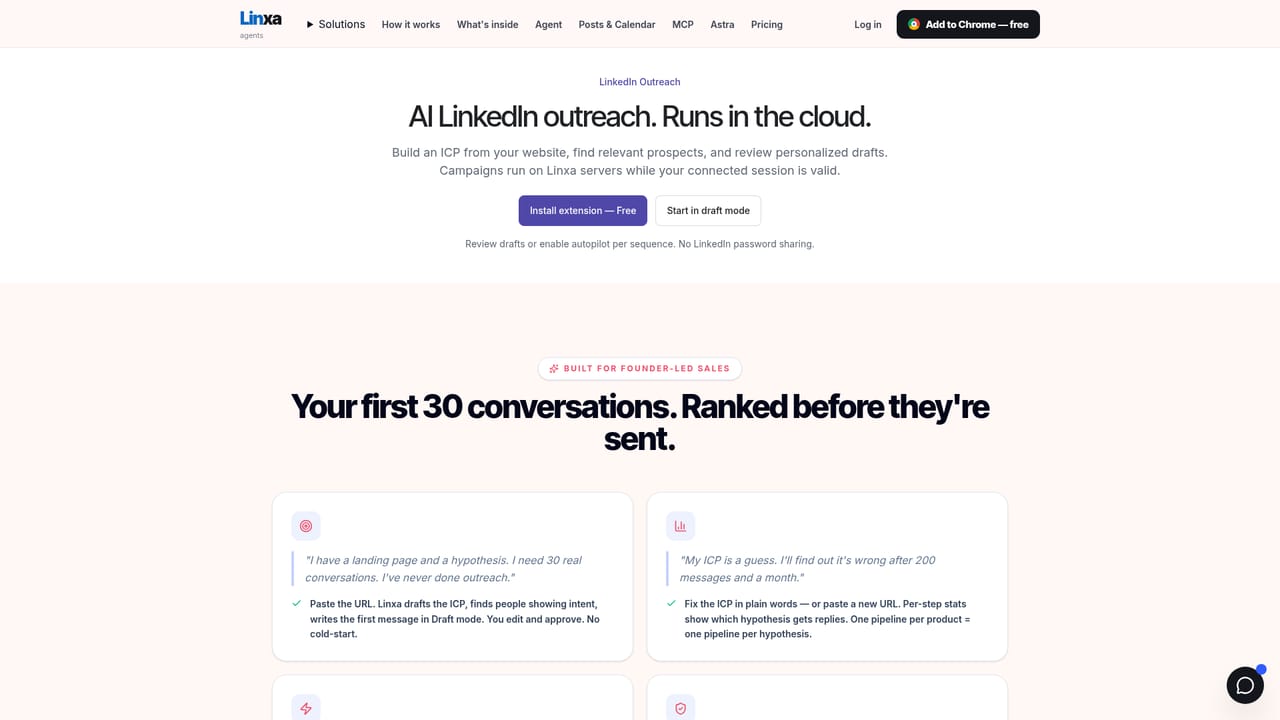
Screenshot of Salee, Turn your website into a LinkedIn campaign that runs in the cloud

What is Salee?

Salee is an AI humanizer tool that turns your website into a LinkedIn campaign that runs in the cloud. Linxa converts a website URL into an ICP and a multi step LinkedIn sequence, then runs outreach in the cloud with prompt based personalization.

Linxa (marketed on its homepage as Salee) is an AI LinkedIn outreach platform built around one starting point: your website. Paste a URL and the system drafts a product brief and an ideal customer profile, then assembles a multi step sequence you can edit before anything is sent. The pitch is aimed at founders who know their product but have never run outbound, and at sales teams that want personalization guided by prompts rather than static merge fields. The mechanics are straightforward. The Chrome extension connects the LinkedIn account you already use, without asking for your LinkedIn password. From there, outreach executes on Linxa servers through a proxy in a country you pick, so sequences keep running with your computer switched off. Prospects can come from LinkedIn searches, Sales Navigator lists, post activity or individual profiles, and Linxa ranks them by fit against the ICP it drafted. Personalization mixes templates with prompts placed inside the message, so the AI reads a profile and writes a contextual line instead of pasting a job title. Campaigns can be written in several languages, including language specific name tokens, and message grammar can follow a saved gender setting for languages that need it. New sequences open in draft mode, letting you check messages and tune prompts, and automatic sending is a deliberate switch you enable per sequence. Replies flow into the Smart Inbox with AI drafted responses, and a CRM keeps deals and next steps separate from the conversations that produced them. Team accounts give each teammate a private inbox while sharing one pipeline. Paid accounts can raise the daily LinkedIn request budget up to 1,000 for heavier research and searching, with invitation limits and pacing still enforced. Compared with established tools such as Dripify, Expandi, Waalaxy or MeetAlfred, Linxa leans harder on conversational setup and prompt driven personalization, plus an agent and MCP access for people who prefer to work from Claude, Codex, Cursor or Kiro. The gaps are worth noting: there is no email finder and no native HubSpot integration, so multichannel and CRM centric stacks will need custom work through MCP.

How do you use Salee?

  1. 1Install the Chrome extension
    Add the extension from the Chrome Web Store and connect the LinkedIn account you already use. Linxa does not ask for your LinkedIn password.
  2. 2Check what Linxa infers from your URL
    Paste your website into the URL analyser to see the product brief and ICP it derives before committing to a campaign.
  3. 3Build the sequence
    Choose language, tone and goal, and Linxa assembles the full multi step sequence with message templates and prompts.
    Salee — Build the sequence
  4. 4Source and rank prospects
    Pull people from LinkedIn searches, Sales Navigator lists or post activity, then rank them by fit against the drafted ICP.
  5. 5Review drafts and set limits
    Check the first messages, tune prompts where the AI output misses, and set invitation limits, pacing and the daily request budget.
  6. 6Enable autopilot and work replies
    Turn on automatic sending per sequence and handle responses in the Smart Inbox, where AI reply drafts sit beside each conversation.

Pros and cons

Pros

  • Website to campaign setup removes the blank page problem for first time outbound usersAI
  • Cloud execution keeps sequences running with the computer off and never requires a LinkedIn passwordAI
  • Prompt based personalization reads profile context instead of relying on raw merge fieldsAI
  • Free Smart Inbox plan is permanent and needs no credit cardAI
  • MCP access lets Claude, Codex, Cursor or Kiro read and act on Linxa dataAI

Cons

  • No email finder, so outreach stays single channel on LinkedInAI
  • No native HubSpot integration; CRM handoff depends on MCP or custom workAI
  • Free accounts are capped at 200 daily requests while only paid plans can raise the budgetAI
  • Higher request budgets carry meaningful account risk, and retries count against the daily limitAI
  • Pricing is per LinkedIn account, which gets expensive for larger sales teamsAI

How much does Salee cost?

Pricing

Inbox is $0 per month for conversations, missed replies and AI reply drafts. Outreach is $39 per month for sources, sequences and editable strategy. Team is $49 per LinkedIn account per month with a shared workspace, multiple accounts and CRM. Annual billing on Outreach and Team gives 12 months for the price of 10.

Learn more

Integrations

No native HubSpot integration and no email finder. External AI clients (Claude, Codex, Cursor, Kiro) can reach Linxa data through MCP, with free read access and authorized write access.

Features

Sources drawn from LinkedIn search, Sales Navigator, posts and profiles, ICP fit ranking, multi step sequences mixing templates and AI prompts, multilingual messages, Smart Inbox with AI reply drafts, Signals for post activity, a separate CRM pipeline, shared team workspace, a chat agent and MCP access.

Frequently asked questions about Salee

  • How much does Salee cost?
    Inbox is $0 per month for conversations, missed replies and AI reply drafts. Outreach is $39 per month for sources, sequences and editable strategy. Team is $49 per LinkedIn account per month with a shared workspace, multiple accounts and CRM. Annual billing on Outreach and Team gives 12 months for the price of 10.
  • Does Salee have an API?
    Yes, Salee offers an API.
  • How do you use Salee?
    The walkthrough on this page covers 6 steps: 1. Install the Chrome extension 2. Check what Linxa infers from your URL 3. Build the sequence 4. Source and rank prospects 5. Review drafts and set limits 6. Enable autopilot and work replies.
  • What platforms does Salee support?
    Salee is available on Web App and Browser extension.
  • What does Salee integrate with?
    No native HubSpot integration and no email finder. External AI clients (Claude, Codex, Cursor, Kiro) can reach Linxa data through MCP, with free read access and authorized write access.
  • What are the limitations of Salee?
    No email finder, so outreach stays single channel on LinkedIn. No native HubSpot integration; CRM handoff depends on MCP or custom work. Free accounts are capped at 200 daily requests while only paid plans can raise the budget.

Status

StatusActive
Views0
Outbound clicks0
Added10/21/2026

Platforms

Web AppBrowser extension

Pricing

FreemiumSubscriptionPaid