Skiv

Video hosting with AI search, chat, transcripts and monetization built in

Beginner
Screenshot of Skiv, Video hosting with AI search, chat, transcripts and monetization built in

What is Skiv?

Skiv is an ad-free video hosting platform where AI indexes every upload for search and question answering. It adds auto transcripts, chapters, clipping, branded embeds, private sharing and paid membership tiers, aimed at creators, educators and teams managing their own video libraries.

Skiv is a video hosting platform that puts artificial intelligence at the centre of how a video library is stored and used. Creators upload footage once, then let Skiv handle delivery, playback and discovery. The pitch is straightforward: every upload is transcribed and indexed, so the things people say, the objects on screen and the text burned into a frame all become searchable. The company positions the product as a home for video rather than a social network, and it carries no advertising on the player or the pages around it. The AI layer covers two jobs. Search answers the question "where in my library is that moment?" by matching a query against spoken words, visual content and on-screen text, then returning the right clip. Chat goes further: a viewer or the owner can ask a natural question in plain language and receive an answer with a timestamp pointing back to the source video. Around that sit the practical tools most libraries need. Transcriptions are generated automatically and shown synced beside the video, chapters let viewers skim, and any transcript line can be clicked to jump to that moment. Clips can be cut from any point and shared quickly, and the player itself can be branded and embedded on an external site with a single line of code. Privacy is handled per video, with private, unlisted, link or password access, plus whole portals for larger collections. Monetization is the other half of the offer. Creators can turn a collection into a paid membership, set their own tiers, and let Skiv manage billing and delivery. The homepage shows creator dashboards with revenue, subscriber counts and plan pricing per collection, alongside analytics for views, unique opens, watch time and bandwidth, broken down by country and time window. Collections group videos thematically, so a library can hold several separately priced or free portals at once. Skiv suits educators, teams, course sellers and independent creators who have outgrown a plain file host but do not want an ad-funded platform deciding what their audience sees. It competes with general video hosts on search and transcripts rather than reach, and with course platforms on hosting and player control rather than curriculum tooling. Anyone needing the free tier can start there; paid membership features are the upgrade path.

How do you use Skiv?

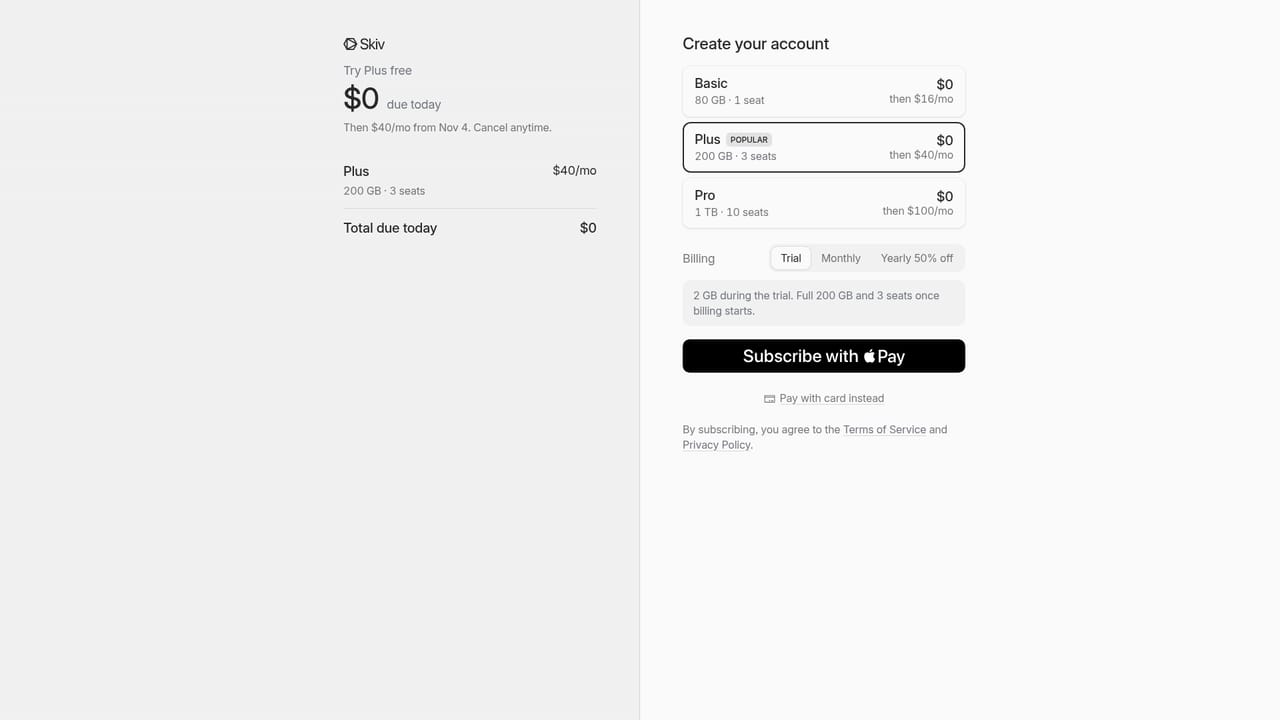
  1. 1Create your account
    Sign up with a Google account or an email address. Skiv sends an activation link, and clicking it opens the library for the first time.
    Skiv — Create your account
  2. 2Upload your first videos
    Add files to the library and give each one a title. Visibility is set per video as private, unlisted, public, or restricted by link or password.
  3. 3Let the AI index the footage
    Transcripts, chapters and search indexing are generated automatically after upload. Once processing finishes, the video can be queried in the library search box.
  4. 4Ask a question with chat
    Use chat to ask in plain language where a topic came up or what was said. The reply includes a timestamp, and clicking it jumps to that point in the video.
  5. 5Clip and embed a moment
    Cut a short clip from any point on the timeline, then copy the embed code and paste it into an external site with your logo and player styling applied.
  6. 6Group videos and set up paid tiers
    Organise videos into collections, publish a public portal, and if you want revenue, choose a monthly price for the collection and let Skiv run billing and access.

Pros and cons

Pros

  • AI search matches queries against speech, visuals and on-screen text, which is more forgiving than title-based searchAI
  • Chat returns answers with timestamps so viewers land directly on the relevant momentAI
  • Automatic transcripts, synced playback and chapters improve access without manual captioning workAI
  • No advertising on the player, and the player itself can carry the creator's branding and logoAI
  • Private, unlisted, link and password sharing sit alongside paid membership tiers with billing handled by SkivAI

Cons

  • Pricing for storage, bandwidth and paid plans is not stated on the homepage, so costs need checking before committing a large libraryAI
  • Chat and search are only as good as the transcript and indexing quality; heavy accents, music or dense on-screen text may return weaker matchesAI
  • The product is a hosting and discovery layer, not an editor: clipping is offered but full production still happens elsewhereAI
  • Monetization handles billing and delivery but there is no mention of tax handling, refunds or payout schedulesAI
  • Review scores are shown as aggregate badges with no visible breakdown of how many reviews sit behind themAI

How much does Skiv cost?

Pricing

The homepage shows per-collection subscription prices on creator dashboards (examples range from $5 to $12 per month) and labels one collection as free, and the signup button says getting started is free. No platform-wide plan or storage pricing is published on the homepage, so the cost of hosting itself is not stated.

Learn more

Features

AI search across speech, visuals and on-screen text; chat that answers questions with timestamps; automatic transcripts with click-to-jump playback; chapters; clipping from any moment; private, unlisted, link and password sharing; public portals and collections; customizable branded player with one-line embeds, 4K playback, subtitles, Chromecast and Airplay; analytics for views, unique opens, watch time, bandwidth and country; paid membership tiers with billing and delivery handled by Skiv.

Frequently asked questions about Skiv

  • How much does Skiv cost?
    The homepage shows per-collection subscription prices on creator dashboards (examples range from $5 to $12 per month) and labels one collection as free, and the signup button says getting started is free. No platform-wide plan or storage pricing is published on the homepage, so the cost of hosting itself is not stated.
  • How do you use Skiv?
    The walkthrough on this page covers 6 steps: 1. Create your account 2. Upload your first videos 3. Let the AI index the footage 4. Ask a question with chat 5. Clip and embed a moment 6. Group videos and set up paid tiers.
  • What platforms does Skiv support?
    Skiv is available on Web App.
  • What are the limitations of Skiv?
    Pricing for storage, bandwidth and paid plans is not stated on the homepage, so costs need checking before committing a large library. Chat and search are only as good as the transcript and indexing quality; heavy accents, music or dense on-screen text may return weaker matches. The product is a hosting and discovery layer, not an editor: clipping is offered but full production still happens elsewhere.

Status

StatusActive
Views0
Outbound clicks0
Added10/21/2026

Platforms

Web App

Pricing

FreemiumSubscription