Free trial
A 2-week free trial is offered, and no credit card is needed for the first update. The homepage also says a team's first AI-generated report is free.
Learn moreAI-generated engineering reports from Jira and Linear data
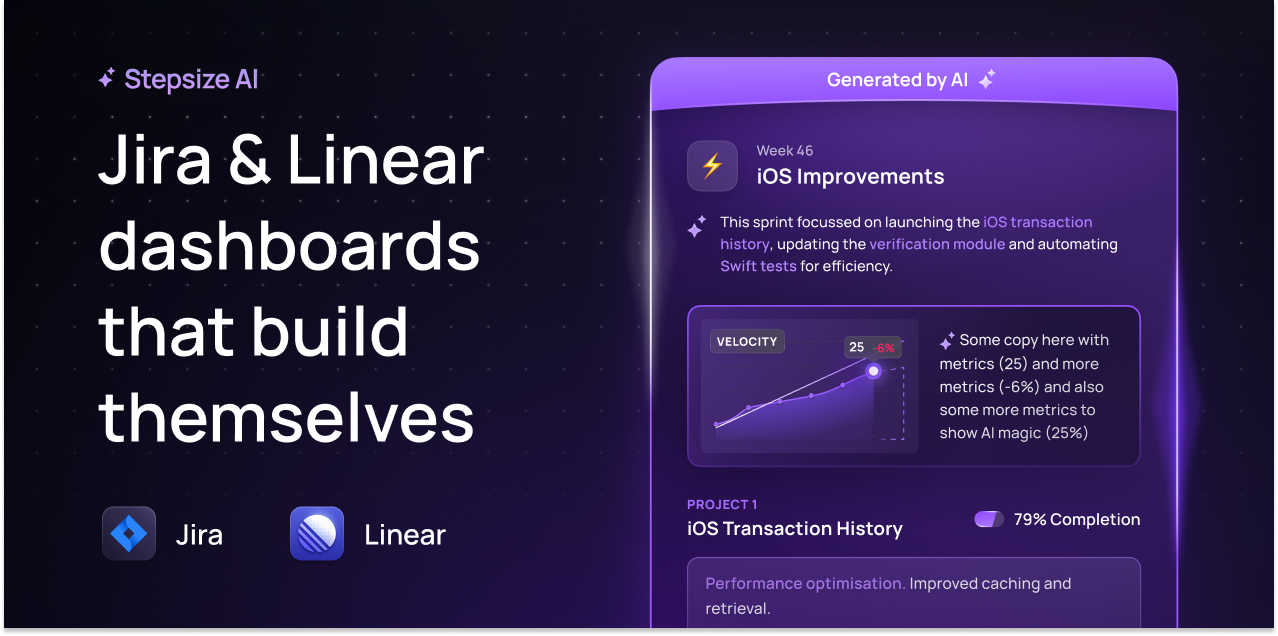
Stepsize AI is an AI project builder tool. Stepsize AI connects to Jira or Linear and turns issue tracker activity into recurring development reports, pairing charts and metrics with AI-written commentary, progress summaries, epic-based themes and delivery risk suggestions.
Stepsize AI turns issue tracker activity into weekly development reports that engineering managers and leadership can read without opening a single board. It analyses Jira boards or Linear teams, assembles the metrics and charts that describe how work is moving, and writes plain-language commentary that explains what the numbers mean. The pitch is aimed squarely at the reporting gap that opens as engineering teams grow: the data exists, but nobody has time to compile it. The product leans on two ideas. First, dashboards build themselves, with no manual configuration or template picking. Second, every chart carries an explanation, so a sprint theme, a project highlight, or a delivery risk is stated in words rather than left for the reader to infer. Project-level insights group loose tasks into themes using the structure of your epics, and each update links back to its sources so a suspicious figure can be traced. Risk detection is framed as practical suggestions rather than alerting alone. In practice the tool sits on top of an existing tracker rather than replacing it. You connect Jira or Linear, choose which channels, projects and repositories are included, and receive recurring updates aimed at keeping stakeholders aligned. The site describes the reporting method as built from conversations with engineering and product leaders, which positions the output as an opinionated house style rather than a blank analytics canvas. Security is treated as a selling point: AES-256 encryption at rest and in transit, no customer data used to train large language models, and scoped data selection. Stepsize has since been acquired by ClickUp, and the site steers visitors toward ClickUp for the successor product, so teams evaluating it should confirm current availability before committing. It competes with general tracker reporting add-ons and manual status rituals.
A 2-week free trial is offered, and no credit card is needed for the first update. The homepage also says a team's first AI-generated report is free.
Learn moreThe homepage does not publish plan prices or tiers. It states that the first AI-generated report is free and that a 2-week free trial requires no credit card for the first update. Current pricing should be checked on the dedicated pricing page.
Learn moreThe homepage names Jira boards and Linear teams as the issue tracker sources. Which channels, projects and repositories are included can be scoped per update.
AI-generated dashboards with no manual setup, metrics paired with automatic commentary, progress views with source links, project-level insights that cluster loose tasks into themes using epics, and delivery risk detection with practical suggestions. Reports are produced weekly from issue tracker activity.
 AI Angels400+ customizable AI girlfriends for NSFW chat, voice calls, and roleplay
 Candy AIExperience the future of companionship with AI friends who chat, role-play, and connect with you on a human level.
 ourdream.aiA vast AI roleplay platform with millions of characters for chat, images, video and voiceAI Angels400+ customizable AI girlfriends for NSFW chat, voice calls, and roleplayCandy AIExperience the future of companionship with AI friends who chat, role-play, and connect with you on a human level.ourdream.aiA vast AI roleplay platform with millions of characters for chat, images, video and voice