Pricing
The CLI is free to use. You pay each provider directly at their standard rates, and billing details entered once are shared with the services you add so tiers and subscriptions can be managed from the command line.
Learn moreAdd hosting, databases, auth and AI to a project with one CLI command
Own Stripe Projects? Verify ownership to get a dofollow link
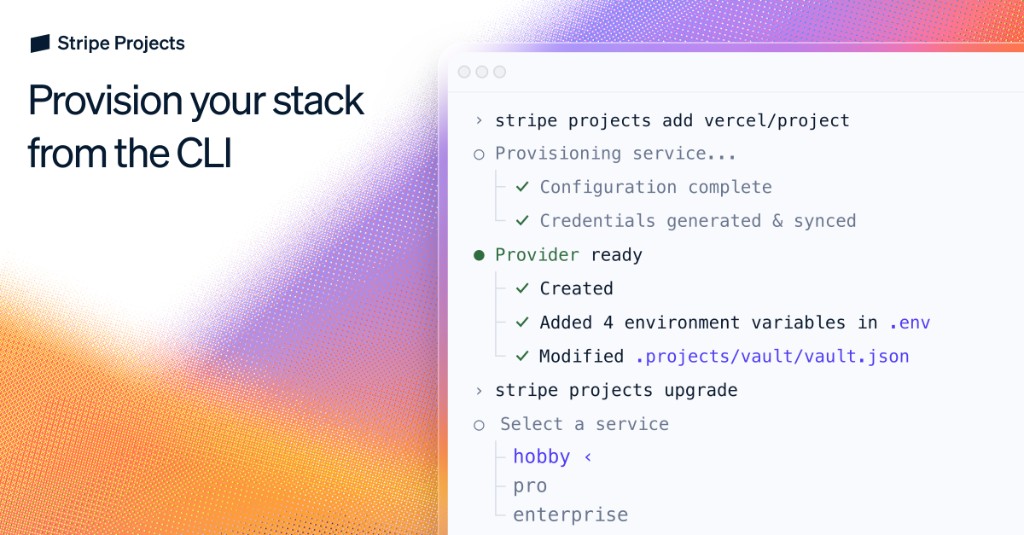
Stripe Projects is an AI project builder tool. A CLI for provisioning the services behind an app. Run one command per provider to create resources, generate credentials, sync environment variables and manage billing tiers, from your terminal or through an AI coding agent.
Stripe Projects is a command line layer for provisioning the services an application depends on. Instead of signing up for each provider, clicking through dashboards and copying API keys by hand, a developer runs a command such as `stripe projects add exa/api` and the service is created inside an account they own. Credentials are generated, synced into the local environment and written to a project vault file, so the app can use the new dependency immediately. The tool is aimed at developers and, increasingly, at the AI coding agents working alongside them. The homepage is explicit that code generation became fast while provisioning stayed manual, and Stripe Projects is positioned against that gap. Agents such as Codex, Claude Code and Cursor can be handed a plain instruction to add a service, and because the workflow is deterministic and returns real credentials, the agent does not need to navigate a dashboard or guess at configuration. Billing details are entered once and shared securely with the stack, so plan upgrades, downgrades and usage monitoring also happen from the terminal. In practice the flow starts with `stripe projects init`, followed by `stripe projects catalog` to list available providers. Adding a service provisions it, populates environment variables in the .env file and records the change in the vault. `stripe projects upgrade` moves a provider to a different tier. Because environment variables stay portable, the same setup travels across local machines, teammates and agents, and every change is auditable and repeatable. The catalog spans hosting, databases, authentication, AI and other infrastructure, with named partners including Vercel, Neon, Supabase, PostHog, Clerk, Cloudflare, Fly.io, Netlify, Algolia and Firecrawl. Ready made templates covering auth starters, chat apps, ecommerce and agent sandboxes give a working base. The obvious comparison is a platform as a service bundling everything, whereas Stripe Projects leans on choice across providers with a single billing relationship. The CLI itself is free, and you pay each provider directly at its standard rates.
The CLI is free to use. You pay each provider directly at their standard rates, and billing details entered once are shared with the services you add so tiers and subscriptions can be managed from the command line.
Learn moreDocumentation lives at docs.stripe.com/projects, alongside a providers directory, a template gallery, a community leaderboard and a blog covering build walkthroughs.
Learn moreA partner catalog spanning hosting, databases, auth, AI and more, with named providers including Vercel, Neon, Supabase, PostHog, Clerk, Cloudflare, Fly.io, Netlify, Algolia, Firecrawl and HeyGen, plus more added over time.
Learn moreProvision services, generate and sync credentials, and upgrade provider tiers from the CLI. Billing is configured once and shared across the stack, environment variables stay portable across machines, teammates and agents, and changes are auditable and repeatable. A template library covers auth, chat, ecommerce and agent sandbox starters.
 AI Angels400+ customizable AI girlfriends for NSFW chat, voice calls, and roleplay
 Candy AIExperience the future of companionship with AI friends who chat, role-play, and connect with you on a human level.
 ourdream.aiA vast AI roleplay platform with millions of characters for chat, images, video and voiceAI Angels400+ customizable AI girlfriends for NSFW chat, voice calls, and roleplayCandy AIExperience the future of companionship with AI friends who chat, role-play, and connect with you on a human level.ourdream.aiA vast AI roleplay platform with millions of characters for chat, images, video and voice