Free trial
An unlimited free trial is advertised, and no credit card is required to start.
Learn moreAI safety documentation for construction and industrial crews

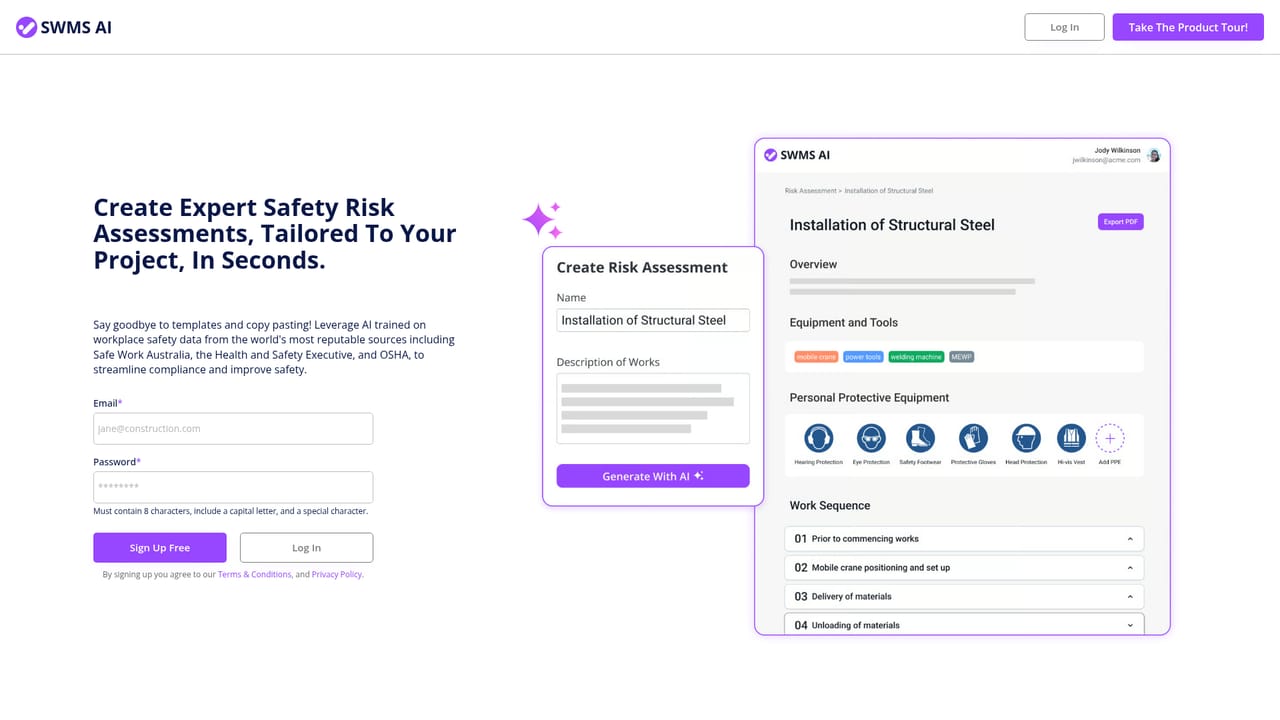
SWMS uses an AI model trained on occupational safety material to draft safe work method statements, JHAs, SWPs, RAMS and safety data sheets. Users describe a project, the tool returns hazards, risk scores and control measures, and the result downloads as a branded PDF.
SWMS takes a project description and turns it into a structured safety document: a safe work sequence, a hazard list with risk scores, and suggested control measures. A user describes the job, the trade, the special equipment involved and any hazards already known, and the tool produces a draft risk assessment that can be downloaded as a PDF carrying the company's own details and branding. The same engine covers several document types: Job Hazard Analysis, Safe Work Procedure, Safe Work Method Statement, Risk Assessment Method Statement and Safety Data Sheet. The underlying knowledge base is drawn from occupational safety resources, codes of practice, existing risk assessments and safety documents, which is why the output is framed around industry language rather than generic text. Organisations that want closer alignment can have the engine customised against their own safety policies and proprietary standards. The vendor names construction, mining, oil and gas, transportation, warehousing and facilities management as the sectors it targets, so the practical fit is high risk field work where paperwork is a daily obligation rather than a once a year task. A second product, Oscar, is a conversational assistant trained on public safety information. It answers compliance questions in plain language and, like the document generator, can be tuned to a company's own requirements and best practices. The stated ability to respond in any language matters for crews where English is a second language and for multinational operations. Against alternatives, SWMS sits closer to dedicated safety software from a niche vendor than to general purpose writing assistants. A general chatbot can produce plausible safety prose, but it has no curated safety corpus behind it and no branded PDF output. Established safety platforms tend to be heavier, built for incident registers and audit trails rather than fast drafting. SWMS is narrow by design: it drafts documentation, and it leaves record keeping and site verification to whatever systems the business already runs. The homepage does not state document counts, language coverage limits, data residency, or the exact scope of the AI training set beyond the general description above.
An unlimited free trial is advertised, and no credit card is required to start.
Learn moreThe Standard Plan is listed at $20 per month and includes unlimited safety risk assessments, PDF downloads customised with company details, and access to the Oscar AI safety assistant. The homepage does not describe any higher tiers or per-seat differences.
Learn moreA contact page is available for questions and for discussing customisation to company safety policies. The homepage does not describe support channels or response times.
Learn moreGenerates safe work method statements, job hazard analyses, safe work procedures, risk assessment method statements and safety data sheets. Each output includes a safe work sequence, hazard identification, risk scoring and suggested control measures. PDFs are customised with company details and branding. The Oscar assistant answers safety questions conversationally in any language, and both features can be aligned with a company's own policies.
 AI Angels400+ customizable AI girlfriends for NSFW chat, voice calls, and roleplay
 Candy AIExperience the future of companionship with AI friends who chat, role-play, and connect with you on a human level.
 ourdream.aiA vast AI roleplay platform with millions of characters for chat, images, video and voiceAI Angels400+ customizable AI girlfriends for NSFW chat, voice calls, and roleplayCandy AIExperience the future of companionship with AI friends who chat, role-play, and connect with you on a human level.ourdream.aiA vast AI roleplay platform with millions of characters for chat, images, video and voice


