Free trial
Practice can be started free without a credit card, and cancellation is available at any time according to the homepage.
Learn moreAI practice, instant marking and feedback for AP, SAT and high school subjects.
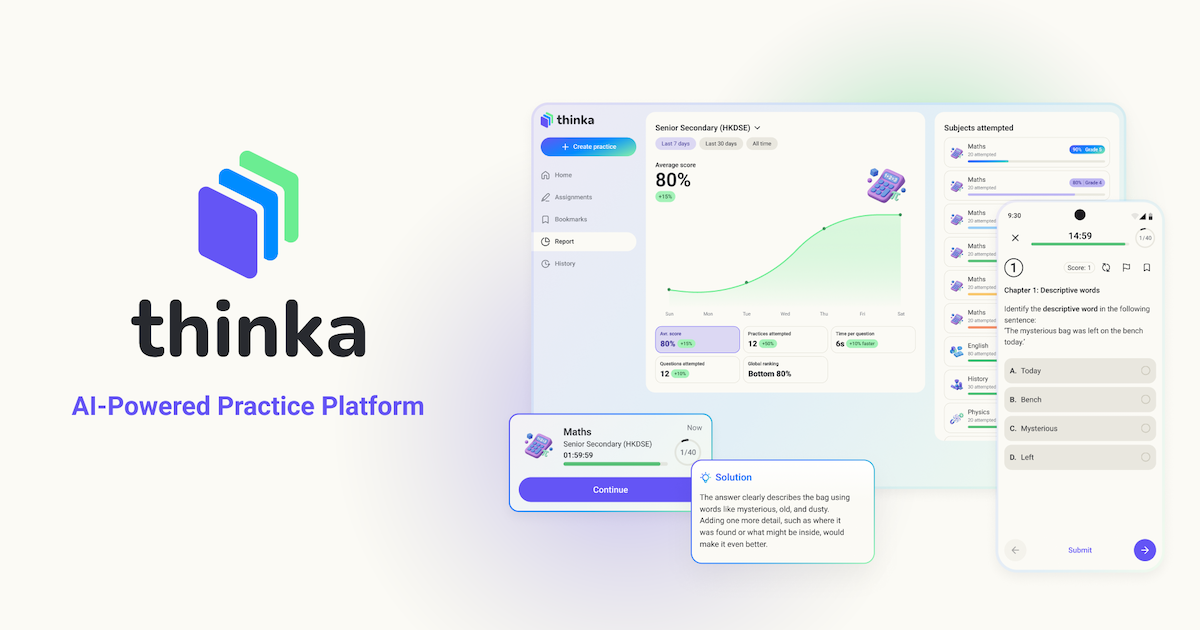
Thinka generates unlimited practice questions for AP, SAT, international curricula and high school subjects, then auto-marks answers with explanations and progress tracking. A teacher and parent section adds quiz generation and class analytics.
Thinka is an AI practice platform for exam preparation. Students pick a curriculum, subject and topic, then answer questions generated on demand in multiple choice, short answer or long answer format. Each set is new, so repeat sessions on the same topic do not recycle the same items. The stated coverage is 60 curricula, spanning AP and SAT preparation in the United States, international AS and A Levels, IGCSE, the International Baccalaureate, language tests, professional exams, and national curricula for the UK, Hong Kong, Japan, Thailand and Singapore. Marking is the core of the product. When an answer is submitted, the AI grades it, highlights errors, supplies explanations and gives a grade level assessment. Over time those results build a picture of which topics are weakest, and the platform reports that 65 percent of students improved their accuracy in its 2025-26 impact report, with a median gain of roughly one grade boundary in many subjects. Free study notes with worked examples and practice questions sit alongside the question generator for students who want reference material before drilling. Students are the primary audience, but the platform also caters to teachers and parents through a separate section with quiz and worksheet generation, analytics dashboards and management of multiple classes or children. Thinka reports more than 100,000 student users, over 58,000 teachers and parents, and 146 registered schools. Among exam prep tools, Thinka sits closer to a question drill and marking engine than to a course library. Its differentiating feature is the volume of fresh, markable content rather than a fixed bank of past papers, which suits students who have already worked through existing papers and want targeted repetition on weak units. Progress syncs across desktop, tablet and mobile, with apps listed for iOS and Android.
Practice can be started free without a credit card, and cancellation is available at any time according to the homepage.
Learn moreFree to start, with no credit card required and cancellation offered anytime. The site directs users to a dedicated pricing page for plan details and does not publish tier prices on the homepage.
Learn moreA user manual is published at docs.thinka.ai for product help. No other support channels are described on the homepage.
Learn moreAI generated question sets by curriculum, subject, topic, difficulty and format (MCQ, short answer, long answer), instant auto-marking with explanations and grade level assessment, weak topic tracking, free study notes with worked examples, teacher and parent dashboards with quiz generation, and progress sync across desktop and mobile.
Learn more AI Angels400+ customizable AI girlfriends for NSFW chat, voice calls, and roleplay
 Candy AIExperience the future of companionship with AI friends who chat, role-play, and connect with you on a human level.
 ourdream.aiA vast AI roleplay platform with millions of characters for chat, images, video and voiceAI Angels400+ customizable AI girlfriends for NSFW chat, voice calls, and roleplayCandy AIExperience the future of companionship with AI friends who chat, role-play, and connect with you on a human level.ourdream.aiA vast AI roleplay platform with millions of characters for chat, images, video and voice