TweetFast

Turn rough ideas into structured tweets in seconds

Beginner
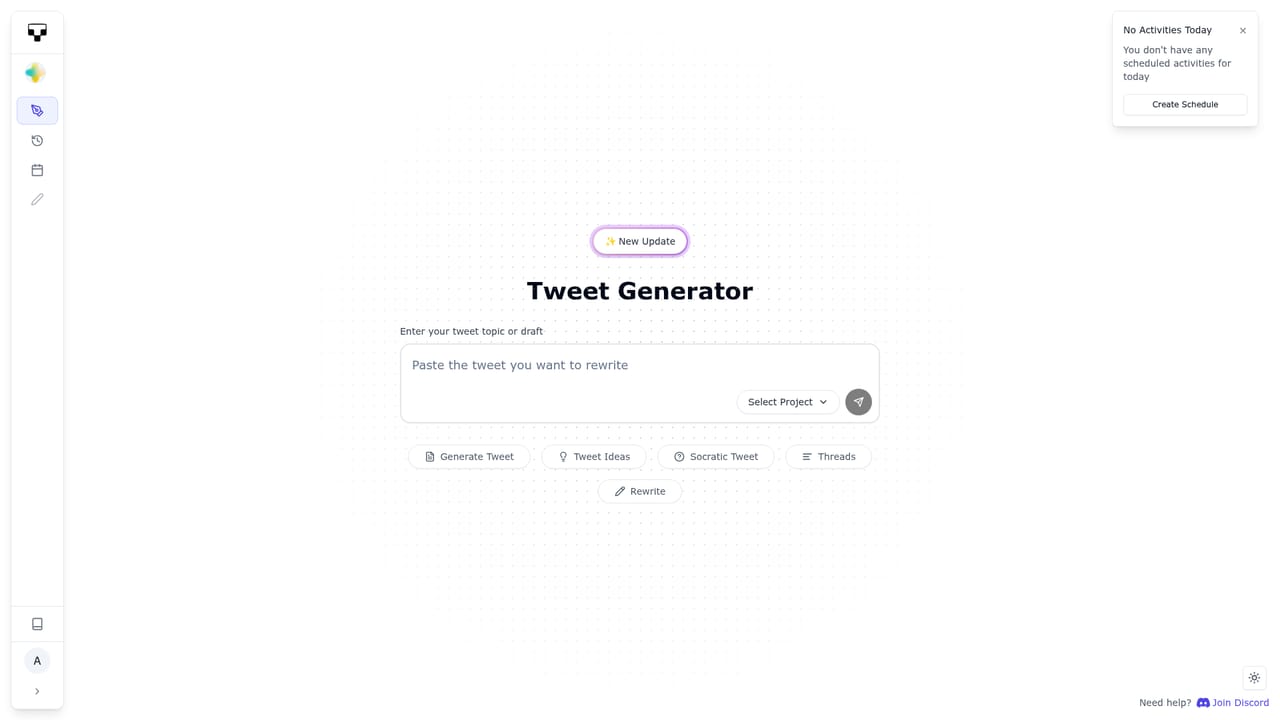
Screenshot of TweetFast, Turn rough ideas into structured tweets in seconds

What is TweetFast?

TweetFast is a content writing tool that turns rough ideas into structured tweets in seconds. An X-focused writing assistant that rewrites rough drafts into structured, high performing style tweets, with a tweet editor and scheduler included. Usage is capped daily per feature and tier, and several advanced features remain on the roadmap.

TweetFast is a writing tool built specifically for X (formerly Twitter), aimed at people who have something to say but stall on phrasing it. The product takes a rough draft and rewrites it into a structured post, drawing on patterns the team says were extracted from more than 10,000 high performing tweets. The output is presented as short, scannable frameworks: bulleted contrasts, hook lines, thread openers and calls to action. The workflow is straightforward. A draft goes into a box, the tool returns a polished version, and the built-in editor lets you adjust wording before anything is published. Scheduled posting is handled from the same dashboard, so a batch of ideas can be processed in one sitting and queued across the week. Usage limits are counted daily per feature (tweets and threads, schedulers, rewrites, Socratic chats), and workspaces and projects let you separate clients or accounts. Social media managers, founders, newsletter writers and agencies running several X accounts are the obvious audience, particularly teams that post often and want a consistent format without hiring a copywriter. The scheduling and workspace structure suggests the Agency plan is aimed at client work rather than single-person use. The market around X writing tools is crowded with general purpose AI writers and scheduling suites. TweetFast's bet is narrowness: it does one platform, ships tweet-shaped templates rather than blank chat prompts, and bundles rewriting, ideas, scheduling and account connection in one place. Several of the more ambitious features, including a browser extension, tone learning, follower import and account management, are listed on the public roadmap as upcoming rather than shipped, so buyers should judge the current product on the core writing and scheduling loop. There is no public API, no free tier disclosed on the homepage, and no details on data handling beyond a general FAQ entry. Treat it as a focused drafting assistant, not a full analytics or audience growth platform.

How do you use TweetFast?

  1. 1Open the dashboard and create a workspace
    Sign in and set up a workspace for yourself or a client, then add a project inside it so drafts and scheduled posts stay grouped.
    TweetFast — Open the dashboard and create a workspace
  2. 2Paste a rough draft
    Drop an unfinished thought or a messy paragraph into the draft field. The homepage shows a notification clean-up musing as a typical input.
  3. 3Generate and compare rewrites
    Run the rewrite feature to get a structured version, then repeat the pass until the phrasing fits. Each rewrite counts against the daily allowance.
  4. 4Polish in the tweet editor
    Use the editor to trim length, tighten the hook and add a thread call to action before the post is finalised.
  5. 5Schedule the post
    Send the finished tweet or thread to the scheduler and pick a slot. Scheduler runs are capped daily depending on the plan.
  6. 6Repeat with the idea generator
    When you run out of angles, use the viral tweet idea generator and Socratic chat prompts to surface new topics, then start the loop again.

Pros and cons

Pros

  • Turns unstructured drafts into clearly formatted posts with hooks, lists and thread openersAI
  • Combines rewriting, idea generation and scheduled posting in a single dashboardAI
  • Multiple workspaces and projects suit agencies handling several accountsAI
  • Lifetime option offered at a one-time price for early buyersAI
  • Tier limits are explicit per day, so capacity is easy to predictAI

Cons

  • Locked to X only, with no support for LinkedIn, Threads or other networksAI
  • Homepage publishes no free plan and no trial terms, so cost is unknown until checkoutAI
  • Tone learning, browser extension, follower import and account management are still marked upcomingAI
  • No visible analytics, so performance still has to be measured inside XAI
  • Support runs through a Discord ticket rather than email or a formal help centreAI

How much does TweetFast cost?

Pricing

Three tiers are listed with annual billing (two months free). Starter at $9.99 per month, discounted to $1.99 with coupon Save8. Agency at $19.99, discounted to $4.99 with Save15. Lifetime at $245, discounted to $145 with Save100, limited to the first 1000 buyers. Daily limits on tweets, schedulers, rewrites and chats rise by tier.

Learn more

Support

The FAQ directs users with unresolved questions to open a ticket on the product's Discord server. No email or help centre channel is described.

Integrations

X account connection is the only integration the homepage documents. A Chrome extension and managed X accounts are listed as upcoming rather than available.

Features

Viral tweet AI, thread hook generation, a Socratic tweet mode, an idea generator, rewrite tooling, thread calls to action, a tweet editor and scheduled posting are all listed as completed. Connected X accounts are supported. Chrome extension, managed accounts, follower import, keyword monitoring, automatic reposting and tone learning appear on the roadmap as upcoming.

Frequently asked questions about TweetFast

  • How much does TweetFast cost?
    Three tiers are listed with annual billing (two months free). Starter at $9.99 per month, discounted to $1.99 with coupon Save8. Agency at $19.99, discounted to $4.99 with Save15. Lifetime at $245, discounted to $145 with Save100, limited to the first 1000 buyers. Daily limits on tweets, schedulers, rewrites and chats rise by tier.
  • How do you use TweetFast?
    The walkthrough on this page covers 6 steps: 1. Open the dashboard and create a workspace 2. Paste a rough draft 3. Generate and compare rewrites 4. Polish in the tweet editor 5. Schedule the post 6. Repeat with the idea generator.
  • What platforms does TweetFast support?
    TweetFast is available on Web App.
  • What does TweetFast integrate with?
    X account connection is the only integration the homepage documents. A Chrome extension and managed X accounts are listed as upcoming rather than available.
  • What are the limitations of TweetFast?
    Locked to X only, with no support for LinkedIn, Threads or other networks. Homepage publishes no free plan and no trial terms, so cost is unknown until checkout. Tone learning, browser extension, follower import and account management are still marked upcoming.

Status

StatusActive
Views0
Outbound clicks0
Added10/21/2026

Platforms

Web App

Pricing

PaidSubscription