Free trial
No time limited trial is described. Instead there is a free tier with 3 analyses per month and 100 comments per video, plus one guest analysis that can be run before creating an account.
Learn moreTurn any YouTube comment section into a sentiment and topic report
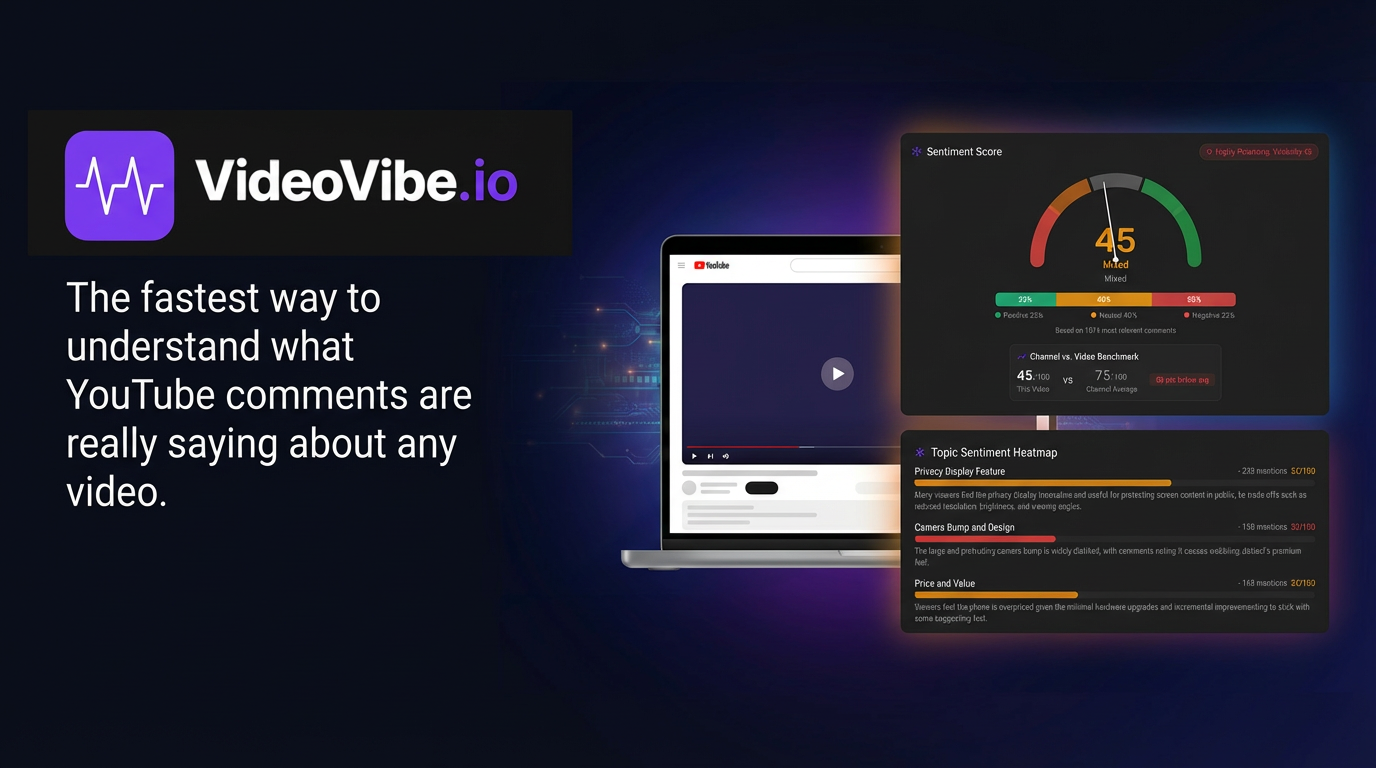
VideoVibe.io is a text conversation analysis tool that turns any YouTube comment section into a sentiment and topic report. VideoVibe analyzes public YouTube comments and builds a Community Pulse Report with a 1 to 100 sentiment score, positive, neutral and negative splits, top topics, notable quotes, narrative insights and an audience profile.
VideoVibe is a browser based tool that reads through the comment section of a YouTube video and turns it into a structured report. You supply a video URL, the service pulls the public comments, and the Community Pulse Engine returns a single document that covers sentiment, recurring subjects and representative voices from the thread. It is aimed at creators deciding what to make next, marketers checking how a campaign or sponsor read landed, and researchers who need a fast read on audience reaction without scrolling thousands of replies by hand. The output is called a Community Pulse Report and it follows the same layout every time. A sentiment score from 1 to 100 sits alongside a visual gauge, and a bar chart splits the comments into positive, neutral and negative shares. Between three and seven top topics are listed with mention counts and a sentiment figure for each one. Notable quotes are surfaced with the author name, like count and a short note on why the comment matters. Narrative sections on community insights and an audience profile round out the report, describing themes, points of disagreement and who appears to be commenting. Reports can be copied to the clipboard or exported as PDF and CSV files, and past analyses stay in a history view with dashboard tracking. In practice the workflow is short. A guest can run one analysis before signing up, and the free tier allows 3 analyses per month at up to 100 comments per video, so a first look costs nothing. Pro raises that to 35 analyses and 1,500 comments each, while Elite covers 120 analyses and 5,000 comments. It competes less with full social listening suites than with manual comment reading and general purpose chat assistants, and it trades breadth across networks for depth on YouTube threads specifically. Anyone working mainly on Instagram, TikTok or X will need something else; creators who live in YouTube comments get a purpose built report format instead of an open ended chat prompt.
No time limited trial is described. Instead there is a free tier with 3 analyses per month and 100 comments per video, plus one guest analysis that can be run before creating an account.
Learn moreFree tier: 3 analyses per month, 100 comments per video. Pro: $144/yr list, currently $72/yr (about $6/mo). Elite: $348/yr list, currently $174/yr (about $14.50/mo). A launch offer gives the first 100 paid subscribers 50% off the first year.
Learn moreSupport is handled through a help FAQ covering limits, privacy and cancellation. Paid tiers list priority support, and the Elite plan adds a priority analysis queue. No live chat or phone support is described.
Learn moreEach run produces a Community Pulse Report: a 1 to 100 sentiment score with gauge, a positive, neutral and negative breakdown, 3 to 7 top topics with mention counts and per topic sentiment, notable quotes with author and likes, narrative community insights and an audience profile. Reports can be copied, exported to PDF or CSV, and kept in an analysis history with dashboard tracking.
 AI Angels400+ customizable AI girlfriends for NSFW chat, voice calls, and roleplay
 Candy AIExperience the future of companionship with AI friends who chat, role-play, and connect with you on a human level.
 ourdream.aiA vast AI roleplay platform with millions of characters for chat, images, video and voiceAI Angels400+ customizable AI girlfriends for NSFW chat, voice calls, and roleplayCandy AIExperience the future of companionship with AI friends who chat, role-play, and connect with you on a human level.ourdream.aiA vast AI roleplay platform with millions of characters for chat, images, video and voice