Free trial
Sign-up is free and the homepage invites visitors to try Zenquiz for free, but it does not state how many free credits or quizzes are included.
Learn moreTurn study notes into practice quizzes, pay per quiz
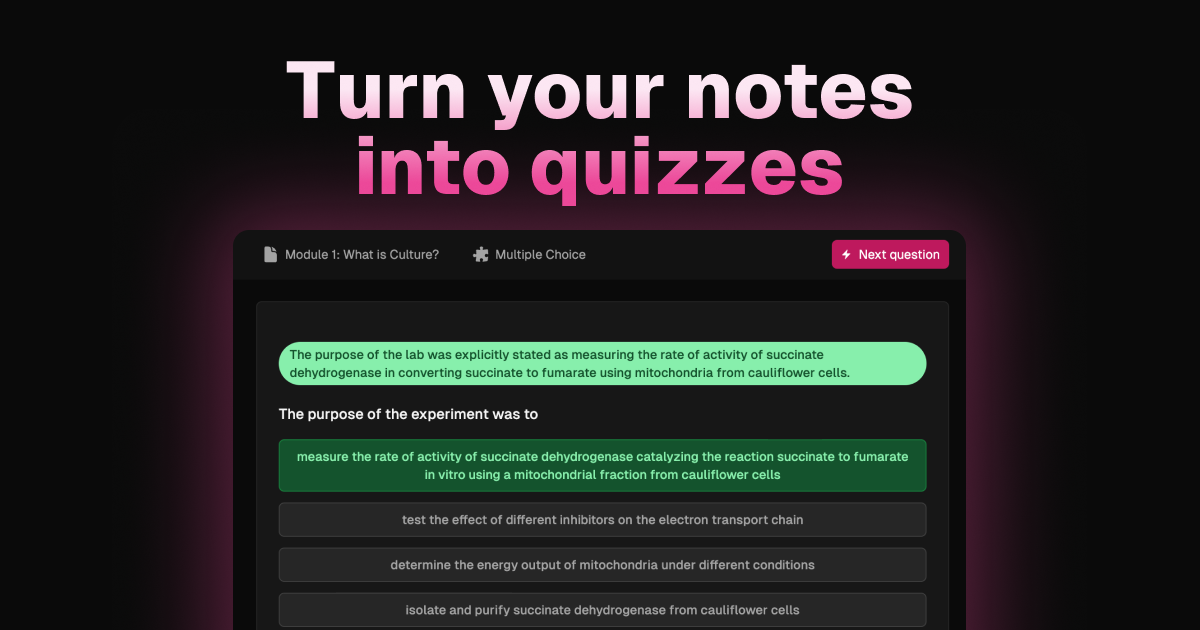
Zenquiz is an exam preparation tool that turns study notes into practice quizzes, pay per quiz. Zenquiz is a web app that generates multiple choice, true/false and fill-in-the-blank quizzes from uploaded notes or Notion and Google Drive imports, with feedback on answers.
Zenquiz is a web-based quiz maker that converts study material into practice exams. A user supplies notes, the tool reads them, and it returns a set of questions that can be answered on screen, with feedback on the responses. Question formats include multiple choice, true/false and fill-in-the-blank, so the same set of notes can be tested in more than one way. The product is aimed at three groups. Students are the core audience: the site pitches quizzes, flashcards and notes tailored to a learning style, meant to support revision before an exam. Educators can use it to draft quizzes, assessments and exams and to cut down on content preparation and grading. Businesses are also addressed, with assessments for training sessions, course development and certification programs. Quizzes can be shared with friends and classmates, which suits study groups. In practice, the workflow starts with the material itself. Word documents and other text files can be uploaded directly, and the site suggests using text formatting in the notes to flag important points, since that extra context shapes the questions. Notes can also be imported from Notion or Google Drive after logging in with those accounts. Sample questions on the homepage, drawn from philosophy, cognitive science and biochemistry notes, show the tool handling dense academic text and producing four-option questions with plausible wrong answers. The pricing model sets Zenquiz apart from many study apps. It sells credit packs, with one credit spent per quiz, and states that there are no subscriptions. That suits occasional users such as someone preparing for a single exam period. Among alternatives, it sits closer to focused note-to-quiz generators than to full learning platforms or classroom response systems, so teams needing live sessions, deep analytics or an LMS connection should check what it actually offers first. A short blog on the site covers study techniques and how AI quiz generation works.
Sign-up is free and the homepage invites visitors to try Zenquiz for free, but it does not state how many free credits or quizzes are included.
Learn morePrepaid credits, one credit per quiz, no subscriptions. Regular pack: 100 credits for $3.99 (about $0.04 per quiz). Savers pack: 250 credits for $5.99 (about $0.02 per quiz). Sign-up is free.
Learn moreImports notes from Notion and Google Drive after a secure login, plus direct uploads of Word and other text files.
Learn moreGenerates quizzes from uploaded notes with multiple choice, true/false and fill-in-the-blank questions. Gives feedback on answers, supports Word and text uploads, imports from Notion and Google Drive, and lets users share quizzes. Also mentions flashcards and notes.
 AI Angels400+ customizable AI girlfriends for NSFW chat, voice calls, and roleplay
 Candy AIExperience the future of companionship with AI friends who chat, role-play, and connect with you on a human level.
 ourdream.aiA vast AI roleplay platform with millions of characters for chat, images, video and voiceAI Angels400+ customizable AI girlfriends for NSFW chat, voice calls, and roleplayCandy AIExperience the future of companionship with AI friends who chat, role-play, and connect with you on a human level.ourdream.aiA vast AI roleplay platform with millions of characters for chat, images, video and voice