Free trial
A free Pro trial is offered through the registration link, and a free API key is available to test the detector endpoint before choosing a paid plan.
Learn moreScore any text for AI authorship, sentence by sentence
Own AI Detector by Sapling? Verify ownership to get a dofollow link

AI Detector by Sapling is an AI checker tool. A free, browser-based AI content detector from Sapling that returns a document-level AI-generation score plus per-sentence scores, with PDF and DOCX upload, URL checking, a Chrome extension and an API. Covers English plus five other languages, with Italian and Dutch in preliminary form.
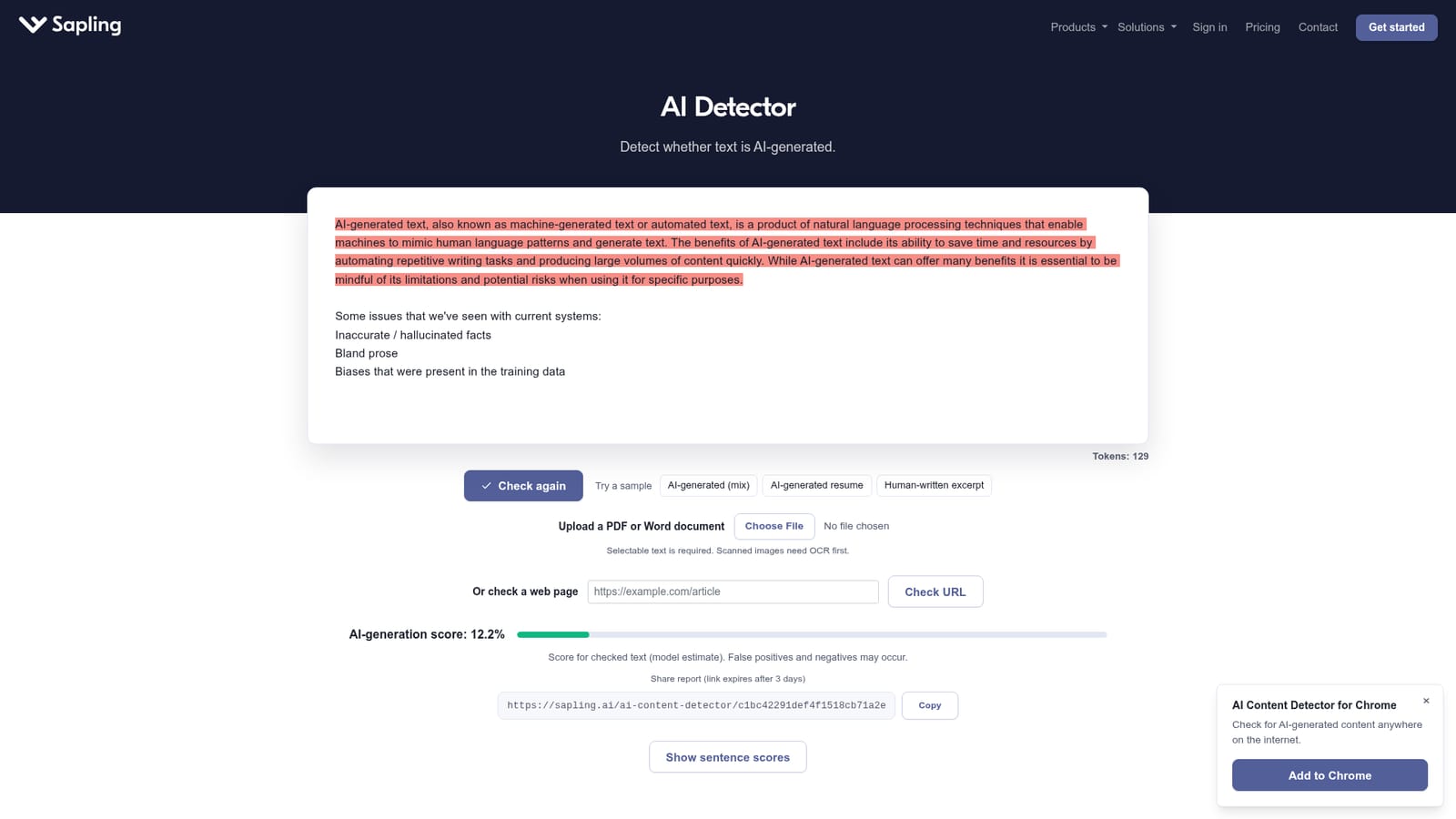
Sapling's AI Detector is a screening tool that returns a probability estimate for whether a passage of text was produced by a large language model. Paste text, upload a PDF or Word file, or point the checker at a URL, and it returns an overall AI-generation score plus a highlighted view of the portions the model flags. The same underlying model then scores each sentence individually, which matters because a partly machine-written document can post a low overall number while a handful of its sentences sit near 100 percent. The engine is a Transformer trained to classify tokens rather than to write, and it outputs a probability for each word or token in the input. Sentence scores aggregate those token probabilities, so the document score and the sentence scores stay on one consistent scale. Sapling retrains to keep pace with current systems, and the changelog names GPT-5, Claude 4.5, Gemini 2.5, Qwen3 and DeepSeek-V3 among the covered models, with Kimi added and reported false positives down 60 percent in a recent round. English is joined by Spanish, Portuguese, French, German and Japanese, with Italian and Dutch marked as preliminary and less sensitive. PDF and DOCX uploads are supported, though only selectable text is read, so scanned pages need OCR first. The tool is built for people who have to make a judgment call about provenance: teachers reading student essays, editors vetting freelance submissions, SEO teams auditing content at scale, and recruiters screening resumes. A Chrome extension puts a Detect AI button next to chatbot outputs and on any selected text around the web, and an API feeds the same scoring into applicant tracking or content pipelines for high-volume work. Sapling is direct about the ceiling of the technology, and that candor should shape how buyers use it. Short, generic or essay-like writing produces the most false positives, no current detector should stand alone as proof of authorship, and the free tier cuts off at roughly 2,000 characters. Treat the score as one signal among several, and calibrate it against examples from your own workflow before acting on it. Sapling also sells grammar and writing assistance, so the detector slots into a broader editing product rather than standing as a single-purpose forensic suite.
A free Pro trial is offered through the registration link, and a free API key is available to test the detector endpoint before choosing a paid plan.
Learn moreA free tier covers checks up to 2,000 characters. Sapling Pro and Enterprise subscribers can submit up to 100,000 characters per check. The detector API is billed separately from Pro, with usage pricing and calculators published in the API docs.
Learn moreA contact form handles enterprise and custom-volume questions, and Sapling publishes API documentation, an evaluation guide, a technical whitepaper and a changelog.
Learn moreA Chrome extension places the detector on any webpage and beside chatbot responses, and a REST API lets teams embed resume or content scoring into their own systems.
Learn moreOverall AI-generation score with highlighted passages, per-sentence scores from the same model, PDF and DOCX extraction, URL checking, sample texts, a shareable report link that expires after three days, a Chrome extension with an embedded Detect AI button beside chatbot output, and a documented detector API. English is supported alongside Spanish, Portuguese, French, German, Italian, Dutch and Japanese.
 AI Angels400+ customizable AI girlfriends for NSFW chat, voice calls, and roleplay
 Candy AIExperience the future of companionship with AI friends who chat, role-play, and connect with you on a human level.
 ourdream.aiA vast AI roleplay platform with millions of characters for chat, images, video and voiceAI Angels400+ customizable AI girlfriends for NSFW chat, voice calls, and roleplayCandy AIExperience the future of companionship with AI friends who chat, role-play, and connect with you on a human level.ourdream.aiA vast AI roleplay platform with millions of characters for chat, images, video and voice


