Free trial
A free trial is offered and the homepage states that no credit card is required to start.
Learn moreAI-generated K-8 math lessons tailored to each homeschooled child
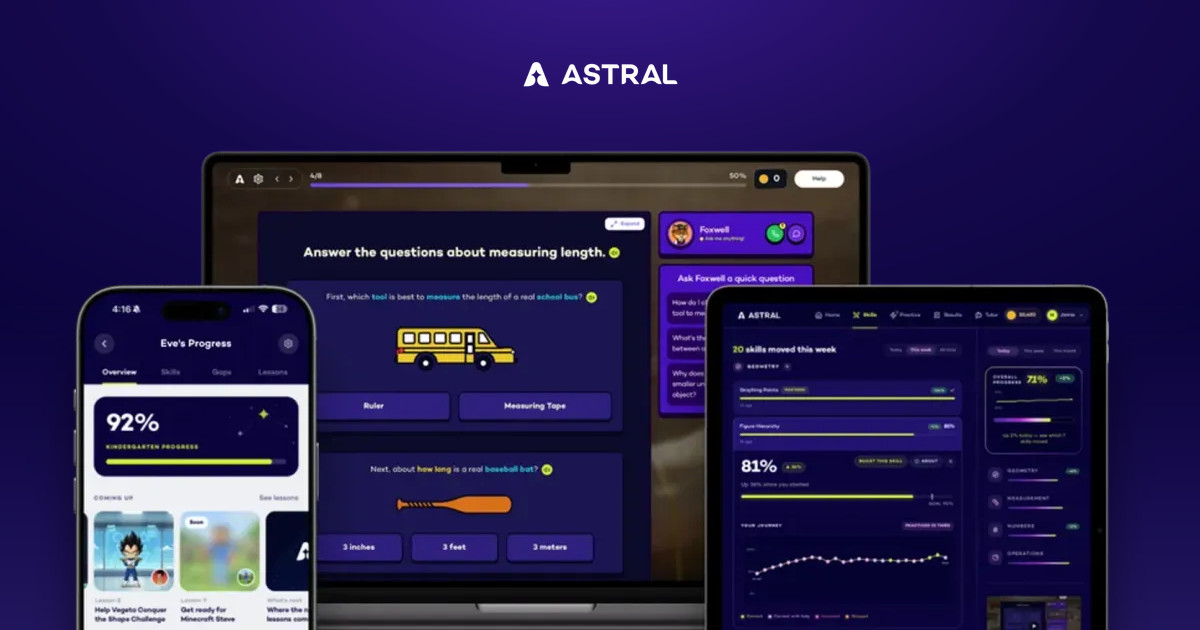
Astral is an AI tutor and complete K-8 math curriculum for homeschoolers. It places each child with an assessment, then generates daily lessons around their interests until skills reach mastery, with a parent dashboard for tracking.
Astral is a K-8 math curriculum for homeschooling families in which an AI tutor generates each lesson for the individual child, instead of handing every student the same textbook sequence. It targets parents who teach at home and want a structured, standards-aware math program without building worksheets or hunting for a fitting grade level themselves. The process starts with a placement assessment. The opening lessons map the child's skills against national standards to find a true starting point, so the material is neither too easy nor too hard, and the program moves ahead when the child shows readiness. From there, the child works through daily lessons toward mastery of each skill. Lessons are themed around personal interests such as space, dinosaurs, chess, cooking or horses, and they star a character of the child's own. Explanations can arrive as pictures, personalized videos or step-by-step walkthroughs, depending on what makes the idea click, and the homepage says the content stays true to the family's values. A parent dashboard lets the adult follow progress without grading every page. On credibility, the homepage cites families in more than 33 states, approval for education savings account funds in nine states, and a team with backgrounds at Harvard, MIT and Princeton. Curriculum reviewer Cathy Duffy is quoted calling it truly innovative. Product imagery shows it running on a phone, a laptop and a tablet, so it appears to be used through the browser on whatever device the household already owns. Among alternatives, Astral sits between fixed-sequence boxed curricula and general-purpose chatbot tutors. It is narrower than either in subject range, since it covers only math, but it offers a full progression from kindergarten to eighth grade rather than ad hoc help. The homepage does not list prices, though it advertises a free trial that needs no credit card, which makes a low-risk test with one child practical before committing.
A free trial is offered and the homepage states that no credit card is required to start.
Learn moreThe site has an FAQ page, and account sign in and sign up are available. No other support channels are stated on the homepage.
Learn morePlacement assessment against national standards, daily lessons to mastery, interest-based themes with a personal character, explanations as pictures, personalized videos or step-by-step, values-aware content, and a parent dashboard.
 AI Angels400+ customizable AI girlfriends for NSFW chat, voice calls, and roleplay
 Candy AIExperience the future of companionship with AI friends who chat, role-play, and connect with you on a human level.
 ourdream.aiA vast AI roleplay platform with millions of characters for chat, images, video and voiceAI Angels400+ customizable AI girlfriends for NSFW chat, voice calls, and roleplayCandy AIExperience the future of companionship with AI friends who chat, role-play, and connect with you on a human level.ourdream.aiA vast AI roleplay platform with millions of characters for chat, images, video and voice


