Free trial
New users receive 30 free credits to try the generator before buying a subscription or credit pack.
Learn moreAI image generation steered by a 3D scene you build yourself
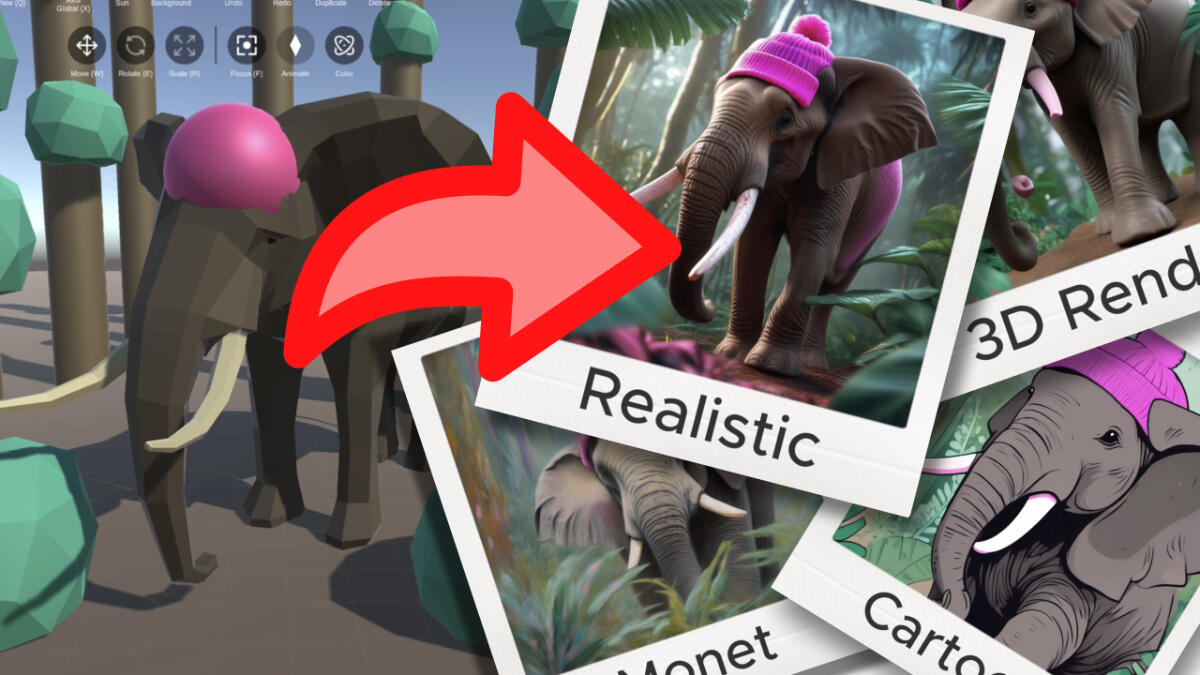
Blimey is a generative image tool. A desktop AI image generator where you block out a 3D scene to control composition, colors and camera angles, then render the result. Includes saved scenes, consistent characters via face images, style and pose controls, and optional 3D model import or generation.
Blimey is a desktop AI image generator built around a 3D scene editor. Instead of relying on a text prompt alone, you place and arrange 3D objects to define the composition, pick colors and a style, then let the model render a finished image from that setup. The argument behind the product is simple: a prompt is a blunt instrument when you already know what the picture should look like, while a rough spatial blockout gives the generator far more to work with. The workflow suits people with a fixed visual target. Consistent characters and scenes are possible because the same scene can be reused and re-rendered, and a character can be locked in with an uploaded face image. Multiple camera angles come from moving the view around the same scene rather than rewriting the prompt. Reference images can drive overall style, depth and pose controls are exposed as separate dials, and backgrounds can be swapped without rebuilding the scene. Scenes can be saved for later, and pre-made 3D models are included, with the option to import .obj files or generate a new model from an image reference. Navigation is deliberately game-like: WASD or arrow keys to move around the viewport. The site states that no previous 3D experience is needed, and the tool is aimed at illustrators, concept artists and designers who care about framing and palette more than prompt craft. Upscaling, live generation and image prompts arrived through 2023 updates, with 3D model generation added in March 2024. Blimey is the work of a single developer, Markus Malmros, and it is distributed as a downloadable application for Mac and Windows rather than a browser tool. That puts it in contrast with prompt-first generators: more setup time per image, but tighter control over layout and color. Pricing runs either as an unlimited monthly or yearly subscription or as pay-per-image credits, bought inside the app.
New users receive 30 free credits to try the generator before buying a subscription or credit pack.
Learn moreTwo options, both bought in the app in USD: an unlimited subscription at $39 per month, or $19 per month billed yearly at $228 (billed as a 51 percent discount), and pay-per-image credits at 100 for $9, 500 for $19 or 1500 for $49. One credit renders one image.
Learn moreSupport runs through email to the developer, who builds Blimey solo and invites feedback and problem reports. There is also a changelog on the homepage.
3D scene building with pre-made models, .obj import and model generation from an image reference; composition, color and multi-angle camera control; consistent scenes and characters; face and style reference images; depth, pose and background controls; saved scenes; 4x upscaling; live image generation; game-style WASD and arrow key navigation.
 AI Angels400+ customizable AI girlfriends for NSFW chat, voice calls, and roleplay
 Candy AIExperience the future of companionship with AI friends who chat, role-play, and connect with you on a human level.
 ourdream.aiA vast AI roleplay platform with millions of characters for chat, images, video and voiceAI Angels400+ customizable AI girlfriends for NSFW chat, voice calls, and roleplayCandy AIExperience the future of companionship with AI friends who chat, role-play, and connect with you on a human level.ourdream.aiA vast AI roleplay platform with millions of characters for chat, images, video and voice






