Free trial
Sign up without a credit card and receive 5,000 free credits to test sessions, observations and extractions before committing to a paid plan.
Learn moreA REST browser API that hands AI agents clean page data, not raw HTML
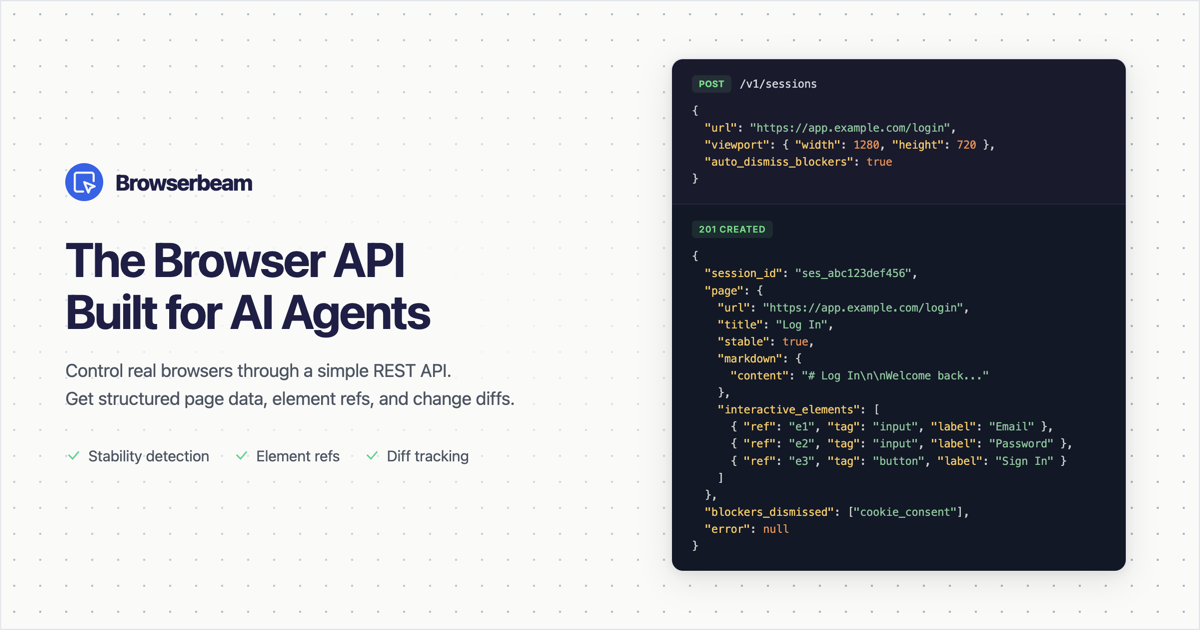
Browserbeam is an AI simulation generator tool. A hosted REST API that puts a real browser behind your AI agent or scraper, returning scoped markdown, stable element refs, form structures and change diffs instead of raw HTML. Plain-language AI selectors are cached per domain, and blockers, stability waits and session cleanup are handled server side.
Browserbeam is a hosted browser automation API aimed at developers building AI agents and scraping pipelines. Instead of driving Puppeteer or Playwright yourself and passing a wall of HTML to a model, you call a REST endpoint that opens a real browser session and returns a compressed, LLM-ready view of the page: markdown content, a list of interactive elements with short stable refs, and grouped form structures. A single POST to create a session handles navigation, viewport setup and automatic dismissal of cookie banners and popups, so common setup work disappears from your codebase. After the session exists, actions run through an act endpoint that takes a list of steps: observe a scoped section, fill a form by field label, extract structured data, scroll through lazy-loaded content, take a screenshot, or close the session. Each step returns fresh page state plus a changes object describing what shifted since the last read, which keeps the token cost of follow-up calls low. A stability signal in every response tells the agent when the page is finished loading, replacing fixed sleeps and networkidle guesses. The scraper-facing feature most teams will notice is AI selectors. In an extract schema you describe fields in plain language using the ai >> prefix (for example "ai >> the price including currency") and the engine resolves and caches a selector per domain, so repeat scrapes of the same site reuse the cached selector at no extra cost. That sidesteps the usual breakage on single page apps with hashed class names. Cookie injection, custom JavaScript execution and smart wait conditions on expressions cover authenticated and framework-heavy sites. It competes with raw Playwright, hosted scraping APIs and general browser-agent frameworks. Browserbeam sits closer to infrastructure than to an autonomous agent product: it gives your own code or LLM a controllable browser and standardizes the payload. Sessions are metered in credits, which makes cost predictable but ties usage to a hosted service rather than a local headless install.
Sign up without a credit card and receive 5,000 free credits to test sessions, observations and extractions before committing to a paid plan.
Learn moreThe homepage advertises a free trial with 5,000 free credits and no credit card required, and points to pricing on the homepage itself. Beyond the credit allowance, per-plan rates are not stated in the available content, so exact tiers need checking on the live page.
Learn moreSupport details are not described on the homepage. Documentation and an integrations index are public, and a cookie policy page exists, but no help desk or contact channel is stated.
Official SDKs are published for Python, TypeScript and Ruby, and an MCP server is available for agent frameworks, alongside a general integrations index on the site.
Learn moreCore capabilities include session creation with automatic blocker dismissal, scoped markdown observation, a stable element registry with short refs, change diffs after each action, stability detection, form filling by field label, AI-resolved extract selectors cached per domain, scroll collection that consolidates lazy-loaded content, screenshots, cookie injection, custom JavaScript execution and expression-based waits.
Learn more AI Angels400+ customizable AI girlfriends for NSFW chat, voice calls, and roleplay
 Candy AIExperience the future of companionship with AI friends who chat, role-play, and connect with you on a human level.
 ourdream.aiA vast AI roleplay platform with millions of characters for chat, images, video and voiceAI Angels400+ customizable AI girlfriends for NSFW chat, voice calls, and roleplayCandy AIExperience the future of companionship with AI friends who chat, role-play, and connect with you on a human level.ourdream.aiA vast AI roleplay platform with millions of characters for chat, images, video and voice