Build It For Me

A WordPress copilot that writes, edits and builds on request

Beginner
Screenshot of Build It For Me, A WordPress copilot that writes, edits and builds on request

What is Build It For Me?

Build It For Me is a WordPress plugin that adds Billy, an AI copilot which reads your site's content and configuration, edits pages and posts on request, generates SEO ready blog content through a Writer Bot, and creates custom interactive widgets without code.

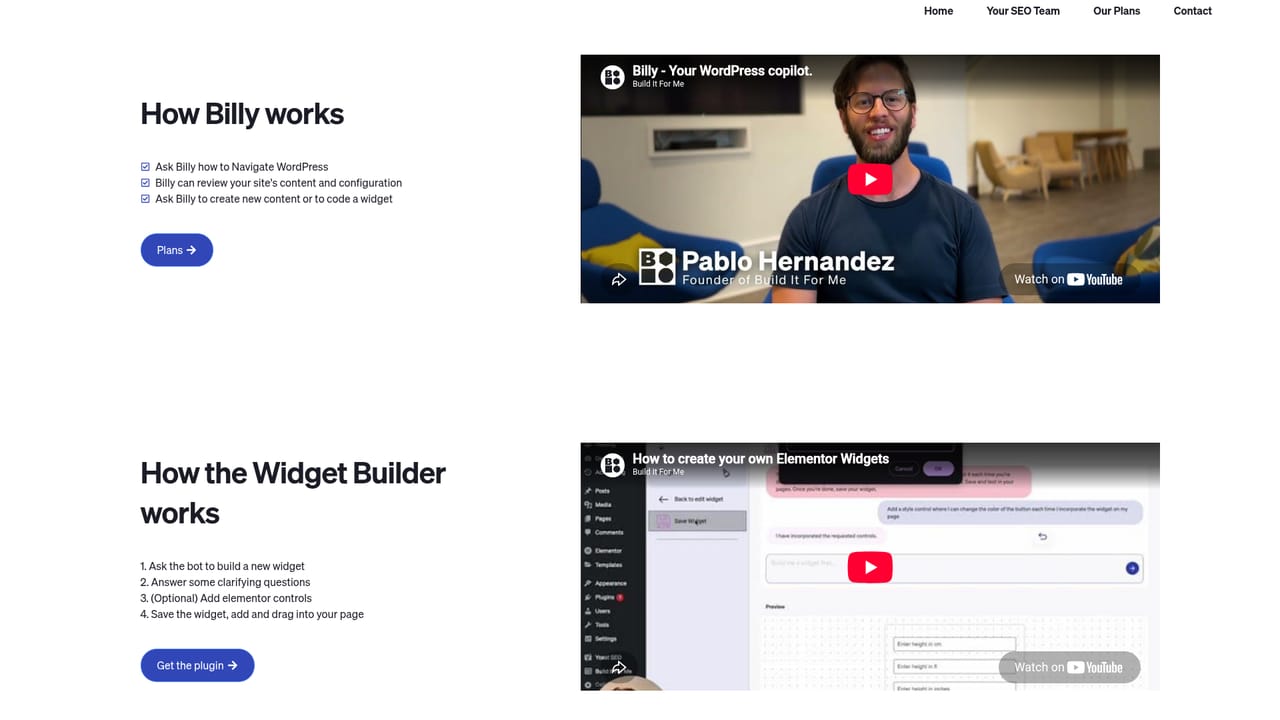
Build It For Me is a WordPress plugin built around an AI assistant called Billy, designed to act less like a chat window and more like a colleague who already knows your site. Billy reads the content and configuration of the WordPress install it is attached to, which lets it answer questions about how the site is set up and carry out changes to pages and posts when asked. The pitch covers three jobs: building a new site, maintaining an existing one, and growing it with search friendly content. Billy does not work alone. The Writer Bot generates blog posts and pages, and can produce one article or several in a single request, each with meta descriptions, image alt text and other on page SEO elements filled in. The Widget Builder handles the interactive side, turning a plain language request into a custom widget for landing pages, which means things like calculators or interactive blocks can be added without writing code. A custom development service sits alongside the plugin for teams that want humans to handle the build. The product is aimed at two fairly different audiences. Beginners get guided instructions for navigating and changing a WordPress site without learning the admin panel in depth. Freelancers, agencies and in house marketers get a faster route through routine content production and small site edits. Because Billy works inside WordPress rather than in a separate dashboard, it fits into an existing publishing workflow, and it competes with general writing assistants on the content side and with page builder plugins on the widget side, though few rivals combine both under one assistant that can actually modify the site. It is worth being clear about scope. This is a WordPress specific tool, so sites on other platforms are out of reach, and the AI works within the permissions and structure of the WordPress install it is connected to. Teams that want a platform agnostic writing assistant or a full site builder with no WordPress dependency should look elsewhere.

How do you use Build It For Me?

  1. 1Compare the plans
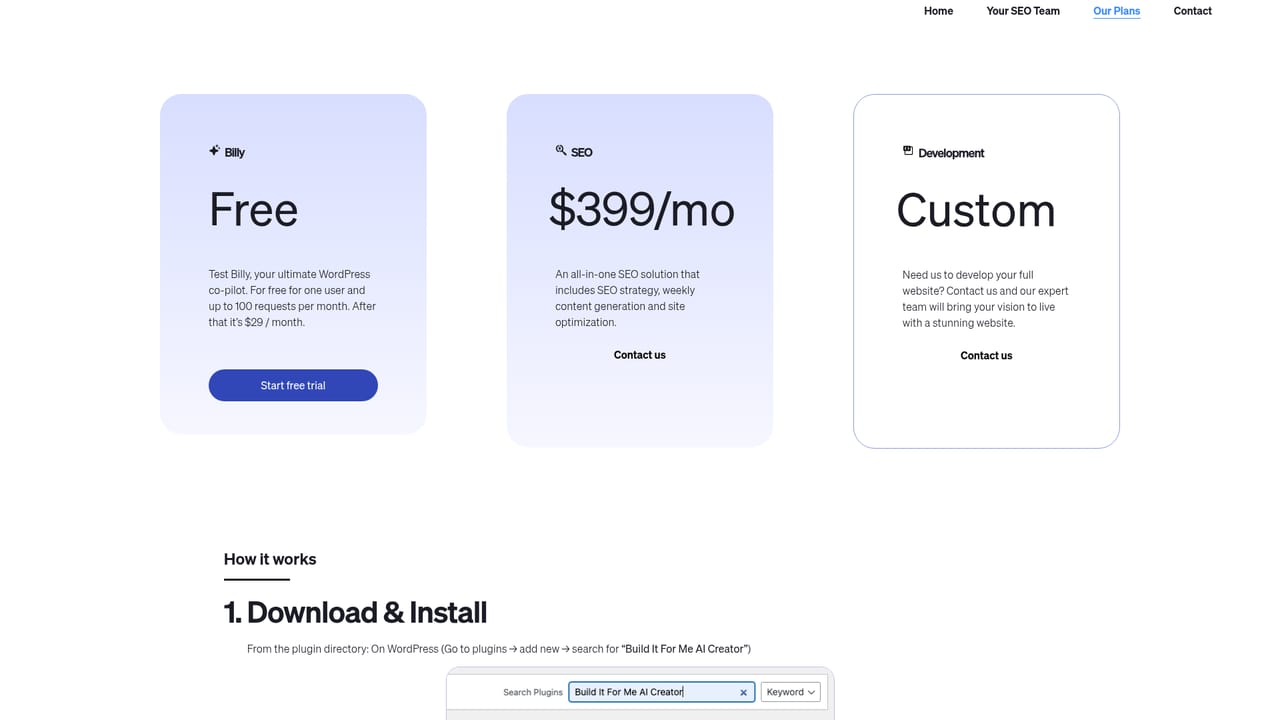
    Review the plan options and pick the tier that matches whether you are building a new site or maintaining an existing one.
    Build It For Me — Compare the plans
  2. 2Install the plugin on your WordPress site
    Add Billy to your WordPress install so the copilot can read your site's content and configuration. Setup happens inside WordPress after signup.
  3. 3See how Billy works
    Read the walkthrough of Billy, the Writer Bot and the Widget Builder to understand which assistant to use for a given task.
    Build It For Me — See how Billy works
  4. 4Ask Billy to change a page or post
    Request an edit in plain language and let Billy apply it to the relevant page or post on your site.
  5. 5Generate SEO content with the Writer Bot
    Ask the Writer Bot for one or several posts, with meta descriptions and image alt text produced alongside the article body.
  6. 6Build an interactive widget
    Describe the widget you want and use the Widget Builder to create it for a landing page without writing code.

Pros and cons

Pros

  • Billy reads the site's own content and configuration, so advice and edits are specific to that WordPress installAI
  • The Writer Bot can produce multiple posts in one request with meta descriptions and image alt text includedAI
  • The Widget Builder turns plain language requests into interactive widgets without codeAI
  • Works inside WordPress, so content and edits land in the existing publishing workflowAI
  • Guidance is pitched at both newcomers and experienced WordPress usersAI

Cons

  • Locked to WordPress, so there is no use for sites on other CMS platformsAI
  • Pricing tiers and plan limits are not visible on the homepage, so cost needs checking before committingAI
  • The three tools (copilot, Writer Bot, Widget Builder) are described briefly, with little detail on output quality controlAI
  • Custom development is a separate contact based service rather than something handled inside the pluginAI
  • No information on the homepage about how AI generated edits are reviewed or rolled backAI

How much does Build It For Me cost?

Features

Billy acts as a WordPress copilot that knows your site's content and configuration, giving tailored guidance and making changes to pages and posts on request. The Writer Bot generates blog posts and pages in batches with meta descriptions, image alt text and other SEO elements. The Widget Builder creates custom interactive widgets for landing pages without code, and a custom development service is available on request.

Learn more

Frequently asked questions about Build It For Me

  • How do you use Build It For Me?
    The walkthrough on this page covers 6 steps: 1. Compare the plans 2. Install the plugin on your WordPress site 3. See how Billy works 4. Ask Billy to change a page or post 5. Generate SEO content with the Writer Bot 6. Build an interactive widget.
  • What platforms does Build It For Me support?
    Build It For Me is available on Web App.
  • What are the limitations of Build It For Me?
    Locked to WordPress, so there is no use for sites on other CMS platforms. Pricing tiers and plan limits are not visible on the homepage, so cost needs checking before committing. The three tools (copilot, Writer Bot, Widget Builder) are described briefly, with little detail on output quality control.

Status

StatusActive
Views0
Outbound clicks0
Added10/21/2026

Platforms

Web App

Pricing

PaidSubscription