Bupsy

A free Mac app giving AI bots a roster, running your own Claude Code or Codex plan.

Intermediate
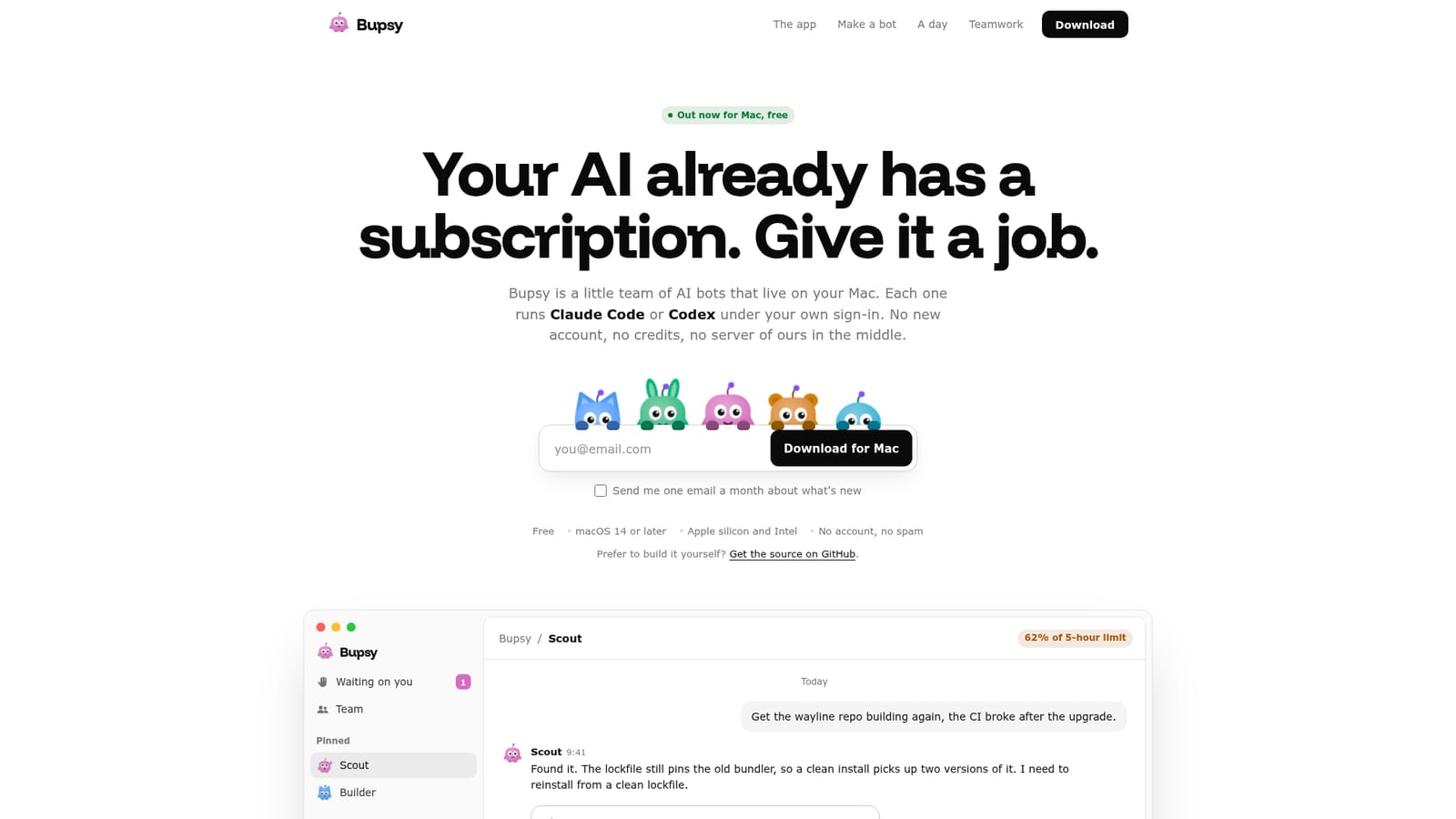
Screenshot of Bupsy, A free Mac app giving AI bots a roster, running your own Claude Code or Codex plan

What is Bupsy?

Bupsy is a free native Mac app that hosts a team of AI bots running on a user's existing Claude Code or Codex subscription, with no accounts, credits, or external servers involved.

Bupsy is a native macOS application that hosts a small team of AI bots, each one running Claude Code or Codex under the user's own sign-in. Rather than introducing a new subscription, credit system, or hosted backend, it sits on top of the AI coding tools a developer already pays for, acting as a local control layer rather than a service of its own. The app is aimed at developers and technical teams who already rely on Claude Code or Codex and want a way to delegate ongoing work, such as fixing a broken build, drafting documentation, or triaging an inbox, without babysitting a terminal or juggling multiple chat windows. Each bot is represented by a simple animated face (eight shapes, eight colours, six moods) that communicates its state at a glance: ready, working, stuck, or waiting on a decision. In practice, bots can be given routines and goals that run on a schedule, checking in each morning or keeping a queue below a certain age. Multiple bots can share a group chat, handing off tasks to each other with @mentions while staying quiet unless addressed, which keeps usage against the underlying plan's quota efficient. Any action beyond reading requires explicit approval, and external services such as Gmail, Notion, Linear, or custom APIs are reached through a separate component called Executor that holds the credentials, which Bupsy itself never sees. Within the broader field of AI coding assistants and agent orchestration tools, Bupsy's position is narrow and specific: it does not compete with cloud-hosted multi-agent platforms that bill by credit, but instead offers a local, account-free front end for CLI tools a user already owns. It is currently Mac only, built in native Swift, and distributed as source-available software under BUSL 1.1, with iPhone, Windows, and Linux versions still in development. It is not affiliated with Anthropic or OpenAI.
How do you use Bupsy?

  1. 1Download the Mac app
    Enter an email address on the homepage to start the download, then open the installer and drag Bupsy into the Applications folder.
    Bupsy — Download the Mac app
  2. 2Sign in to an engine
    Install Claude Code or Codex and sign in once through the CLI. Bupsy detects the sign-in automatically and never stores the credential itself.
  3. 3Make your first bot
    Click the plus icon to create a bot, give it a name, shape, and colour, and answer its question about what job it should handle.
  4. 4Set routines and goals
    Give a bot a recurring instruction, such as a morning briefing or keeping an inbox under a day old, and watch its face change as its status changes.
  5. 5Build a team
    Add several bots to one chat and use @mentions to hand off tasks between them, approving any action that goes beyond simple reading.
  6. 6Connect outside tools
    Link services such as Gmail, Notion, or Linear through Executor, which manages the credentials separately so Bupsy never holds the keys.
    Bupsy — Connect outside tools

Pros and cons

Pros

  • Uses an existing Claude Code or Codex subscription instead of charging separately or billing by creditAI
  • No account creation and no Bupsy-run server; conversations stay as files on the user's own diskAI
  • Bot faces give an at-a-glance status read instead of requiring a dashboard or log fileAI
  • Bots can hand off tasks to each other in group chats and still ask before anything riskyAI
  • Free to download for macOS 14 or later, including Apple silicon and Intel MacsAI

Cons

  • Only available on macOS today; iPhone, Windows, and Linux versions are still in developmentAI
  • Requires an existing paid Claude Code or Codex account, so it adds no value without oneAI
  • Distributed under a source-available BUSL 1.1 license rather than a fully open-source licenseAI
  • Remote access from phone or another Mac depends on setting up Tailscale separatelyAI
  • As an early-stage product, several advertised capabilities (like the iPhone app) are not yet shippedAI

How much does Bupsy cost?

Pricing

Bupsy itself is free to download and run on macOS 14 or later; the homepage states no credits or subscription fee for the app, though it requires an existing paid Claude Code or Codex plan to function.

Learn more

Support

Support appears to be handled through the Contact page; no live chat, phone line, or dedicated help centre is mentioned on the homepage.

Learn more

Integrations

Connects to external tools such as Gmail, Notion, Linear, and other APIs through a separate component called Executor, which holds credentials so Bupsy itself never sees them.

Learn more

Features

Visual bot-status faces, scheduled routines and goals, multi-bot group chats with task handoff, approval prompts for risky actions, slash-command access to Claude Code and Codex commands, and voice interaction using the Mac's built-in voices.

Frequently asked questions about Bupsy

  • How much does Bupsy cost?
    Bupsy itself is free to download and run on macOS 14 or later; the homepage states no credits or subscription fee for the app, though it requires an existing paid Claude Code or Codex plan to function.
  • How do you use Bupsy?
    The walkthrough on this page covers 6 steps: 1. Download the Mac app 2. Sign in to an engine 3. Make your first bot 4. Set routines and goals 5. Build a team 6. Connect outside tools.
  • What platforms does Bupsy support?
    Bupsy is available on MacOS.
  • What does Bupsy integrate with?
    Connects to external tools such as Gmail, Notion, Linear, and other APIs through a separate component called Executor, which holds credentials so Bupsy itself never sees them.
  • What are the limitations of Bupsy?
    Only available on macOS today; iPhone, Windows, and Linux versions are still in development. Requires an existing paid Claude Code or Codex account, so it adds no value without one. Distributed under a source-available BUSL 1.1 license rather than a fully open-source license.

Status

StatusActive
Views0
Outbound clicks0
Added10/13/2026

Platforms

MacOS

Pricing

Free

Creator

@vanshdevx

Twitter / X