What these tools do and who they are for
Newsletter analysis tools sit between a crowded inbox and a decision. Rather than asking a reader to open every issue, they ingest newsletters and return something compact: a single digest of the best material, a read on how competing publications structure and sequence their issues, or a drafting hand for teams that publish their own. The reader is usually a marketer, founder, analyst or content lead who subscribes to far more mail than can be read and wants the useful parts surfaced without manual skimming.
What they replace is the folder of unread issues and the spreadsheet someone keeps to track rival senders. Instead of a weekly manual audit of subject lines, send cadence and topic mix, the analysis happens on the mail as it arrives.
How to choose one
The first question is what you want out of the inbox. If the goal is personal reading load, a digest tool is the fit. If the goal is understanding how other newsletters are built and positioned, a competitive intelligence tool is the fit. If the goal is producing your own newsletter faster, a content agent belongs in the stack.
Then check the mechanics. Does the tool work from a forwarding address, an inbox connection or manual submission, and does that match how your mail is set up? How much of the analysis is summarisation versus comparison across senders, since only the second tells you anything about positioning? Free tiers are common here, so trial the analysis on a real week of mail before committing. Finally, check output format: a digest you read once, a report you share with a team, or drafts you publish all imply different workflows.
Notable tools
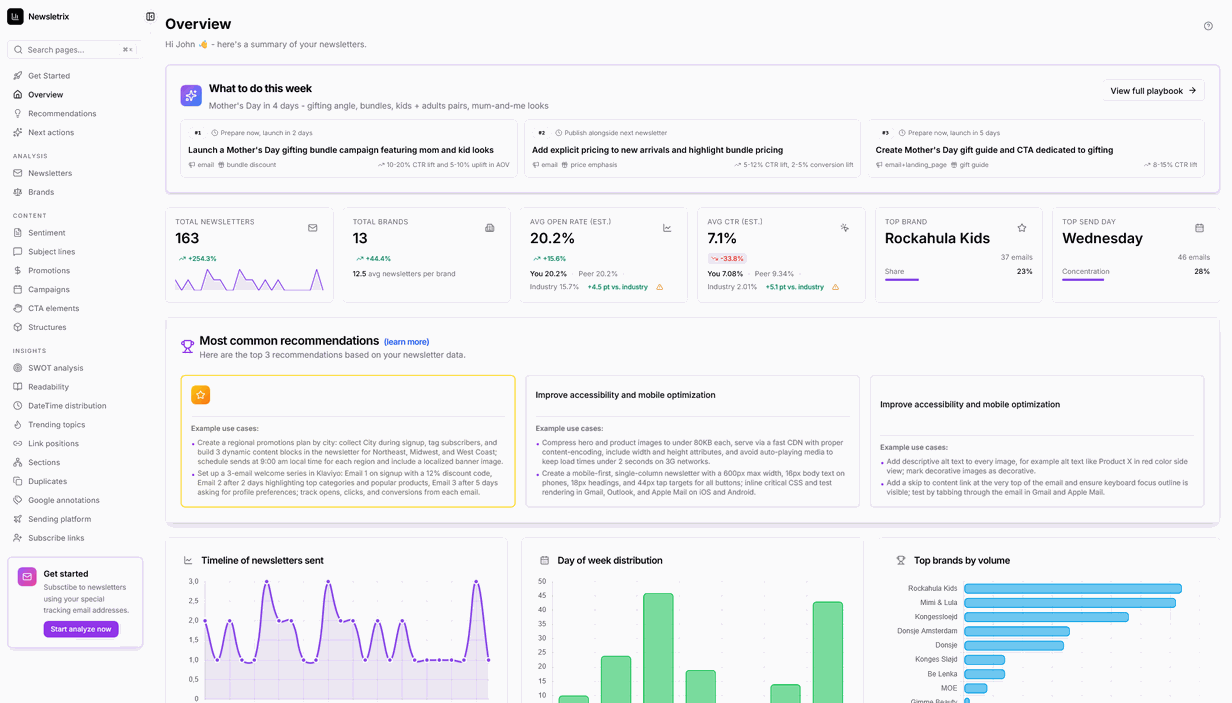
Newsletrix is built for competitive intelligence on newsletter inboxes, using AI analysis to compare what senders are doing. It is the pick when the question is how other publications operate rather than what to read next.
Remy condenses the newsletters you never get around to reading into one AI digest. It suits readers whose problem is volume rather than research.
Mana Digital is an AI agent that plans, writes and schedules B2B content. It sits on the production side, useful once analysis has told you what to publish and when.
Common questions
What is Newsletrix?
Newsletrix is a newsletter analysis tool that applies AI to the newsletters in an inbox to produce competitive intelligence. It is aimed at people who want to understand how other senders structure, position and pace their issues. Free and paid tiers are listed, so the analysis can be tested before any commitment.
Do I need newsletter analysis if I already read my subscriptions?
Reading is not the same as comparing. Manual reading gives you individual issues; analysis gives you patterns across senders, topics and timing. If you publish a newsletter yourself, those patterns are the useful part.
Can these tools help me write my own newsletter?
Some can. Mana Digital handles planning, writing and scheduling of B2B content, so analysis and production can sit in the same workflow. Remy and Newsletrix are aimed at the reading and intelligence side.
Is there a free way to try newsletter analysis?
All three tools listed here offer a free or trial entry point. The practical approach is to run one on a real week of your own mail and judge the output against what you would have picked out yourself.
When to look elsewhere
If the problem is the wording of a message rather than the analysis of incoming mail, the Email Polishing category under the same hub covers tools for tightening drafts. For outreach and inbox management more broadly, the wider Email hub is the better starting point.