Free trial
A free plan is offered permanently with every feature, 2 analyses per week and no credit card. Paid tiers are billed monthly with no contract.
Learn moreCompetitive intelligence for newsletter inboxes, built on AI analysis
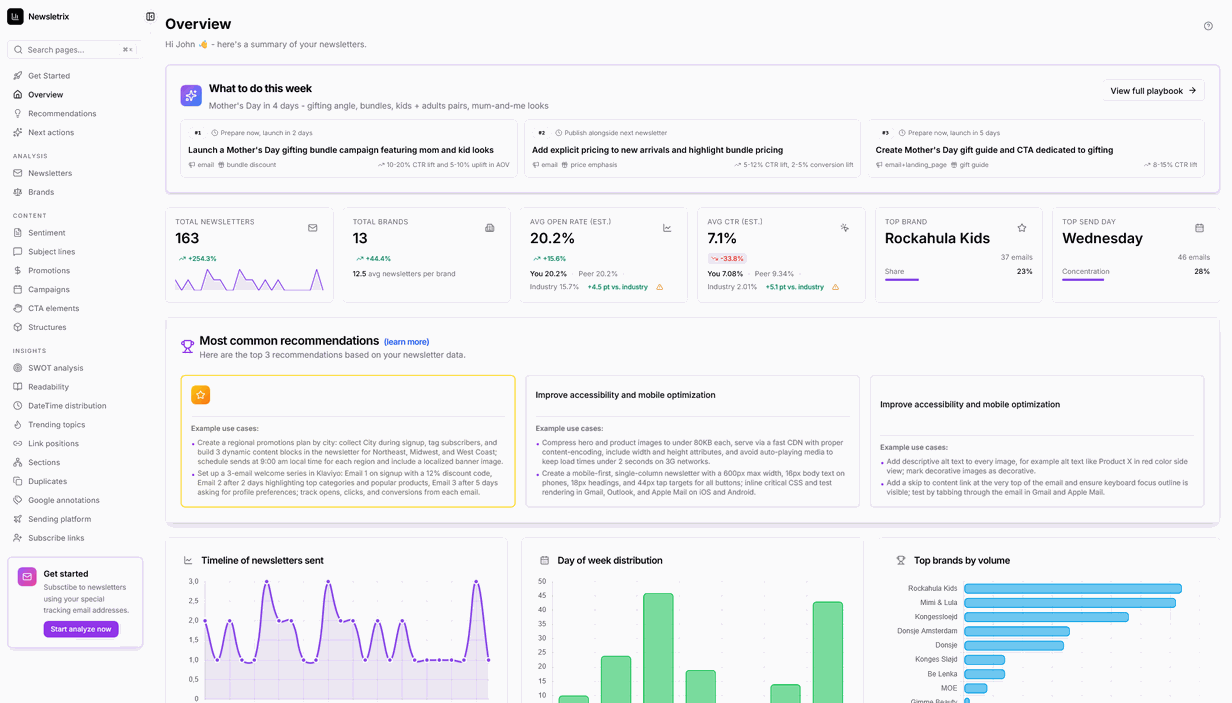
Newsletrix is a newsletter analysis tool. AI dashboard that analyzes competitor newsletters: subject line scoring, send-time heatmaps, CTA and link breakdowns, campaign calendars, SWOT reports and keyword trends, fed by a simple forwarding address instead of integrations.
Newsletrix is a web based analytics dashboard that turns competitor newsletters into a structured intelligence feed. Instead of exporting emails by hand or building spreadsheets, users subscribe to any sender with a unique Newsletrix forwarding address, and every arriving email is parsed automatically for subject lines, calls to action, link structure, readability, sentiment and send timing. A dashboard then presents those signals side by side across all tracked brands. Setup takes minutes and no code or platform integration is required, because anything that lands in an inbox can be analyzed. The product is organized into six modules. Subject line intelligence scores length, emoji use, uppercase, sentiment and keywords, then benchmarks them against estimated open rates. Date and time distribution shows hour by day of week heatmaps so users can find quiet windows in a competitor calendar. Campaign analysis plots seasonal and promotional windows on a timeline with forecast gaps. CTA and link analysis classifies every button and link by intent, placement and destination. A strategic SWOT module produces a strengths, weaknesses, opportunities and threats breakdown per competitor. A content deep dive adds readability scores, keyword clusters and week over week topic shifts. Beyond the dashboard, Newsletrix ships a Model Context Protocol server that connects to ChatGPT, Claude and Cursor. Assistants can query real newsletter data through read only tools with bearer token authentication, scoped per device, and the connector is available on every plan including the free tier. Common use cases include tracking promotional cycles, reverse engineering subject lines that earn opens, and building board ready competitive summaries. Newsletrix competes less with email marketing platforms and more with manual research. It sits alongside the sending tool a team already uses, acting as the listening layer rather than the composer. Newsletter creators, in house marketing teams, agencies managing several clients, consultants and researchers are the intended audiences. The tradeoff worth noting is scope: it analyzes what competitors send, not how your own subscribers behave, so open and click figures shown for rivals are estimates rather than first party measurements.
A free plan is offered permanently with every feature, 2 analyses per week and no credit card. Paid tiers are billed monthly with no contract.
Learn moreFree $0 with 2 analyses per week and 1 tracking address. Starter $9/mo (5 per week), Professional $29/mo (15 per week), Business $69/mo (50 per week). A limited early adopter plan is listed at $45/mo. Every plan includes all features, month to month, cancel anytime.
Learn moreEmail support on the Starter plan, priority support on Professional, and 24/7 priority support on Business and early adopter plans. A demo can be booked through the contact page.
Learn moreNo connectors required: any email platform works, including Substack, Beehiiv, Mailchimp, ConvertKit, Klaviyo, SendGrid and HubSpot. An MCP connector links ChatGPT, Claude and Cursor to your analytics.
Learn moreSix modules cover subject line scoring (length, emoji, sentiment, keywords), send-time heatmaps, campaign calendars and forecast windows, CTA and link classification, SWOT reports per competitor, and content readability with keyword clustering. ESP detection and a spam content score run automatically, and a read-only MCP server exposes the data to external assistants.
Learn more AI Angels400+ customizable AI girlfriends for NSFW chat, voice calls, and roleplay
 Candy AIExperience the future of companionship with AI friends who chat, role-play, and connect with you on a human level.
 ourdream.aiA vast AI roleplay platform with millions of characters for chat, images, video and voiceAI Angels400+ customizable AI girlfriends for NSFW chat, voice calls, and roleplayCandy AIExperience the future of companionship with AI friends who chat, role-play, and connect with you on a human level.ourdream.aiA vast AI roleplay platform with millions of characters for chat, images, video and voice


