
Chatbot App

One chat window for 35+ frontier AI models, plus images and documents.

Beginner

What is Chatbot App?

Chatbot App is an AI chat bot tool. A single chat interface bundling 35+ models from OpenAI, Anthropic, Google, DeepSeek and xAI, alongside image generators, document chat, web search and speech-to-text, with one monthly subscription in place of several.

Chatbot App is a browser-based AI chat client that puts more than 35 language and image models from several providers behind a single interface. Instead of committing to one vendor, users pick from OpenAI GPT tiers, Anthropic Claude Sonnet and Opus models, Google Gemini Flash, DeepSeek V4 Flash and Pro, xAI Grok, plus image generators such as FLUX 1.1 Pro and GPT Image 2.0. The pitch is breadth: the same account covers reasoning, coding help, research, writing and visual work, and the homepage frames it as a way to consolidate several separate AI subscriptions into one bill. The workflow is deliberately plain. You open a chat, choose a model from the store, and type. Mid-conversation you can swap models to compare answers to the same question, which the site positions as a way to cross-check facts and reduce hallucination. Advanced models are documented by their intended use: Sol for hard coding and long-running agents, Luna for speed, Terra as the balanced default, Opus 5 for enterprise-grade reasoning, and the DeepSeek V4 pair for technical work needing open weights or long context. Documents can be uploaded in over 10 file types and queried, summarised or mined for information, and built-in web search keeps responses tied to current material. Practical extras round out the package: speech-to-text input, voice chat, multilingual handling across 100+ languages, and persistent chat history so models can pick up earlier threads. Because everything runs in a browser, chats sync across desktop, tablet and phone without installation. The tool suits generalists and small teams who want many models without managing many accounts: students, teachers, job seekers, researchers and solo operators. It competes less on depth of any single model and more on convenience and cost, so people with specialised needs may still keep a dedicated subscription alongside it.

How do you use Chatbot App?

  1. 1Create your account
    Register with an email address on the sign-up page to reach the chat workspace. Signing up is the entry point before any model selection or document upload is possible.
  2. 2Pick a model from the AI Store
    Open the model picker and browse the catalog by category. Choose a GPT, Claude, Gemini, DeepSeek or image model that matches the task at hand.
  3. 3Start a conversation and switch models
    Ask your question, then resend it to a second model in the same chat to compare answers side by side. This is the quickest way to spot weak or inconsistent output.
  4. 4Upload a document to query
    Attach a PDF or other supported file and ask for a summary, specific facts or an explanation. The chat keeps the document available for follow-up questions.
  5. 5Turn on web search or voice input
    Enable web search when the answer depends on current information, or use voice chat and speech-to-text for hands-free sessions.
  6. 6Review plan limits before upgrading
    Check the pricing page for the current monthly rate and plan inclusions, and read the fair usage and refund policies so there are no surprises later.

Pros and cons

Pros

  • Access to a wide spread of frontier models from competing providers under one loginAI
  • Model switching inside a conversation makes answer comparison and fact-checking practicalAI
  • Document upload and chat across more than 10 file types, with summaries and extractionAI
  • Built-in web search and speech-to-text cover research and hands-free inputAI
  • Browser-based with synced history, so nothing needs installing on each deviceAI

Cons

  • Homepage model names and version numbers read like marketing placeholders, so verify what you actually get before payingAI
  • No native desktop or mobile apps; the whole experience depends on a browser tabAI
  • Feature depth per model is not documented on the homepage, so niche or API-level workflows may be limitedAI
  • User reviews on the site are unsourced and cannot be independently checkedAI
  • Fair usage and refund terms sit on separate pages and can restrict heavy users in ways the sales copy does not highlightAI

How much does Chatbot App cost?

Pricing

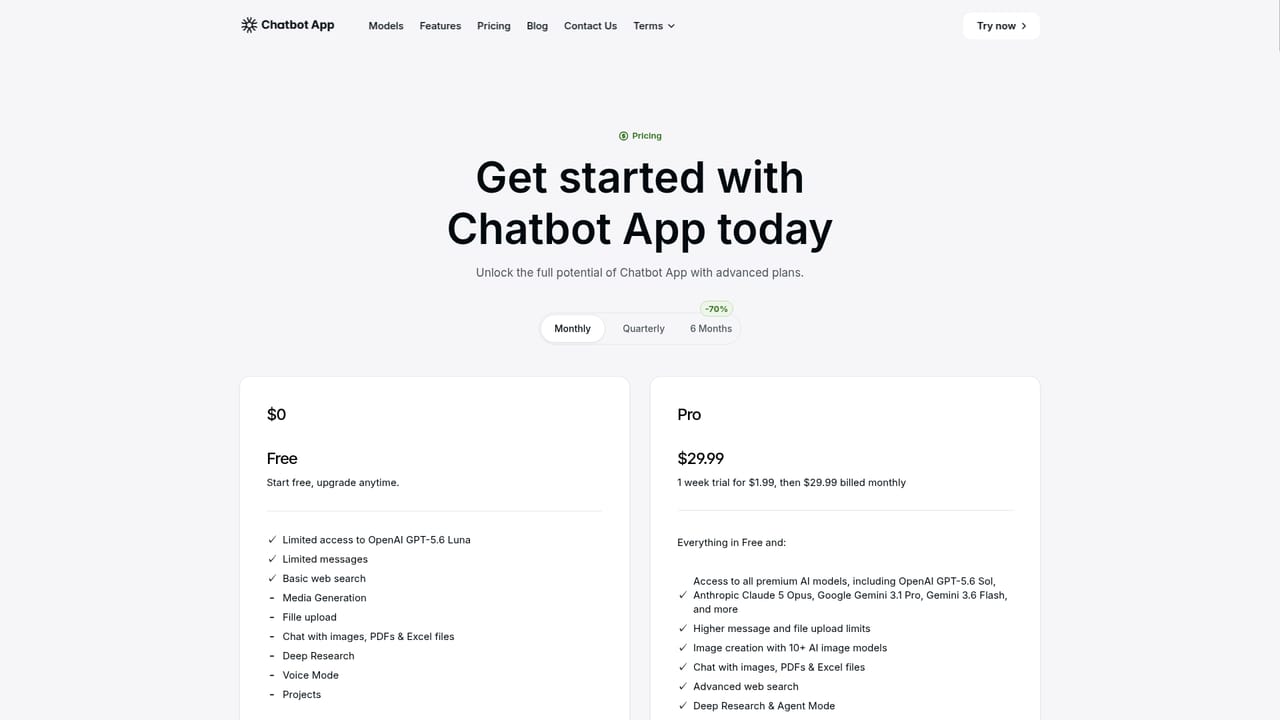
The homepage states that a Pro plan costs $29.99 per month and bundles every model and bot in the AI Store, contrasted with roughly $20 per month for each separate provider subscription. Current plan details and any tiers should be confirmed on the pricing page.

Learn more

Support

A contact page is provided for reaching the team, and separate pages set out fair usage and refund rules. No live chat, phone line or help centre is described on the homepage.

Learn more

Features

Switching between 35+ language and image models in one chat, with documented tiers for coding, research and agent work. Also includes document chat across 10+ file types, real-time web search, speech-to-text, voice chat, support for 100+ languages, persistent chat history, and synced sessions in any browser on desktop, tablet or phone.

Frequently asked questions about Chatbot App

  • How much does Chatbot App cost?
    The homepage states that a Pro plan costs $29.99 per month and bundles every model and bot in the AI Store, contrasted with roughly $20 per month for each separate provider subscription. Current plan details and any tiers should be confirmed on the pricing page.
  • How do you use Chatbot App?
    The walkthrough on this page covers 6 steps: 1. Create your account 2. Pick a model from the AI Store 3. Start a conversation and switch models 4. Upload a document to query 5. Turn on web search or voice input 6. Review plan limits before upgrading.
  • What platforms does Chatbot App support?
    Chatbot App is available on Web App.
  • What are the limitations of Chatbot App?
    Homepage model names and version numbers read like marketing placeholders, so verify what you actually get before paying. No native desktop or mobile apps; the whole experience depends on a browser tab. Feature depth per model is not documented on the homepage, so niche or API-level workflows may be limited.

Status

StatusActive
Views0
Outbound clicks0
Added10/21/2026

Platforms

Web App

Pricing

SubscriptionPaid