Free trial
New customers get 7 days free, then the plan renews at the regular price unless canceled. A repeat trial is not offered to anyone who has already tried Co-Producer.
Learn moreA plugin that listens to your DAW session and finds samples that fit
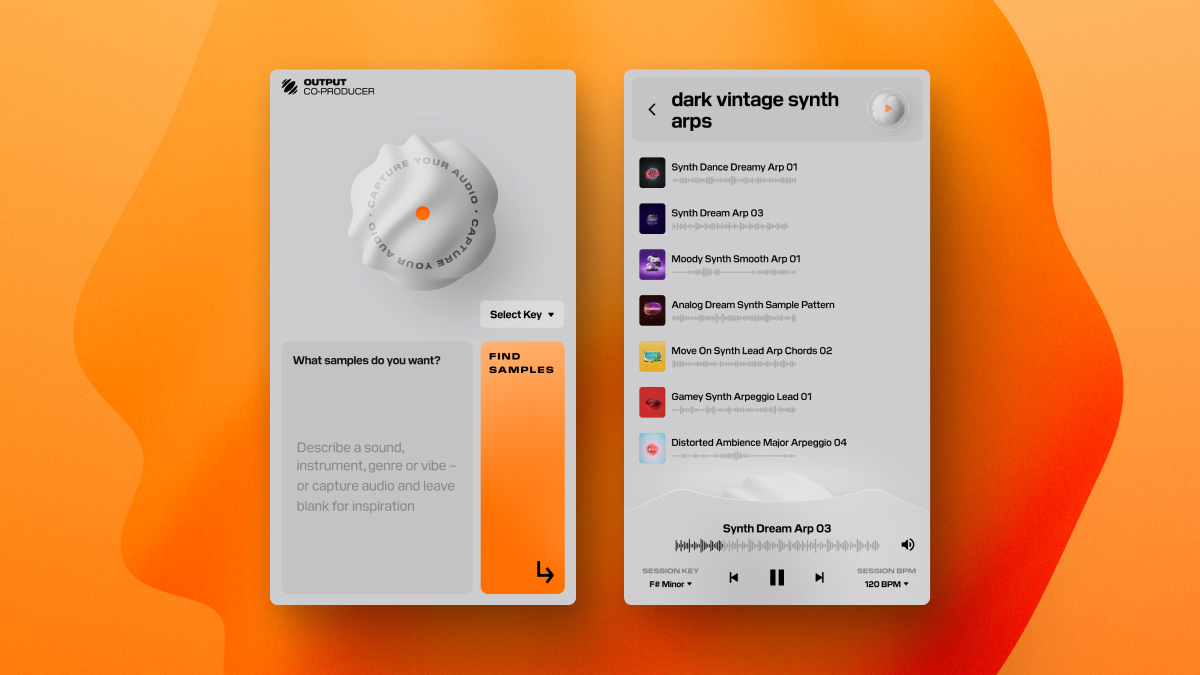
Co-Producer is an Output VST plugin that listens to a DAW session and recommends royalty-free samples matched to its key, tempo and harmony, with drag-and-drop placement and an ethically trained Re-imagine variation feature.
Co-Producer is a VST plugin from Output that analyzes the music in a DAW session and suggests samples that match its harmony, rhythm and complexity. Instead of scrolling through a large sample library, a producer places the plugin on the master track, plays the project, and receives candidates already matched to the session's key and tempo. The samples come from Output's own catalog and selected partner libraries, built by sound designers and producers, and all are royalty-free. The workflow is built around staying inside the DAW. Suggestions can be auditioned in the context of the running song, with playback synced to the session key and tempo, and key detection is automatic. A chosen sample is dragged straight into the project without leaving the session. A separate Re-imagine function takes any sample and produces new variations, which the company says come from generative models trained on royalty-free, musician-made and Creative Commons material. Output also states that the plugin does not learn from, train on or generate audio based on the music it analyzes, and that it uses language models and audio analysis only to select matches. Co-Producer is aimed at beatmakers, songwriters and producers who want a quicker route to loops, one-shots and textures without handing creative decisions to an algorithm. It works with major DAWs on Mac and Windows, and it needs active audio input to analyze a session. It also pairs with Output's Arcade, where dragged samples can be sliced and turned into playable instruments. Access is subscription-based: a standalone Co-Producer plan, or the Output One bundle that adds the company's other plugins and expansions. A seven-day trial is offered to new customers. Among alternatives, it sits between conventional sample marketplaces, which rely on manual search and tagging, and fully generative music tools. Its closed catalog is the trade-off: results are limited to Output's collection and partners rather than the open web or a user's own library.
New customers get 7 days free, then the plan renews at the regular price unless canceled. A repeat trial is not offered to anyone who has already tried Co-Producer.
Learn moreCo-Producer costs $9.99 per month billed monthly. Output One, which adds Arcade, Creator, Portal FX, Thermal FX, Movement FX and all FX expansions, is $14.99 monthly or $9.99 per month billed $119.99 yearly. Cancel anytime.
Learn moreOutput runs a support knowledge base with a Co-Producer user guide and system requirements article. Plans can be managed and canceled online through your account.
Learn moreWorks as a VST plugin in all major DAWs on Mac and PC, and drag and drop connects its samples to Output's Arcade plugin. Output One bundles other Output plugins.
Learn moreAnalyzes harmony, rhythm and complexity to recommend samples, syncs previews to session key and tempo with auto key detection, supports drag and drop inside the DAW, offers Re-imagine variations, and pairs with Arcade for slicing.
Learn more AI Angels400+ customizable AI girlfriends for NSFW chat, voice calls, and roleplay
 Candy AIExperience the future of companionship with AI friends who chat, role-play, and connect with you on a human level.
 ourdream.aiA vast AI roleplay platform with millions of characters for chat, images, video and voiceAI Angels400+ customizable AI girlfriends for NSFW chat, voice calls, and roleplayCandy AIExperience the future of companionship with AI friends who chat, role-play, and connect with you on a human level.ourdream.aiA vast AI roleplay platform with millions of characters for chat, images, video and voice