Free trial
The FAQ says there is no free trial and billing is pay as you go on credits, though the pricing section also mentions a free try with 150 credits. The Free plan is preview only.
Learn moreOne canvas for Veo, Kling and Wan video generation
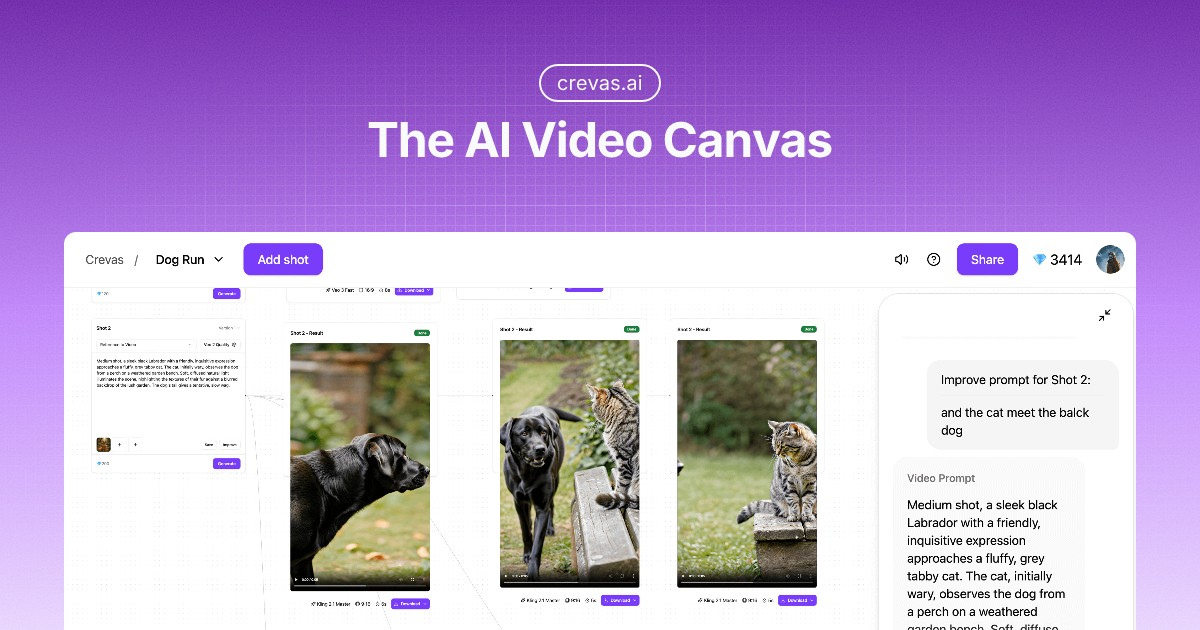
Crevas AI is a web canvas that combines Veo, Kling, Wan and other video models with script-to-shot-list conversion, an AI prompt chat and live collaboration, sold through monthly credit plans.
Crevas AI is a browser-based canvas that gathers several AI video and image models in a single workspace. Instead of moving between separate generators and a chat assistant, a creator writes a script, turns it into a shot list and prompts, and runs generations from the same project. The models named on the site include Veo 3 and 3.1, Sora 2, Kling 2.5 Turbo, Wan 2.5 and the Nano Banana image model, with the vendor stating that more providers are being added. The workflow is built around three ideas. Parallel generation lets several models or variations run side by side, so visual styles can be compared without exporting between tools. A prompt assistant, reached through an AI chat inside the canvas, helps draft and rewrite prompts. Visual collaboration lets teammates co-edit scripts and prompts live, while clients can open a shared project link and watch previews in the browser without downloading files, with permission levels separating editors from viewers. Character consistency is handled through a Character feature for Veo and through reference images and first frame or last frame generation for Kling. Output covers 16:9, 9:16 and 1:1 aspect ratios, with resolutions from 720p up to upscaled 4K. The site positions the product for independent filmmakers, content creators, marketing teams and studios or agencies, and states that exports can be used commercially in films, ads and social content. Within the market, Crevas competes less on raw model quality than on orchestration. Single-model products such as Google Flow offer one generator, whereas Crevas sells access to many models under one subscription with credits. That suits people who already compare outputs across tools and want project organization, version control and sharing in one place. Users who need only one model, or who want deep timeline editing, may find a dedicated generator or a conventional editor a closer match.
The FAQ says there is no free trial and billing is pay as you go on credits, though the pricing section also mentions a free try with 150 credits. The Free plan is preview only.
Learn moreFree plan at $0 with preview only. Crevas Plus is $29/month with 1,000 credits, 720p and 1080p export and 3 projects. Crevas Pro is $199/month with 10,000 credits, upscaled 4K export and unlimited projects. Enterprise is custom, with custom credits and seats.
Learn moreEnterprise customers get priority support, and sales inquiries go by email. The homepage does not describe a help centre or support channels for other plans.
Works with Veo 3 and 3.1, Sora 2, Kling 2.5 Turbo, Wan 2.5 and the Nano Banana image model, covering text-to-video and image-to-video. The vendor says it keeps adding providers.
Parallel generation across models, script to shot list and prompt conversion, an AI chat prompt assistant, real-time collaboration with version control, shareable browser previews, character consistency tools, multiple aspect ratios and exports up to upscaled 4K.
 AI Angels400+ customizable AI girlfriends for NSFW chat, voice calls, and roleplay
 Candy AIExperience the future of companionship with AI friends who chat, role-play, and connect with you on a human level.
 ourdream.aiA vast AI roleplay platform with millions of characters for chat, images, video and voiceAI Angels400+ customizable AI girlfriends for NSFW chat, voice calls, and roleplayCandy AIExperience the future of companionship with AI friends who chat, role-play, and connect with you on a human level.ourdream.aiA vast AI roleplay platform with millions of characters for chat, images, video and voice