Eazy Response

Emoji-based micro surveys that turn visitor reactions into product insight

Beginner
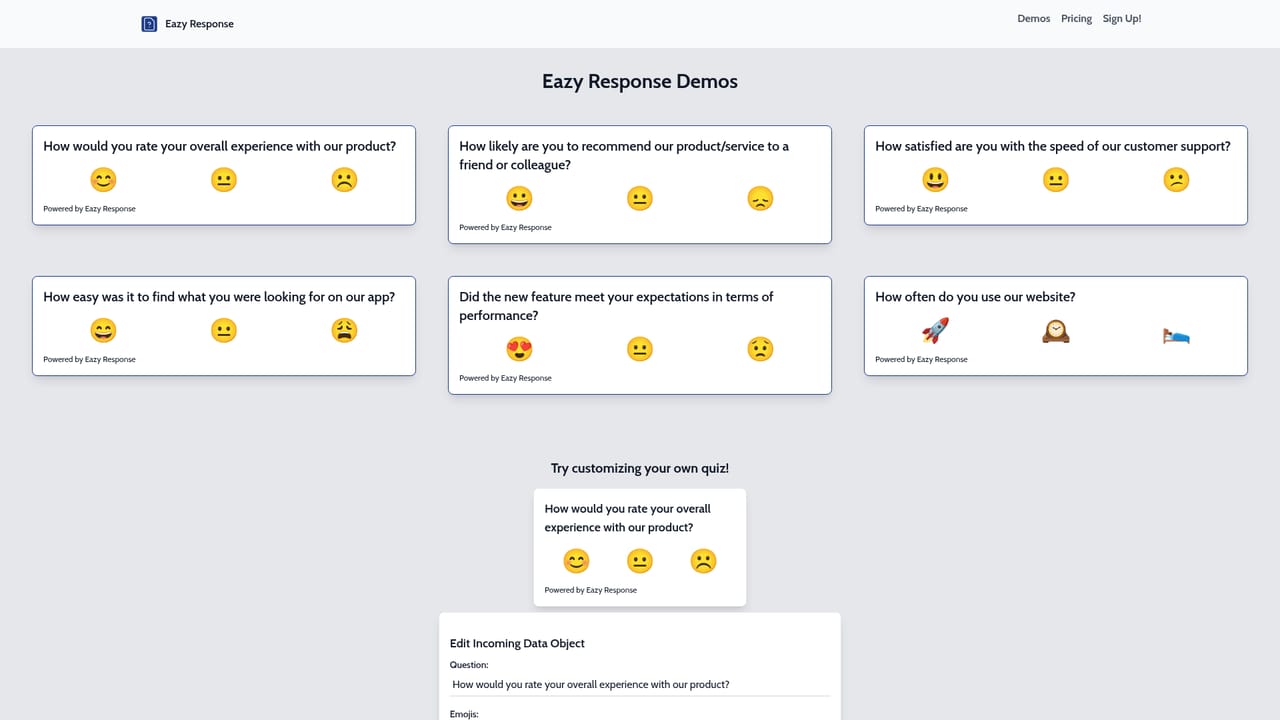
Screenshot of Eazy Response, Emoji-based micro surveys that turn visitor reactions into product insight

What is Eazy Response?

Eazy Response is a no-code feedback widget that asks one custom question per quiz and offers visitors three emoji answers. A one line script installs on any site with head tag access, up to five quizzes run concurrently, and AI-assisted analytics help product owners interpret responses.

Eazy Response is a lightweight feedback widget for product owners who want opinions from actual visitors rather than from a test panel. Instead of long questionnaires, each survey presents a single custom question with three emoji answer choices, so a shopper or app user can respond in a second without leaving the page. The premise is simple: people already read and send emoji daily, so a smiling, neutral or frowning face carries meaning faster than a five point rating scale. Setup is deliberately minimal. An experiment is created in the dashboard, the tool generates a one line snippet, and that snippet is pasted into the head tag of any page. The homepage names Shopify, WordPress, Next.js and plain HTML and JavaScript sites as common targets, and states that anything with head tag access will work. A single account can run up to five quizzes at the same time, each with its own question, which suits teams testing several pages or several product ideas concurrently. Responses land in a quiz analytics view that reports on the answers collected. An AI layer sits on top of that data for deeper analysis of what users are saying, aimed at teams that want interpretation rather than raw tallies. The stated purpose is to steer roadmap decisions: find out whether a new button, feature or service meets expectations before more engineering time is committed. It fits best as an early stage replacement for heavyweight survey platforms. There are no logic branches, no open text fields and no panel recruitment here, so research teams needing segmenting and statistical depth will outgrow it. For founders and product managers who want a quick signal on a live page, the trade is fewer question types for almost no setup friction. Pricing on the homepage lists a single Key Responses tier at 19.99 pounds per month, with annual billing saving 20 percent, no long term contract and cancellation at any time. Broader use cases appear in the demo gallery.

How do you use Eazy Response?

  1. 1Review the demo questions
    Open the demo gallery to see the question formats and emoji answer sets in use. Confirm the single question, three choice model matches the feedback you need.
    Eazy Response — Review the demo questions
  2. 2Sign up and create an experiment
    Register for an account and start a new experiment. Each experiment holds one question, so decide which page or feature you are evaluating first.
  3. 3Write the question and pick a page
    Enter a direct question such as how useful a new button is or how likely a visitor is to recommend a feature. Choose where the quiz should appear.
  4. 4Copy the generated code
    Eazy Response produces a one line snippet for the experiment. Copy it exactly as generated, since it carries the identifier that links responses back to the quiz.
  5. 5Paste it into the head tag
    Add the snippet inside the head tag of the target page. On Shopify or WordPress this usually means the theme settings; on Next.js or plain HTML it goes in the document head.
  6. 6Read the quiz analytics
    Once responses arrive, open the analytics view for a clear tally of answers and let the AI analysis surface the underlying pattern before you commit to roadmap changes.

Pros and cons

Pros

  • Installation is a single script line pasted into the head tag, so live feedback can be collected within minutesAI
  • Emoji answer choices lower the effort of responding, which suits casual site visitors who skip traditional surveysAI
  • Only one question per quiz, which keeps each experiment focused on a specific feature or pageAI
  • Runs up to five experiments at once, enough for teams testing several pages in parallelAI
  • Works on Shopify, WordPress, Next.js and any platform where the head tag is editableAI

Cons

  • Three emoji options per question cap the nuance you can capture, with no open text, branching logic or multi question flowsAI
  • Fixed at five concurrent quizzes on the listed plan, which is tight for larger sites with many pages to testAI
  • Only one price tier is published, so there is no lighter entry plan for solo founders or heavier tier for research teamsAI
  • Response rates depend on widget placement and traffic volume, and nothing on the homepage describes targeting rules or sampling controlsAI
  • No mention of an API or data export, so pulling raw responses into a warehouse or BI tool may not be possibleAI

How much does Eazy Response cost?

Pricing

One published plan, Key Responses, at 19.99 pounds per month with annual billing saving 20 percent. It includes basic experiments, AI powered analytics, up to five concurrent experiments and access to new features. No long term contract, cancel anytime.

Learn more

Integrations

Works with Shopify, WordPress, Next.js and HTML and JavaScript websites, and with any platform that allows editing of the head tag.

Features

Custom single question quizzes answered with three emoji choices, embedded on any page through a one line head tag script. Accounts can run up to five quizzes at once, with per quiz analytics and AI assisted analysis of the collected responses.

Frequently asked questions about Eazy Response

  • How much does Eazy Response cost?
    One published plan, Key Responses, at 19.99 pounds per month with annual billing saving 20 percent. It includes basic experiments, AI powered analytics, up to five concurrent experiments and access to new features. No long term contract, cancel anytime.
  • How do you use Eazy Response?
    The walkthrough on this page covers 6 steps: 1. Review the demo questions 2. Sign up and create an experiment 3. Write the question and pick a page 4. Copy the generated code 5. Paste it into the head tag 6. Read the quiz analytics.
  • What platforms does Eazy Response support?
    Eazy Response is available on Web App.
  • What does Eazy Response integrate with?
    Works with Shopify, WordPress, Next.js and HTML and JavaScript websites, and with any platform that allows editing of the head tag.
  • What are the limitations of Eazy Response?
    Three emoji options per question cap the nuance you can capture, with no open text, branching logic or multi question flows. Fixed at five concurrent quizzes on the listed plan, which is tight for larger sites with many pages to test. Only one price tier is published, so there is no lighter entry plan for solo founders or heavier tier for research teams.

Status

StatusActive
Views0
Outbound clicks0
Added10/21/2026

Platforms

Web App

Pricing

PaidSubscription