Free trial
No time limited trial is offered. A permanent free plan lets you generate, save and manage music and download preview files, but licensed downloads require a paid subscription.
Learn moreAI music generator for royalty free tracks you can license

Ecrett Music generates royalty free background music from Scene, Mood and Genre tags, then lets you swap instruments and rearrange sections without any music theory. Built for game developers, video creators and podcasters who need licensable tracks quickly.
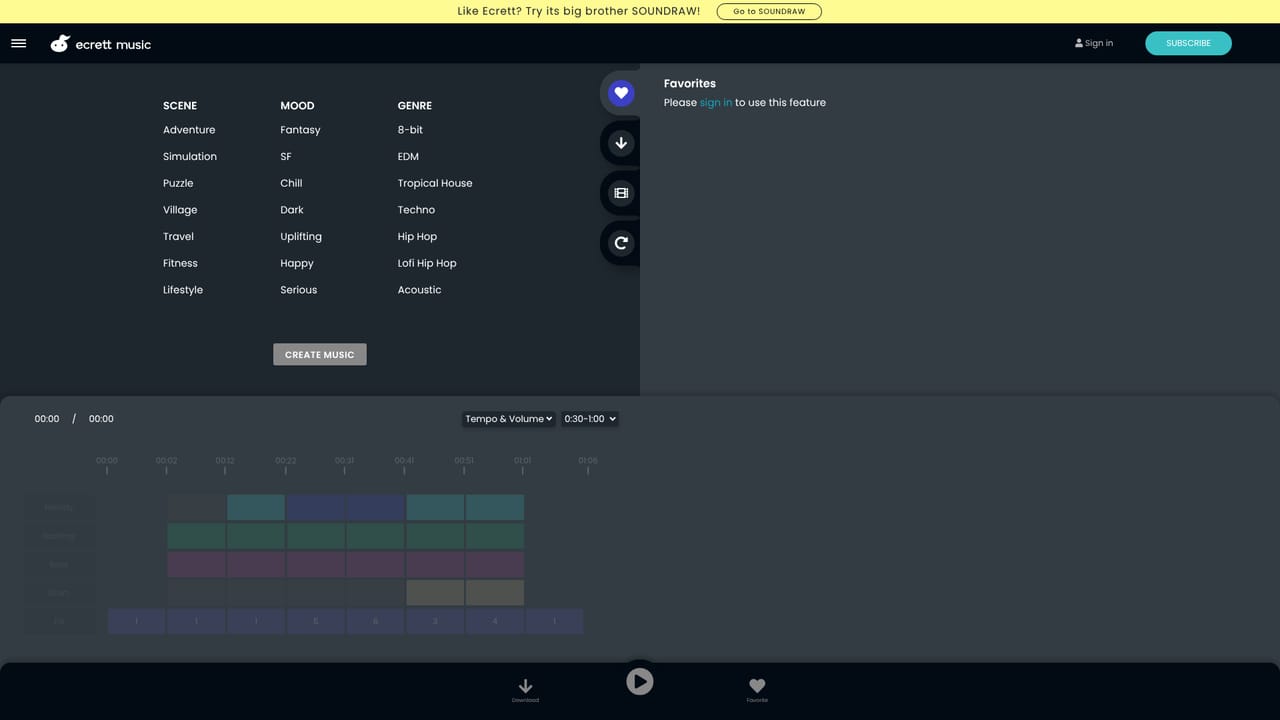
Ecrett Music is a browser based music generator built for people who need background tracks for games, videos and podcasts but do not read or write music. The premise is deliberately narrow: instead of assembling a loop library or operating a full digital audio workstation, you pick a few descriptive tags and let the system compose a track for you. Every generation is different, so repeating the same setting produces a fresh result rather than the same file twice. The workflow has three stages. You begin by choosing at least one option from three buckets, Scene, Mood and Genre, then press Create Music. The generated piece opens in a simple editor where each layer can be swapped: melody, backing, bass and drums are adjusted independently through clicks rather than menus of audio parameters. Structure works the same way, with sections switched on or off to shorten or reshape the arrangement. A management area on the right keeps favorites, a download history, the last ten generated tracks and an upload slot for video, so you can check a track against the footage it will sit under. Licensing is the real product here, and it is why the tool exists alongside general purpose music generators. Paid tiers cover commercial projects, YouTube monetization and unlimited downloads, split between an individual license and a company license. The terms page is unusually explicit about what is allowed: music can be edited into and monetized as part of a game, video or podcast, but it cannot be redistributed as a standalone music file, remixed for release, or sublicensed on its own. Content that is harmful, sexual or hateful is off limits. The free tier is a preview tier. It lets you create, save and manage music and download preview files, which is enough to judge whether the generator suits your channel before paying. Those who need more control over composition or a larger catalogue may prefer a broader generative music platform; Ecrett's case rests on speed, a low price and a license written for creators rather than musicians.
No time limited trial is offered. A permanent free plan lets you generate, save and manage music and download preview files, but licensed downloads require a paid subscription.
Learn moreThree tiers. Free at $0.00 allows preview downloads and saved music. Individual is $4.99 per month billed annually (38 percent saving) and covers unlimited royalty free downloads, commercial use and YouTube monetization under a personal license. Business is $14.99 per month billed annually (40 percent saving) with the same features under a company license.
Learn moreSupport runs through email at info@ecrettmusic.com, and the team invites feedback directly since the product is still in development.
Tag based generation from Scene, Mood and Genre selections, with a fresh result on every run. An editor for swapping melody, backing, bass and drum instruments and toggling arrangement sections. Management tabs for favorites, download history, creation history of the last ten tracks and video preview. Royalty free licensing for games, monetized video, podcasts and ads.
 AI Angels400+ customizable AI girlfriends for NSFW chat, voice calls, and roleplay
 Candy AIExperience the future of companionship with AI friends who chat, role-play, and connect with you on a human level.
 ourdream.aiA vast AI roleplay platform with millions of characters for chat, images, video and voiceAI Angels400+ customizable AI girlfriends for NSFW chat, voice calls, and roleplayCandy AIExperience the future of companionship with AI friends who chat, role-play, and connect with you on a human level.ourdream.aiA vast AI roleplay platform with millions of characters for chat, images, video and voice


