FlashVSR

Diffusion-based AI upscaling that turns compressed video into clean 4K output

Beginner API
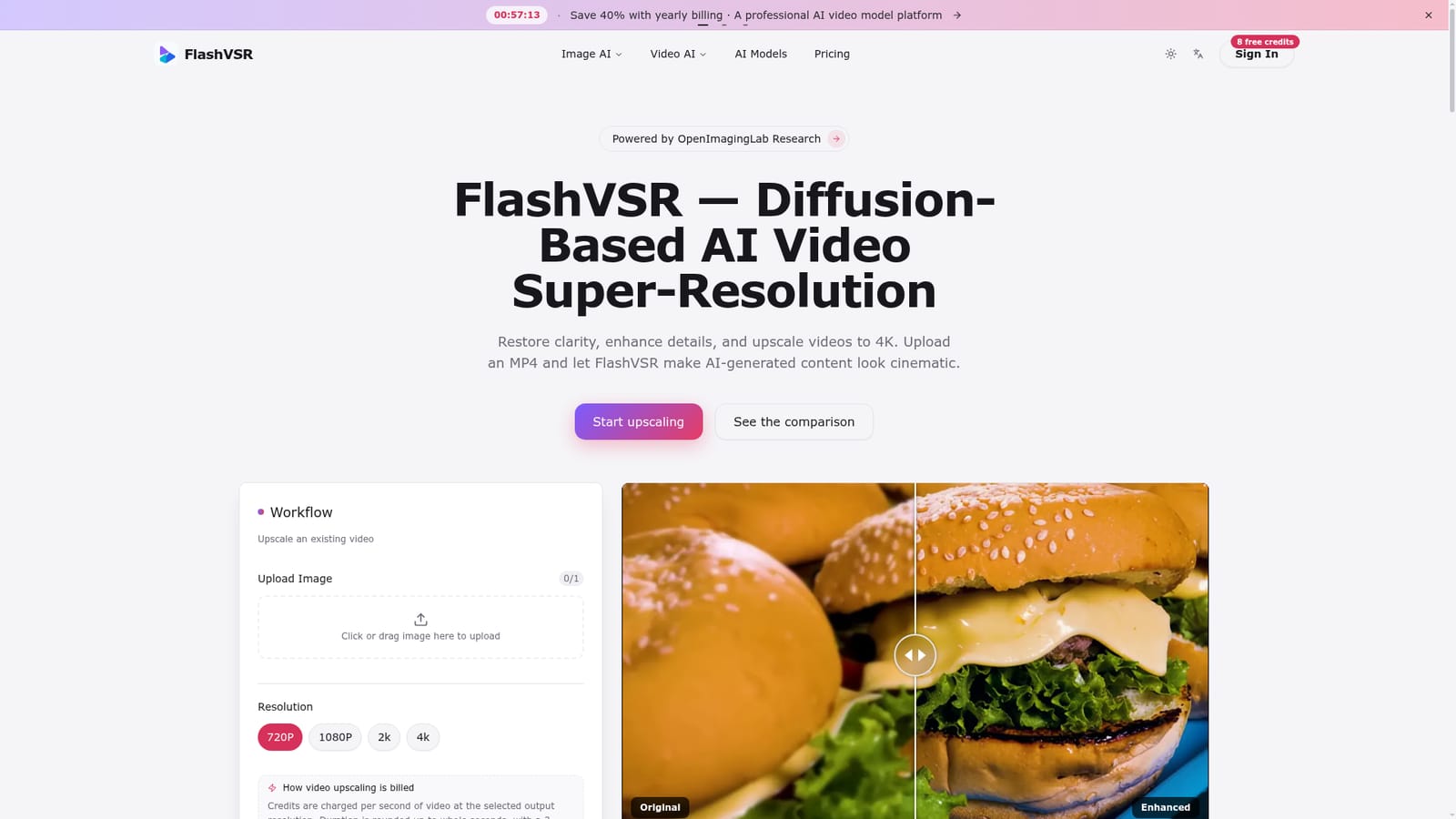
Screenshot of FlashVSR, Diffusion-based AI upscaling that turns compressed video into clean 4K output

What is FlashVSR?

FlashVSR is a generative video tool. Cloud based AI video upscaler that uses a diffusion model to restore detail and maintain temporal consistency while converting MP4 clips to resolutions up to 4K.

FlashVSR is a cloud hosted video super resolution tool built on diffusion research from OpenImagingLab in collaboration with Tsinghua University and Shanghai AI Lab. Users upload an MP4 and the service reconstructs fine detail, removes compression artifacts, and upscales the clip to a chosen resolution between 720p and 4K, all without installing local GPU software. The tool targets creators who need higher resolution output from existing or AI generated footage: short form video producers, archivists restoring older clips, and teams working with AI generated content that needs a sharper finish before publishing. It sits alongside a broader suite of generation tools on the same platform, including text to video, image to video, and text to image modules, so it can act as a finishing step in a larger content pipeline rather than a standalone utility. Technically, FlashVSR relies on a one step streaming diffusion framework paired with locality constrained sparse attention, which keeps motion stable across frames and limits flickering or ghosting that frame by frame upscalers often introduce. A tiny conditional decoder uses the low resolution input as a guide signal to improve consistency, and the underlying model was trained on a curated VSR-120K dataset. The hosted service currently accepts MP4 input only and returns an enhanced MP4 at the selected output resolution. Compared with traditional frame based upscalers and some competing commercial tools, FlashVSR's appeal is its diffusion based detail reconstruction and open research lineage, with model weights published on GitHub and HuggingFace. The hosted platform wraps that research in a credit based freemium service, offering free signup credits for evaluation and paid tiers for ongoing or higher volume use, plus API access reserved for subscribers on the top plan.
How do you use FlashVSR?

  1. 1Create an account
    Sign up on the FlashVSR site to receive free credits that can be used to test the upscaling workflow before purchasing more.
    FlashVSR — Create an account
  2. 2Upload an MP4 video
    Choose an existing MP4 file, such as a compressed or low resolution clip, to use as the source for enhancement.
  3. 3Select the target resolution
    Pick an output resolution between 720p and 4K depending on how much detail the final video needs.
  4. 4Run the enhancement job
    Start processing and let the diffusion model reconstruct detail and apply temporal consistency across frames.
  5. 5Compare and download the result
    Review the original and enhanced versions side by side, then download the upscaled MP4 once satisfied.
  6. 6Request API access on the Max plan
    Max subscribers who need programmatic access can email support to request onboarding after their subscription is verified.
    FlashVSR — Request API access on the Max plan

Pros and cons

Pros

  • No local GPU setup required since all processing happens in the cloudAI
  • Diffusion based reconstruction recovers detail that simple upscaling methods missAI
  • Temporal consistency engine reduces flicker and ghosting across framesAI
  • Output resolution can be chosen from 720p up to 4KAI
  • Underlying research model is published openly on GitHub and HuggingFaceAI

Cons

  • Only MP4 input and output are supported, limiting format flexibilityAI
  • API access is restricted to Max subscribers and requires a manual email verification stepAI
  • Specific pricing tiers beyond the free signup credits are not detailed on the homepageAI
  • No stated limits on maximum video length, file size, or processing timeAI
  • New users only get a small pool of free credits to test the service before payingAI

How much does FlashVSR cost?

Free trial

New users receive 8 free credits after signing up, allowing them to test the upscaling workflow before committing to a paid plan.

Learn more

Pricing

FlashVSR uses a freemium, credit based model with free signup credits for new users and paid plans for continued use; yearly billing is offered at a 40 percent discount over monthly billing, with full tier details on the pricing page.

Learn more

Support

Support is handled by email, including requests from Max subscribers who want API access, which is verified before onboarding.

Learn more

Features

Diffusion based detail reconstruction, locality constrained sparse attention for temporal consistency, selectable output resolutions from 720p to 4K, and API access for subscribers on the top tier plan.

Learn more

Frequently asked questions about FlashVSR

  • How much does FlashVSR cost?
    FlashVSR uses a freemium, credit based model with free signup credits for new users and paid plans for continued use; yearly billing is offered at a 40 percent discount over monthly billing, with full tier details on the pricing page.
  • Does FlashVSR offer a free trial?
    New users receive 8 free credits after signing up, allowing them to test the upscaling workflow before committing to a paid plan.
  • Does FlashVSR have an API?
    Yes, FlashVSR offers an API.
  • How do you use FlashVSR?
    The walkthrough on this page covers 6 steps: 1. Create an account 2. Upload an MP4 video 3. Select the target resolution 4. Run the enhancement job 5. Compare and download the result 6. Request API access on the Max plan.
  • What platforms does FlashVSR support?
    FlashVSR is available on Web App.
  • What are the limitations of FlashVSR?
    Only MP4 input and output are supported, limiting format flexibility. API access is restricted to Max subscribers and requires a manual email verification step. Specific pricing tiers beyond the free signup credits are not detailed on the homepage.

Status

StatusActive
Views0
Outbound clicks0
Added10/12/2026

Platforms

Web App

Pricing

FreemiumSubscriptionPaid